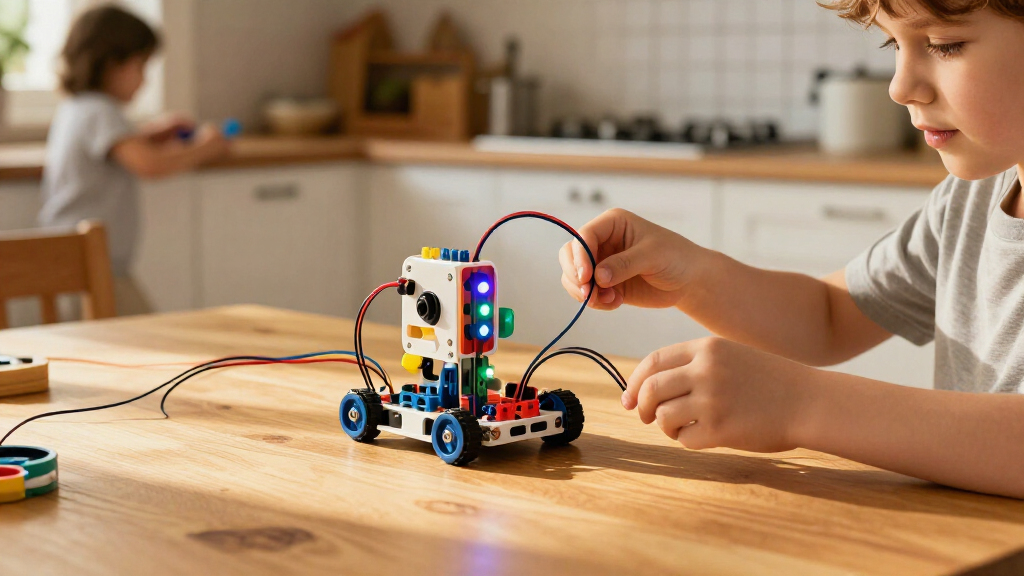
Hands-on coding kits for kids turn programming ideas into movement, puzzles, inventions, or robot builds. My best overall pick is the Ozobot Evo for its mix of color-code activities and app-based programming, while the Code & Go Robot Mouse is a clear screen-free starting point and the Let’s Start Coding Ultimate Coding Kit suits kids ready to work with real code and electronics. The main tradeoff is between easy, guided play and more open-ended projects that call for extra patience or adult help. Age labels matter, but a child’s interest in building, puzzles, or tinkering matters just as much. Read on for the full breakdown and help matching a kit to the learner.

Prime made for students and young adults
- Fast, free delivery for dorm and study essentials
- Prime Video and Amazon Music included
- Member-only deals
Key Takeaways
- Ozobot Evo earns the broadest appeal by pairing a low-barrier color-code entry point with app-based coding, though families should check device compatibility before buying.
- Code & Go Robot Mouse is the clearest screen-free option for early learners; its guided maze play is less suited to older kids who want open-ended programming.
- Let’s Start Coding and Makey Makey teach different kinds of coding creativity: one centers on electronics and code, while the other turns everyday conductive objects into computer inputs.
- The robot-building kits trade quick starts for construction time. Teach Tech Mech-5, OKK‘s 635-piece build, and ACEBOTT‘s robot arm and tank car are better for kids who enjoy assembling before programming.
- There is no single best format for every child: the Coding Chameleon favors focused pet-like interaction, while SIGHTEEDA‘s 5-in-1 format offers variety at the cost of a potentially less focused learning path.
| Let’s Start Coding Ultimate Coding Kit for Kids |  | Best for C++ Foundations | Brand: Let’s Start Coding | Programming language: C++ | Projects: 100+ free coding and STEM projects | VIEW LATEST PRICE | See Our Full Breakdown |
| Teach Tech Mech-5 STEM Coding Robot Building Kit |  | Best for Mechanical Coding | Brand: Teach Tech | Model: TTC-895 | Recommended age: 10 years and up | VIEW LATEST PRICE | See Our Full Breakdown |
| OKK 635-Piece Remote-Controlled STEM Robot Building Kit |  | Best for Remote-Controlled Building | Brand: OKK | Model: 13063 | Pieces: 635 | VIEW LATEST PRICE | See Our Full Breakdown |
| Ozobot Evo Entry Coding Robot Kit |  | Best for Beginners | Brand: Ozobot | Model: Evo Entry Kit | Age range: 5 years and up | VIEW LATEST PRICE | See Our Full Breakdown |
| SIGHTEEDA 5-in-1 Coding Robot Kit for Kids |  | Best for Model Variety | Brand: SIGHTEEDA | Model: K96228 | Recommended age: 6 years and up | VIEW LATEST PRICE | See Our Full Breakdown |
| Learning Resources Code & Go Robot Mouse Activity Set | 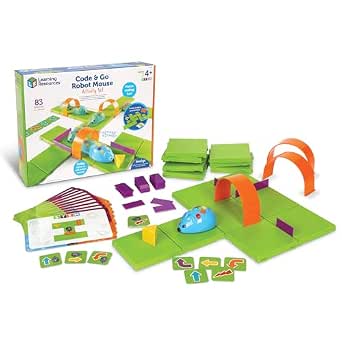 | Best for Preschool Beginners | Recommended age: 4 years and up | Pieces: 83 | Maze board size: 20 x 20 inches | VIEW LATEST PRICE | See Our Full Breakdown |
| Thames & Kosmos My Robotic Pet: Coding Chameleon |  | Best for Interactive Robot Building | Recommended age: 8–12 years | Length: 15 inches | Sensors: Color sensor and infrared sensor | VIEW LATEST PRICE | See Our Full Breakdown |
| Makey Makey STEM Invention Kit for Kids |  | Best for Open-Ended Inventions | Age range: 8 years and up | Compatible devices: Mac, Windows, and Chromebook | Power: No batteries required | VIEW LATEST PRICE | See Our Full Breakdown |
| ACEBOTT 4-in-1 Programmable Robot Arm and Tank Car STEM Kit |  | Best for Advanced Robotics Projects | Recommended age: 12 years and up | Controller: ESP32 | Robotic arm: Programmable 5DOF | VIEW LATEST PRICE | See Our Full Breakdown |
| hands-on coding kits for kid | Recommended age | Brand |
|---|---|---|
| Let’s Start Coding Ultimate Co | — | Let’s Start Coding |
| Teach Tech Mech-5 STEM Coding | 10 years and up | Teach Tech |
| OKK 635-Piece Remote-Controlle | 8–14 years | OKK |
| Ozobot Evo Entry Coding Robot | — | Ozobot |
| SIGHTEEDA 5-in-1 Coding Robot | 6 years and up | SIGHTEEDA |
| Learning Resources Code & Go R | 4 years and up | — |
| Thames & Kosmos My Robotic Pet | 8–12 years | — |
| Makey Makey STEM Invention Kit | — | — |
| ACEBOTT 4-in-1 Programmable Ro | 12 years and up | — |
More Details on Our Top Picks
Let’s Start Coding Ultimate Coding Kit for Kids
For kids ready to connect coding ideas with code they can write, this kit offers more than 100 free coding and STEM projects and introduces C++. That gives it a different focus from the Ozobot Evo Entry Kit, which starts with screen-free color codes and Blockly rather than a text-based programming language. The project library gives families multiple activities to work through, while the compact kit needs no batteries, so sessions don’t depend on charging or replacing them.
The tradeoff is that its listing gives little detail about the physical coding interface or how projects progress, making it harder to judge the learning path before buying. Its plastic construction is another practical limitation, and the stated age range of 0–12 is broad enough to be unhelpful. I’d choose this for a child interested in coding concepts and C++; younger beginners may get a clearer on-ramp from Ozobot’s color-code activities.
Pros:- Includes more than 100 free coding and STEM projects.
- Introduces C++ alongside programming and STEM activities.
- Hands-on project format supports active learning.
- Requires no batteries.
Cons:- The listed 0–12 age range does not clearly identify the intended learner level.
- Product information does not explain the physical interface or how project difficulty progresses.
- Plastic construction may feel less substantial than a building-focused kit.
Best for: Families seeking a project-based introduction to programming and C++ for a child who is ready to follow coding activities.
Not ideal for: Parents seeking a clearly age-targeted first coding toy or a detailed, graduated curriculum; the listed age range is broad and the project progression is unspecified.
- Brand:Let’s Start Coding
- Programming language:C++
- Projects:100+ free coding and STEM projects
- Educational objectives:Coding skills, programming skills, and STEM
- Manufacturer-listed age range:0–12 years
- Material:Plastic
- Batteries:None required
- Dimensions:4.5 × 8 × 2.25 inches
Our verdict“Choose this for a child ready to work through many coding projects and explore C++, but pick the Ozobot Evo Entry Kit for a more clearly described beginner path.”
Teach Tech Mech-5 STEM Coding Robot Building Kit
Mech-5 makes the building process part of the coding lesson. Kids assemble the robot over multiple hours, then arrange coding buttons on a mechanical wheel to control movement and actions such as throwing, lifting, kicking, or drawing. Compared with the OKK 635-Piece Robot Kit, which combines a larger snap-together build with remote and app control, Mech-5 puts more emphasis on understanding a physical sequence of commands and mechanical movement.
That focused approach suits patient builders, but the assembly commitment is substantial: this is not a ready-to-play robot, and a child may need help with construction. The button-based coding wheel is tangible and does not require batteries, though it offers a narrower kind of interaction than app-based programming. I’d shortlist it for an older child who enjoys building and wants to see how ordered commands produce actions; families after quick setup should look at Ozobot Evo instead.
Pros:- Combines robot construction with introductory coding and mechanical engineering.
- Coding buttons on a physical wheel make command sequences tangible.
- Programs several actions, including throwing, lifting, kicking, and drawing.
- Requires no batteries.
Cons:- Assembly takes multiple hours before the robot is ready to use.
- The build may require adult assistance.
- Its mechanical coding method is less flexible than an app-based coding environment.
Best for: Children aged 10 and up who enjoy multi-hour construction projects and want to explore coding through mechanical sequences and robot actions.
Not ideal for: Families wanting a robot that is ready to use quickly, or younger children who may need extensive help with the lengthy assembly.
- Brand:Teach Tech
- Model:TTC-895
- Recommended age:10 years and up
- Programming method:Coding buttons placed on a mechanical coding wheel
- Actions:Throwing, lifting, kicking, drawing, moving, and rotating
- Assembly time:Multiple hours
- Included components:Assembly parts and English instruction manual
- Batteries:None required
Our verdict“Pick Mech-5 for an older child who wants a substantial build and physical command sequencing, not for a quick-start coding activity.”
OKK 635-Piece Remote-Controlled STEM Robot Building Kit
The OKK kit pairs a sizable snap-together build with immediate ways to control the finished robot. Its 635 pieces give construction-focused kids more assembly to work through than the 348-piece SIGHTEEDA 5-in-1 kit, while the included 2.4 GHz remote and companion app offer both direct control and programmed movement paths. Adjustable limbs and facial features add a character-building angle beyond simply driving a robot around.
That mix makes it a good fit for children who want a substantial build and interactive play afterward, but it is less focused on a named text-based coding language than the Let’s Start Coding Ultimate kit. Assembly may need adult help, and the remote’s two AAA batteries are not included, even though the robot itself uses a rechargeable battery. Its listed indoor use also limits where kids can test it. I’d choose it over Mech-5 when remote and app control matter more than a mechanical coding wheel.
Pros:- 635-piece construction offers an involved hands-on build.
- Supports control by 2.4 GHz remote or companion app.
- App modes include programmed movement paths.
- Rechargeable robot battery and adjustable limbs allow continued play and posing.
Cons:- Assembly may require adult help for some builders.
- The remote needs two AAA batteries that are not included.
- Listed for indoor use, limiting where the robot can be driven.
Best for: Ages 8–14 who want a substantial robot build followed by remote driving and app-based programmed movement.
Not ideal for: Families wanting an outdoor robot, a build with minimal adult help, or a kit that includes every battery needed for use.
- Brand:OKK
- Model:13063
- Pieces:635
- Recommended age:8–14 years
- Controls:2.4 GHz remote and companion app
- App modes:5
- Remote range:Up to 65 ft in open areas
- Robot battery:Rechargeable lithium battery
- Remote batteries:2 AAA batteries, not included
Our verdict“Choose the OKK kit for a child who wants a larger robot build with remote and app control, while Mech-5 is the better fit for physical command-wheel coding.”
Ozobot Evo Entry Coding Robot Kit
Ozobot Evo offers the clearest beginner progression in this group. Children can start by drawing paths with the included color-code markers, then move to Ozobot Blockly, which has five skill levels and access to more than 700 lessons. That screen-free-to-digital route makes it more approachable for new learners than the Let’s Start Coding Ultimate kit’s C++ focus, while still offering room to build coding skills over time.
The included robot, starter activities, markers, charging cable, and zip case make this a ready-to-start option rather than a multi-hour construction project like Teach Tech Mech-5. Its tradeoffs are a single robot, which can limit shared use, and the need for a compatible device for Blockly. The lesson library is a meaningful learning resource, but the digital side depends on access to that device. I’d pick Ozobot for a younger beginner who benefits from guided steps and a screen-free entry point.
Pros:- Offers screen-free Color Codes and app-based Ozobot Blockly.
- Five Blockly skill levels support progression from beginner activities.
- Includes over 700 lessons across multiple subjects.
- Comes with markers, starter activities, charging cable, and a zip case.
Cons:- The kit includes only one robot, limiting simultaneous use by siblings or groups.
- Blockly coding requires a compatible device.
- Unlike the building kits, it does not center on assembling a robot from parts.
Best for: Children aged 5 and up who are new to coding and would benefit from starting with physical color codes before progressing to Blockly lessons.
Not ideal for: Households without a compatible device for Blockly or families who need several children to use robots at the same time.
- Brand:Ozobot
- Model:Evo Entry Kit
- Age range:5 years and up
- Coding methods:Ozobot Blockly and screen-free Color Codes
- Blockly skill levels:5
- Available lessons:Over 700
- Included components:1 Evo robot, Get Started activities, charging cable, 5 dual-tip Color Code markers, and 1 zip case
- Battery:Lithium-ion
Our verdict“Choose Ozobot Evo for a younger first-time coder who needs a guided route from screen-free activities to Blockly, rather than a construction-heavy kit.”
SIGHTEEDA 5-in-1 Coding Robot Kit for Kids
Five build configurations give this kit its main advantage: children can rework 348 pieces into different robot models rather than finish a single design and stop there. Remote and smartphone-app controls add driving, path programming, gravity sensing, and coding modes. Compared with the OKK 635-Piece Robot Kit, SIGHTEEDA has fewer pieces but offers five stated models, making it a better match for kids who value rebuilding and changing up the play pattern over a larger single construction task.
The coding modes add hands-on experimentation, but the product details do not specify a programming language or a lesson library, so I’d treat this as an introductory, play-led kit rather than a structured coding course like Ozobot Evo. App-based control requires a smartphone, and small pieces call for adult supervision with younger builders. I’d choose it for a child who likes making and remaking robots; skip it if device-free coding is a priority.
Pros:- 348-piece kit builds five different robot models.
- Offers remote and smartphone-app control.
- Includes driving, path programming, gravity sensing, and coding modes.
- Rebuilding supports varied hands-on play beyond a single finished model.
Cons:- App-based control requires a smartphone.
- Small pieces may need adult supervision for younger children.
- Product details do not specify a coding language or lesson library.
Best for: Children aged 6–12 who enjoy rebuilding models and want remote or app-controlled robot activities with introductory coding modes.
Not ideal for: Families seeking device-free app-based control or a clearly structured curriculum with specified lessons and coding progression.
- Brand:SIGHTEEDA
- Model:K96228
- Recommended age:6 years and up
- Number of models:5
- Number of pieces:348
- Control options:2.4 GHz remote control and smartphone app
- Play modes:Driving, path programming, gravity sensing, and coding
- Material:Acrylonitrile Butadiene Styrene (ABS)
- Batteries:2 lithium-ion batteries included
Our verdict“Choose SIGHTEEDA for a child who wants to rebuild and control several robot designs, but choose Ozobot Evo for a more clearly laid-out coding lesson path.”
Learning Resources Code & Go Robot Mouse Activity Set
For the youngest coders in this group, this set turns programming into a physical sequence: arrange the maze, plan a route with cards, then press buttons to guide Colby. That makes abstract ideas like order and cause-and-effect easier to grasp without a screen. Its 83 pieces, 16 maze grids, and double-sided activity cards give children ways to change the challenge rather than repeat one fixed path. Compared with the Ozobot Evo Entry Coding Robot Kit, this mouse set keeps the interaction centered on a tabletop maze and button inputs, which can be more approachable for preschoolers but offers less scope for growing into more advanced programming. The tradeoff is its narrow age focus: older children may outgrow the activities, and the robot needs three AAA batteries that are not included.
Pros:- Screen-free, button-controlled play makes coding sequences tangible for young learners.
- Maze pieces and double-sided cards support repeated route-planning activities.
- Activities practice sequencing, logic, and problem-solving through hands-on play.
- Lights, sounds, and two speeds add feedback as children test a route.
Cons:- Requires three AAA batteries, which are not included.
- The maze-and-button format may offer limited challenge as children get older.
Best for: Families introducing children ages 4 and up to sequencing through screen-free, guided maze play.
Not ideal for: Older children looking for buildable robots, computer-based coding, or projects that grow substantially in complexity.
- Recommended age:4 years and up
- Pieces:83
- Maze board size:20 x 20 inches
- Maze grids:16
- Coding cards:30 double-sided
- Activity cards:10 double-sided
- Robot features:Lights, sounds, and two speeds
- Power:3 AAA batteries required; not included
Our verdict“Choose this set for a young beginner who is ready to plan simple coding sequences by building and solving physical mazes.”
Thames & Kosmos My Robotic Pet: Coding Chameleon
This pick combines assembly with screen-free programming: kids build a 15-inch chameleon, then use physical action cards to direct its movements across three modes. Touch and gesture responses, color changes, and a moving tongue give each command a visible result, while the guide connects the build to robotics and biomimicry. Compared with the Learning Resources Code & Go Robot Mouse Activity Set, the chameleon asks for more construction and suits older children, but the mouse is the easier starting point for preschoolers who mainly need practice planning simple sequences. The added complexity is also the main tradeoff: ages 8–11 need adult assembly help, and independent building is aimed at ages 12 and up. Batteries are required, and the available product information does not specify their type.
Pros:- Physical action cards provide screen-free control across three play modes.
- Color and infrared sensors support responsive interactions.
- RGB LEDs, articulated joints, and a moving tongue make commands easy to observe.
- The 48-page guide links building and play to coding, robotics, and biomimicry.
Cons:- Assembly for ages 8–11 requires adult help.
- Batteries are required, with no battery type specified in the supplied product details.
Best for: Children ages 8–12 who want to build a characterful robot and try card-based coding with adult support during assembly.
Not ideal for: Younger beginners seeking a ready-to-play maze activity, or families wanting a kit with no battery requirement or assembly assistance.
- Recommended age:8–12 years
- Length:15 inches
- Sensors:Color sensor and infrared sensor
- Lighting:RGB LEDs
- Play modes:Coding, Wild, and Pet
- Manual:48 pages
- Assembly guidance:Adult help recommended ages 8+; independent play ages 12+
- Power:Batteries required
Our verdict“Pick the Coding Chameleon for an older child who wants a guided robot build with tactile, screen-free programming and interactive responses.”
Makey Makey STEM Invention Kit for Kids
Makey Makey is the most open-ended option here: instead of building a robot or following a maze, kids turn everyday objects into touchpads, game controls, or musical circuits. The board connects through USB, works with Mac, Windows, and Chromebook, and needs no battery or software installation, so getting a first project running is straightforward. Compared with the Thames & Kosmos My Robotic Pet: Coding Chameleon, it offers more freedom to invent with household materials but less of a self-contained toy experience; children need a compatible computer and ideas for what to make. The included clips, wires, stickers, and visual project guide help start the process, though this is less structured than the Learning Resources Code & Go Robot Mouse Activity Set. It suits curious makers better than children who want a robot to operate right away.
Pros:- Everyday objects can become touchpads, game controllers, or musical circuits.
- Quick USB setup requires no software installation or programming experience.
- Compatible with Mac, Windows, and Chromebook.
- Includes a board, connector wires, alligator clips, stickers, and project instructions.
Cons:- A compatible computer is required, so it is not a standalone coding toy.
- Open-ended projects may provide less structure than guided maze or robot kits.
- No warranty is provided.
Best for: Kids ages 8 and up who have access to a Mac, Windows computer, or Chromebook and enjoy inventing their own interactive projects.
Not ideal for: Families without a compatible computer, or children who prefer a complete robot or clearly staged activities over open-ended experimentation.
- Age range:8 years and up
- Compatible devices:Mac, Windows, and Chromebook
- Power:No batteries required
- Included board:Makey Makey board
- Included connections:USB cable, 6 connector wires, and 7 alligator clips
- Other included items:20 color stickers and instructions with visual project start guide
- Dimensions:4.75 x 3 x 2 inches
- Weight:7.4 ounces
Our verdict“Choose Makey Makey for a computer-equipped young maker who wants to invent interactive projects from ordinary objects rather than follow a fixed robot activity.”
ACEBOTT 4-in-1 Programmable Robot Arm and Tank Car STEM Kit
This is the most technically ambitious kit in this batch, aimed at older kids ready to assemble a working robot and explore programming beyond button sequences. Its four configurations—car, tank robot, robotic arm car, and robotic arm tank—give the build more variety than the single chameleon form of the Thames & Kosmos My Robotic Pet: Coding Chameleon. The programmable 5DOF arm can grab, lift, and place objects, while ESP32 control and Arduino and Scratch compatibility open different routes into coding. Sixteen tutorials, app control, and an IR remote give families a starting path, but they do not remove the effort involved: assembly and coding are expected, and the recommended age is 12 and up. Compared with the Makey Makey STEM Invention Kit, this is more focused on robotics hardware and less suited to quick, free-form computer projects.
Pros:- Four build configurations let the robot shift between vehicle and robotic-arm forms.
- Programmable 5DOF arm can grab, lift, and place objects.
- Supports both Arduino and Scratch.
- Includes 16 tutorials plus app and IR remote control.
Cons:- Recommended for ages 12 and up, making it a poor fit for younger children.
- Assembly and coding create a steeper entry point than the mouse or card-based kits.
Best for: Teens ages 12 and up who want to assemble a programmable robot, experiment with a robotic arm, and learn through Arduino or Scratch tutorials.
Not ideal for: Younger children or beginners seeking a ready-to-use, screen-free coding toy with minimal assembly and setup.
- Recommended age:12 years and up
- Controller:ESP32
- Robotic arm:Programmable 5DOF
- Build configurations:4
- Programming compatibility:Arduino and Scratch
- Control methods:iOS and Android app, and IR remote
- Tutorials:16
- Tracks:Rubber tank treads
Our verdict“Choose this ACEBOTT kit for a teen ready to take on a substantial build and explore programmable movement with an articulated arm.”
How We Picked
I compared the nine kits by how directly a child can connect an action to a coding idea, how much setup and adult support the activity may require, and how well the kit’s format fits different ages and interests. I also looked at the balance between guided lessons and experimentation, the role of building and physical components, and whether a kit offers a clear path beyond its first activity. These factors matter more than the number of pieces or features alone: a smaller kit can be a better first coding experience if a child can start independently.
The ranking favors kits with an approachable starting point and room to keep learning, which puts Ozobot Evo first for its range of coding entry points. Options with narrower strengths rank lower overall but may suit a specific learner better: the Robot Mouse leads for screen-free basics, while the coding and building kits reward children who want electronics, construction, or invention. I treat age guidance as a starting point, not a promise of fit, since reading confidence, patience for assembly, and access to a compatible device can change how accessible a kit feels.
| hands-on coding kits for kid | Brand |
|---|---|
| Let’s Start Coding Ultimate Co | Let’s Start Coding |
| Teach Tech Mech-5 STEM Coding | Teach Tech |
| OKK 635-Piece Remote-Controlle | OKK |
| Ozobot Evo Entry Coding Robot | Ozobot |
| SIGHTEEDA 5-in-1 Coding Robot | SIGHTEEDA |
| Learning Resources Code & Go R | — |
| Thames & Kosmos My Robotic Pet | — |
| Makey Makey STEM Invention Kit | — |
| ACEBOTT 4-in-1 Programmable Ro | — |
Factors to Consider When Choosing Hands-on Coding Kits For Kids
Before choosing a kit, decide what you want the child to do with code: guide a character, build a robot, control electronics, or invent a new kind of input. That choice narrows the field faster than comparing feature lists. These broader tradeoffs can help you avoid a kit that looks impressive but does not match the way your child likes to learn.
Choose the Kind of Coding Experience First
A maze robot teaches sequencing through visible moves, while an electronics kit connects code to lights, switches, or other physical outputs. A programmable build adds construction and mechanical problem-solving before the coding even begins. These activities are not interchangeable, even when all are marketed as coding kits. Think about whether your child prefers puzzles with a clear finish, making a device, or changing what a project can do. A common mistake is choosing by the word “coding” alone and overlooking the activity that will hold the child’s attention.
Match the Starting Difficulty to Patience, Not Just Age
Age guidance can help flag small parts or expected skills, but it does not measure how much assembly, reading, or troubleshooting a child enjoys. A younger learner who likes following steps may manage a structured build, while an older beginner may prefer a simple robot maze. Look at the first activity: can the child begin with little help, or will an adult need to handle setup and explain instructions? If a kit starts too far above the child’s current comfort level, frustration can arrive before the coding lesson. If it is too guided, a confident learner may finish the challenges quickly and want more freedom.
Check Screen, Device, and Connection Needs
Some kits support screen-free play, some use an app, and others make a computer or connected device part of the coding workflow. That changes where and when the kit can be used, not just how programming is taught. Before choosing an app-dependent kit, verify that your household has a compatible device and that the child can use it comfortably. Also check whether the activity still works if a device is unavailable; a kit with more than one way to start may be easier to share among siblings. Do not assume that “hands-on” means screen-free.
Weigh Build Time Against Play Time
Robot construction can make cause and effect tangible, but assembly takes time and may call for adult help. That is a good trade when a child enjoys following plans, fitting pieces together, and improving a mechanism. For kids who want to start experimenting quickly, a ready-to-use robot or coding activity may get them to the learning sooner. Check how clearly a kit separates building from programming, since a long setup can make it hard to tell which part is causing a problem. Choose for the child’s appetite for the process, not only the finished robot.
Look for Room to Grow Without Chasing Feature Count
A kit has lasting value when the child can move from copying an example to changing it, combining ideas, or making a project of their own. More pieces or multiple build configurations do not automatically create a better learning path. Ask what a child can do after completing the starter activity and whether later challenges use skills learned earlier. For a first-time coder, a clear sequence of small wins may matter more than open-ended options. For a persistent tinkerer, a kit that invites experimentation can stay engaging longer, even if its first lesson takes more support.
Plan for Shared Use and Adult Involvement
Some kits work well as independent play; others are better as a parent-child project or a shared activity between siblings. Consider how many children can participate at once, whether turns are built into the activity, and how easy it is to reset or rebuild. A kit that needs frequent adult troubleshooting may still be a good choice if family project time is part of the plan. It may be a poor fit if the goal is independent play after school. Be realistic about the help available, especially for complex builds and app setup.
Frequently Asked Questions
Which kit is the better first coding gift: Ozobot Evo or Code & Go Robot Mouse?
Choose Code & Go Robot Mouse if screen-free, step-by-step maze play is the priority and the child is new to sequencing. Choose Ozobot Evo if you want a kit with a color-code entry point and a route toward app-based coding. The Mouse keeps the activity simple, but its focused format may offer less room for a child ready to explore programming in different ways. Ozobot has more range, though access to a compatible device can affect how much of that range a child uses. The better first gift is the one that matches the child’s interest and your household’s screen preferences.
Do I need a tablet or computer for these hands-on coding kits?
Not for every kit in this roundup. The Robot Mouse is designed around physical maze activities, while other options use or may benefit from a screen-based coding interface. Check the exact kit instructions and app requirements before ordering, including device compatibility and whether a computer is needed for setup. A screen-free choice can be easier to use in classrooms or shared family spaces, but an app can provide a different route into coding concepts. If device access is limited, make that a deciding factor rather than assuming every kit works the same way.
Should I choose a ready-to-use coding robot or a build-it-yourself kit?
A ready-to-use robot is a better fit when the child wants to start giving instructions quickly and see the result without a long construction phase. A build-it-yourself kit suits children who enjoy assembling mechanisms and are willing to treat construction as part of the activity. Building can make the robot’s physical behavior easier to understand, but it also creates extra steps and opportunities for troubleshooting. If the child loses interest during setup, prioritize a faster start. If building is part of the appeal, the extra effort can make the coding feel more connected to the machine.
Are coding kits that use color or physical controls still teaching programming?
They can teach foundational ideas such as ordering instructions, anticipating results, and correcting a sequence when it fails. Those concepts help a child understand what a program does, even when they are not typing code. The difference is how far the kit takes the learner: some focus on introductory logic, while electronics or app-based kits may offer more direct experience with coding interfaces. A physical activity can be a useful entry point, but it may not satisfy a child who specifically wants to write or edit code. Check what the child will actually create, not just the kit’s use of the word “coding.”
How much adult help should I expect with a robot-building kit?
Plan for at least some help with sorting parts, reading build steps, and diagnosing a model that does not move as expected, particularly for a child near the lower end of the suggested age range. The amount varies with the child’s experience and patience, so age labels alone cannot predict it. A simple coding activity may allow more independent starts, while a multi-part robot build can work better as a shared project. If independent play is the goal, favor a kit with a clear first activity and straightforward setup. If you can participate, a more involved build may be a rewarding way to learn together.
Conclusion
For the widest mix of approachable coding and room to explore, I recommend Ozobot Evo as the best overall. Code & Go Robot Mouse is my best value-style choice for a simple, screen-free introduction, while Let’s Start Coding Ultimate Coding Kit is the stronger pick for a child ready to work with code and electronics. For beginners who benefit from clear physical steps, the Robot Mouse is the easiest starting point; for young makers who want a character-like activity, the Coding Chameleon offers a more focused option. Choose Teach Tech Mech-5, OKK, or ACEBOTT when building is part of the fun, and Makey Makey when invention matters more than a conventional robot. My best premium-style recommendation is Ozobot Evo for its breadth of entry points; the right choice ultimately depends on whether your child wants to code, build, solve, or invent.