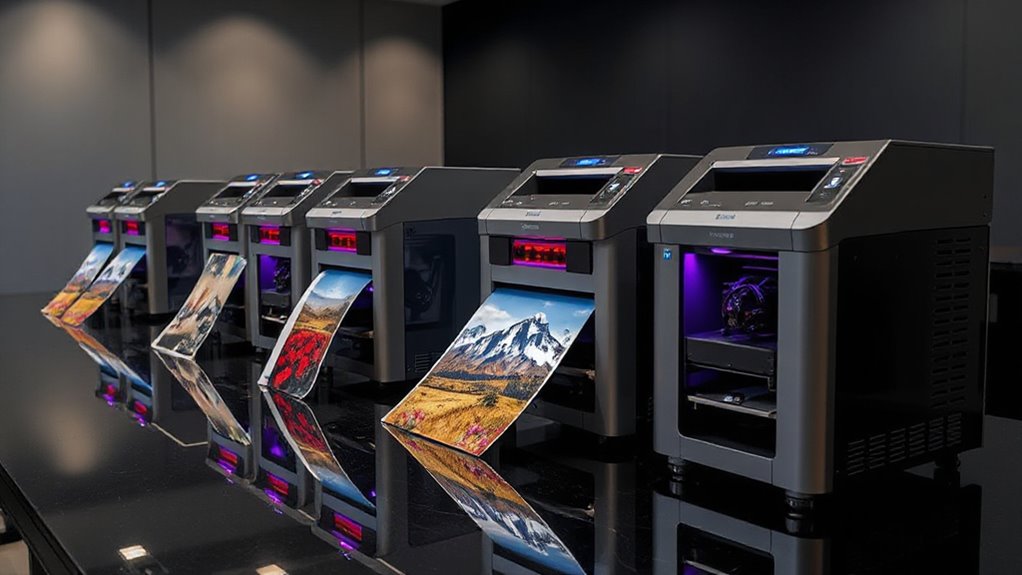

For professional wide-format photo printing, I’d choose the Canon imagePROGRAF PRO-1100 as the best overall fit for photographers who need prints up to 17 inches wide and a dedicated photo workflow. The Canon PRO-2100 suits larger fine-art output, while the Epson ET-15000 offers wider paper handling with refillable tanks and all-in-one functions. The main tradeoff is between print width and professional color control, versus footprint, running costs, and everyday versatility. Several compact models in this lineup are capable photo printers, but their narrower media limits make them less suited to large exhibition prints. Read on for my full comparison and guidance on which format fits your work.

Prime made for students and young adults
- Fast, free delivery for dorm and study essentials
- Prime Video and Amazon Music included
- Member-only deals
Key Takeaways
- The Canon PRO-1100 is my best overall choice for dedicated photo work when 17-inch maximum media width is enough; the PRO-2100 and PRO-4100 serve buyers whose work requires substantially wider output.
- The PRO-2100 and PRO-4100 occupy a different working class from desktop models: their 24-inch and 44-inch formats support larger print workflows but demand more room and a clearer need for oversized output.
- The Epson ET-15000 favors workflow flexibility with wide-format capability, tank ink, and all-in-one features; its role differs from printers designed specifically for professional photo and fine-art output.
- The ET-8550 and ET-8500 split around media width: the ET-8550 handles wider photo media, while the ET-8500 is a more compact photo-focused option.
- Compact models such as the PRO-310, PRO-200S, XP-15000, and XP-980 suit narrower output needs; their smaller formats can be practical, but they do not replace a 24-inch or 44-inch printer.
| Epson EcoTank Photo ET-8500 Wireless Color All-in-One Supertank Printer |  | Best for Media Variety | Printer type: Wireless color all-in-one inkjet | Ink system: Claria ET Premium 6-color ink | Display: 4.3-inch touchscreen | VIEW ON AMAZON | See Our Full Breakdown |
| Epson EcoTank ET-15000 Wireless Wide-Format All-in-One Supertank Printer |  | Best Value for a Wide-Format Office | Functions: Print, scan, copy, fax | Print technology: Inkjet with refillable ink tanks | Maximum print resolution: 4800 × 2400 dpi | VIEW ON AMAZON | See Our Full Breakdown |
| Canon imagePROGRAF PRO-4100 44-Inch Large-Format Inkjet Printer |  | Best for Large Studio Prints | Print width: Up to 44 inches | Maximum resolution: 2400 × 1200 dpi | Print head: 1.28-inch, 12-channel integrated print head | VIEW ON AMAZON | See Our Full Breakdown |
| Epson EcoTank Photo ET-8550 Wireless Wide-Format All-in-One Tank Printer |  | Best for High-Yield Photo and Home-Office Printing | Printer type: Wireless wide-format all-in-one ink tank printer | Functions: Print, scan, copy | Ink system: Cartridge-free, refillable ink bottles | VIEW ON AMAZON | See Our Full Breakdown |
| Canon imagePROGRAF PRO-1100 17-Inch Professional Wireless Inkjet Photo Printer |  | Best Premium 17-Inch Photo Printer | Printer type: Wide-format inkjet photo printer | Maximum print width: 17 inches | Ink system: 11-color pigment-based LUCIA PRO II with Chroma Optimizer | VIEW ON AMAZON | See Our Full Breakdown |
| Canon imagePROGRAF PRO-2100 24-Inch Large-Format Fine Art Printer |  | Best for 24-Inch Studio Printing | Printer type: Inkjet | Maximum media width: 24 inches | Print head: 1.28-inch, 12-channel integrated PF-10 | VIEW ON AMAZON | See Our Full Breakdown |
| Epson Expression Photo HD XP-15000 Wireless Wide-Format Inkjet Printer |  | Best for Compact 13 × 19-Inch Printing | Printer type: Wireless wide-format inkjet | Maximum print size: 13 × 19 inches | Ink system: Six-color Claria Photo HD: black, cyan, magenta, yellow, gray, red | VIEW ON AMAZON | See Our Full Breakdown |
| Canon PIXMA PRO-200S Wireless Professional Inkjet Photo Printer |  | Best for Vivid Dye-Print Color | Printer type: Inkjet | Ink system: Eight-color dye-based | Maximum borderless print size: 13 × 19 inches | VIEW ON AMAZON | See Our Full Breakdown |
| Canon imagePROGRAF PRO-310 13-Inch Wireless Professional Photo Printer |  | Best for Pigment Fine-Art Prints | Printer type: Inkjet | Maximum print width: 13 inches | Ink system: Nine-color pigment ink plus Chroma Optimizer | VIEW ON AMAZON | See Our Full Breakdown |
| Epson Expression Photo XP-980 Wireless Wide-Format All-in-One Printer |  | Best for Photo Printing and Scanning | Ink system: Six-color Claria Photo HD | Print resolution: Up to 5760 × 1440 dpi | Maximum print size: 11 × 17 inches | VIEW ON AMAZON | See Our Full Breakdown |
| professional wide format photo printer | Ink system | Printer type | Display | Connectivity |
|---|---|---|---|---|
| Epson EcoTank Photo ET-8500 Wi | Claria ET Premium 6-color ink | Wireless color all-in-one inkjet | 4.3-inch touchscreen | Wi-Fi, Wi-Fi Direct |
| Epson EcoTank ET-15000 Wireles | — | — | 2.7-inch color touchscreen | USB 2.0, Ethernet, Wi-Fi |
| Canon imagePROGRAF PRO-4100 44 | 12 individual pigment-based LUCIA PRO ink tanks with Chroma Optimizer | — | 4.3-inch LCD touchscreen | USB 2.0 High Speed, Gigabit Ethernet, Wi-Fi |
| Epson EcoTank Photo ET-8550 Wi | Cartridge-free, refillable ink bottles | Wireless wide-format all-in-one ink tank printer | — | — |
| Canon imagePROGRAF PRO-1100 17 | 11-color pigment-based LUCIA PRO II with Chroma Optimizer | Wide-format inkjet photo printer | — | — |
| Canon imagePROGRAF PRO-2100 24 | LUCIA PRO with Chroma Optimizer | Inkjet | — | Ethernet |
| Epson Expression Photo HD XP-1 | Six-color Claria Photo HD: black, cyan, magenta, yellow, gray, red | Wireless wide-format inkjet | — | — |
| Canon PIXMA PRO-200S Wireless | Eight-color dye-based | Inkjet | 3.0-inch color LCD | Wi-Fi, Ethernet, USB |
| Canon imagePROGRAF PRO-310 13- | Nine-color pigment ink plus Chroma Optimizer | Inkjet | 3-inch color LCD | — |
| Epson Expression Photo XP-980 | Six-color Claria Photo HD | — | 4.3-inch color touchscreen | Wireless, Wi-Fi Direct |
More Details on Our Top Picks
Epson EcoTank Photo ET-8500 Wireless Color All-in-One Supertank Printer
The ET-8500 suits photo makers who also print on unusual materials. Its six-color Claria ET Premium ink is aimed at detailed photos and vibrant color, while edge-to-edge printing and support for cardstock, envelopes, CDs, and DVDs give it more media flexibility than the office-focused ET-15000. Wi-Fi and Wi-Fi Direct make it easy to send jobs from different devices, and the 4.3-inch touchscreen provides a larger control panel than the ET-15000’s 2.7-inch display. The tradeoff is scale: the supplied specifications do not state a maximum print width, so I would not rank it ahead of the explicitly 13 × 19-inch ET-15000 for wide-format work. Print speed and paper capacity are also unspecified, making it harder to judge for production workloads.
Pros:- Six-color Claria ET Premium ink is specified for detailed photos and vibrant color
- Edge-to-edge printing supports borderless-looking output
- Handles cardstock, envelopes, CDs, and DVDs
- Wi-Fi and Wi-Fi Direct support wireless printing
Cons:- The supplied product data does not state maximum print width
- Print speeds and paper capacity are not specified
- The six-color ink system involves multiple ink supplies
Best for: Photo hobbyists who want an all-in-one printer for borderless photos and occasional specialty media such as cardstock or discs
Not ideal for: Studios that need a confirmed large print size, documented throughput, or a printer built for high-volume professional output
- Printer type:Wireless color all-in-one inkjet
- Ink system:Claria ET Premium 6-color ink
- Display:4.3-inch touchscreen
- Connectivity:Wi-Fi, Wi-Fi Direct
- Supported media:Cardstock, envelopes, CDs, DVDs
- Printing feature:Edge-to-edge printing
Our verdict“Choose the ET-8500 for flexible photo and specialty-media printing, but pick the ET-15000 when a documented 13 × 19-inch format matters more.”
Epson EcoTank ET-15000 Wireless Wide-Format All-in-One Supertank Printer
The ET-15000 is the practical pick when wide-format photo capability needs to share space with everyday office work. It prints up to 13 × 19 inches and also scans, copies, and faxes, giving a small business more utility than the photo-focused Canon PRO-1100. A 250-sheet front tray handles routine jobs, while the rear specialty-paper feed gives less common media a separate path. Refillable tanks reduce reliance on cartridges, and USB, Ethernet, and Wi-Fi offer useful connection choices. Its 9 ppm color speed trails its 17 ppm black-and-white rating, so it is better suited to intermittent photo and graphics work than a busy print studio. Unlike the Canon PRO-4100, it cannot produce prints wider than 13 inches, and some features require internet access or account registration.
Pros:- Prints up to 13 × 19 inches
- Combines printing, scanning, copying, and faxing
- Refillable ink tanks avoid cartridge-based supplies
- Includes a 250-sheet front tray, rear specialty-paper feed, and USB, Ethernet, and Wi-Fi
Cons:- Color printing is rated slower than black-and-white printing
- Maximum print size is narrower than the PRO-1100 and PRO-4100
- Some features require internet access or account registration
Best for: Small offices and home businesses that need occasional 13 × 19-inch prints alongside scanning, copying, and faxing
Not ideal for: Professional photo studios that need wider output, dedicated photo-focused ink systems, or faster color production
- Functions:Print, scan, copy, fax
- Print technology:Inkjet with refillable ink tanks
- Maximum print resolution:4800 × 2400 dpi
- Print speed:17 ppm black and white; 9 ppm color
- Maximum print size:13 × 19 inches
- Maximum scan size:8.5 × 14 inches
- Paper capacity:250-sheet front tray
- Connectivity:USB 2.0, Ethernet, Wi-Fi
- Display:2.7-inch color touchscreen
Our verdict“Pick the ET-15000 if office versatility and 13 × 19-inch output matter more than specialist photo printing or larger formats.”
Canon imagePROGRAF PRO-4100 44-Inch Large-Format Inkjet Printer
For a studio that needs output beyond the usual desktop wide format, the PRO-4100 is the lineup’s scale specialist: it prints up to 44 inches wide, far beyond the 17-inch Canon PRO-1100. Its 12-channel head and 12 LUCIA PRO pigment inks are designed for detailed, color-consistent work, while the Chroma Optimizer supports more even gloss. Automatic media recognition and remaining-roll estimation help reduce setup guesswork when switching papers or tracking a roll. USB, Gigabit Ethernet, and Wi-Fi make it adaptable to different studio workflows. That capacity comes with substantial space needs and a more involved supply setup than the PRO-1100’s 11-ink system. This is a dedicated large-format printer, so buyers seeking scanning, copying, or faxing should look to the multifunction ET-15000 instead.
Pros:- Supports prints up to 44 inches wide
- 12-channel print head and 12 pigment ink tanks target detailed, consistent output
- Automatic media recognition and roll estimation aid media handling
- USB, Gigabit Ethernet, and Wi-Fi support varied studio setups
Cons:- The 44-inch format requires substantial workspace
- Managing 12 ink tanks adds supply complexity
- Does not list scanning, copying, or fax functions
Best for: Photo labs, fine-art studios, and commercial print teams producing detailed work on media up to 44 inches wide
Not ideal for: Home users or small studios without room for a large printer, or buyers who need scanning and copying built in
- Print width:Up to 44 inches
- Maximum resolution:2400 × 1200 dpi
- Print head:1.28-inch, 12-channel integrated print head
- Ink system:12 individual pigment-based LUCIA PRO ink tanks with Chroma Optimizer
- Ink tank capacities:160 ml, 330 ml, and 700 ml
- Connectivity:USB 2.0 High Speed, Gigabit Ethernet, Wi-Fi
- Display:4.3-inch LCD touchscreen
- Media handling:Automatic media recognition and remaining roll media estimation
Our verdict“Choose the PRO-4100 when your studio needs 44-inch pigment output and has the space and workflow for a dedicated large-format printer.”
Epson EcoTank Photo ET-8550 Wireless Wide-Format All-in-One Tank Printer
The ET-8550 combines wide-format printing with scanning and copying, making it a flexible fit for a home studio that also handles documents and graphics. Its refillable, six-color Claria ET Premium system is designed for photos as well as text, and the manufacturer states that included ink can cover up to 6,200 color pages or up to two years of use. Those figures, along with the stated estimate for 4 × 6-inch photo costs, are manufacturer claims rather than a guarantee for every workload. Compared with the ET-15000, the ET-8550 foregrounds photo and graphics output, while the ET-15000 lists faxing, a 250-sheet tray, and a defined 13 × 19-inch maximum. The ET-8550’s data here does not specify maximum width, and managing six inks still takes attention.
Pros:- Six-color Claria ET Premium ink is designed for photos, graphics, and text
- Refillable ink bottles reduce cartridge replacement needs
- Includes scanning and copying
- Manufacturer states up to 6,200 color pages and up to two years of included ink
Cons:- The supplied data does not state maximum print width
- Managing a six-color ink system requires multiple supplies
- Page yield and photo-cost figures are manufacturer estimates
Best for: Home studios and creative small offices that want refillable photo printing plus scanning and copying
Not ideal for: Buyers who need a confirmed maximum print size, faxing, or documented tray capacity and print speed
- Printer type:Wireless wide-format all-in-one ink tank printer
- Functions:Print, scan, copy
- Ink system:Cartridge-free, refillable ink bottles
- Ink:Claria ET Premium 6-color inks
- Maximum color pages:Up to 6,200
- Included ink:Up to 2 years
Our verdict“Choose the ET-8550 for refillable photo and graphics work with scanning and copying, provided its unspecified maximum width fits your needs.”
Canon imagePROGRAF PRO-1100 17-Inch Professional Wireless Inkjet Photo Printer
The PRO-1100 is the dedicated photo choice for buyers who want a professional ink set in a more contained format than the 44-inch PRO-4100. Its 11-color LUCIA PRO II pigment system and Chroma Optimizer target broad color, detailed dark tones, and consistent gloss, while included print and layout software gives photographers more control over prepared output. Air feeding helps keep paper aligned, and anti-clogging technology is intended to limit interruptions at the print head. The clear compromise is width: at a maximum of 17 inches, it cannot match the PRO-4100 for studio-scale work. It also lacks the ET-15000’s scan, copy, and fax functions, and its 11 separate inks mean more supply management than a simpler tank printer. This pick is for photo output first, not office versatility.
Pros:- 11-color pigment system with Chroma Optimizer targets broad color and consistent gloss
- Print and layout software and printer management tools are included
- Air feeding helps prevent paper skew
- Anti-clogging print-head technology is included
Cons:- Maximum print width is 17 inches, narrower than the PRO-4100
- Managing 11 individual ink colors adds supply complexity
- The supplied data does not list scanning or copying functions
Best for: Photographers and fine-art makers who need pigment-based prints up to 17 inches wide with print-management software
Not ideal for: Studios producing prints wider than 17 inches, or buyers who want a multifunction office printer with scanning and copying
- Printer type:Wide-format inkjet photo printer
- Maximum print width:17 inches
- Ink system:11-color pigment-based LUCIA PRO II with Chroma Optimizer
- Ink compatibility:Canon PFI-4100
- Ink capacity:80 mL per ink
- Paper handling:Air feeding system helps prevent skewing
- Print head:FINE print head with anti-clogging technology
- Warranty:1-year limited warranty
Our verdict“Pick the PRO-1100 for dedicated, detailed photo printing up to 17 inches when the PRO-4100’s larger format would exceed your needs.”
Canon imagePROGRAF PRO-2100 24-Inch Large-Format Fine Art Printer
For a studio that needs prints wider than 17 inches, the 24-inch media capacity makes the PRO-2100 a stronger fit than the Canon imagePROGRAF PRO-1100, which tops out at 17 inches. Its 12-channel print head and LUCIA PRO inks with Chroma Optimizer are aimed at detailed, consistent fine-art and photographic output, while borderless printing and intelligent media handling support larger presentation work. Ethernet gives it a practical place in a shared studio setup. The tradeoff is scale: at 49 inches wide, it needs a dedicated footprint, and its Canon cartridge system limits ink choices. I’d choose it when print width and color consistency matter more than compact size or flexible ink sourcing.
Pros:- Prints on media up to 24 inches wide
- 12-channel integrated print head with LUCIA PRO inks and Chroma Optimizer
- Supports borderless printing and intelligent media handling
- Includes a printer stand and 160 ml starter ink tanks
Cons:- Large 49-inch-wide footprint requires substantial dedicated space
- Designed for Canon ink cartridges, limiting ink alternatives
- Ethernet is the listed connectivity option
Best for: Photo studios and fine-art printmakers who regularly produce work wider than 17 inches and have room for a dedicated printer.
Not ideal for: Home photographers with limited floor space or buyers who want to use third-party ink.
- Printer type:Inkjet
- Maximum media width:24 inches
- Print head:1.28-inch, 12-channel integrated PF-10
- Ink system:LUCIA PRO with Chroma Optimizer
- Connectivity:Ethernet
- Dimensions:35 × 49 × 33 inches (D × W × H)
- Included starter ink:160 ml tanks
Our verdict“Choose the PRO-2100 for consistent, wide studio prints when a 24-inch format justifies its space and Canon ink commitment.”
Epson Expression Photo HD XP-15000 Wireless Wide-Format Inkjet Printer
The XP-15000 gives photographers a useful 13 × 19-inch borderless format without stepping up to a floor-standing printer like the Canon imagePROGRAF PRO-2100. Its six-color Claria Photo HD set includes red and gray inks, giving it dedicated colors for vivid tones and more nuanced monochrome work. The 200-sheet front tray handles everyday paper, while a separate rear feed can take specialty media such as cardstock; automatic duplexing is handy for general documents, though it does not make this a production photo press. The compromise is a smaller maximum print size and an Epson genuine-cartridge design. I’d pick it for a home studio that needs large photo prints but cannot spare space for a 24-inch machine.
Pros:- Produces borderless prints up to 13 × 19 inches
- Six-color ink set includes red and gray
- Separate 200-sheet front tray and 50-sheet rear specialty-media tray
- Supports automatic two-sided printing
Cons:- Maximum print size is smaller than the 24-inch Canon imagePROGRAF PRO-2100
- Designed for Epson genuine cartridges
- Not positioned as a high-volume production printer
Best for: Home photographers who want borderless 13 × 19-inch prints and occasional specialty-media or duplex document printing.
Not ideal for: Print studios that need output wider than 13 inches or want broad third-party ink options.
- Printer type:Wireless wide-format inkjet
- Maximum print size:13 × 19 inches
- Ink system:Six-color Claria Photo HD: black, cyan, magenta, yellow, gray, red
- Front tray capacity:200 sheets
- Rear tray capacity:50 sheets
- Two-sided printing:Automatic
- Sound pressure level:49 dB(A)
Our verdict“Pick the XP-15000 for a space-conscious photo setup that needs 13 × 19-inch output and flexible paper handling.”
Canon PIXMA PRO-200S Wireless Professional Inkjet Photo Printer
The PIXMA PRO-200S is the color-focused choice in this group: its eight-color dye ink system is designed for vibrant photo output, and it handles borderless sizes from 3.5-inch squares up to 13 × 19 inches. That range gives photographers room to make small-format prints as well as larger wall pieces. A 3-inch color LCD provides printer status and settings at the machine, and Wi-Fi, Ethernet, and USB offer more connection choices than the wireless-only details listed for the Epson XP-980. The tradeoff is a print-only design and a 32-pound body that still needs a stable home. Compared with the pigment-based Canon imagePROGRAF PRO-310, the PRO-200S prioritizes dye-based color vibrancy over that model’s stated fine-art pigment focus.
Pros:- Eight-color dye-based ink system designed for vibrant color
- Borderless printing from 3.5 × 3.5 inches up to 13 × 19 inches
- Wi-Fi, Ethernet, and USB connectivity
- Color LCD shows printer status and settings
Cons:- Print-only functionality
- Weighs 32 pounds
- Dye-based ink may be a less suitable fit for buyers prioritizing a pigment-based fine-art system
Best for: Photographers who want vivid borderless color prints up to 13 × 19 inches and need several connection options.
Not ideal for: Artists seeking the PRO-310’s pigment ink system or households that need scanning and copying.
- Printer type:Inkjet
- Ink system:Eight-color dye-based
- Maximum borderless print size:13 × 19 inches
- Smallest listed paper size:3.5 × 3.5 inches
- Display:3.0-inch color LCD
- Resolution:4800 × 2400
- Connectivity:Wi-Fi, Ethernet, USB
- Weight:32 pounds
- Functions:Print only
Our verdict“Choose the PRO-200S for flexible-size, vivid color photo printing when you do not need scanning or copying.”
Canon imagePROGRAF PRO-310 13-Inch Wireless Professional Photo Printer
The PRO-310 brings a nine-color pigment ink system and Chroma Optimizer to photographers focused on detailed color and black-and-white fine-art prints. Its 13-inch width is a better fit for desks and smaller studios than the Canon imagePROGRAF PRO-2100, though it cannot match that printer’s 24-inch media capacity. An anti-clogging system and skew correction address two practical frustrations: interrupted printing and misfed sheets. The LCD also displays ink levels and status. This is a deliberate photo printer rather than a general office machine: it is print-only and simplex, and the listed speed is two pages per minute for both color and black-and-white. I’d favor it over the dye-based PIXMA PRO-200S when pigment inks and fine-art intent matter more than speed or all-in-one functions.
Pros:- Nine-color pigment ink system with Chroma Optimizer
- Designed for detailed photo and fine-art prints with deep blacks
- Anti-clogging system and skew correction
- LCD displays ink levels and printer status
Cons:- Listed print speed is two pages per minute
- Simplex printing only
- Maximum print width is 13 inches, below the PRO-2100’s 24 inches
Best for: Fine-art photographers who want a 13-inch pigment printer for detailed color and monochrome work.
Not ideal for: Buyers who need duplex printing, scanning, copying, or faster multi-page output.
- Printer type:Inkjet
- Maximum print width:13 inches
- Ink system:Nine-color pigment ink plus Chroma Optimizer
- Display:3-inch color LCD
- Print resolution:1200 × 1200 dpi
- Print speed:2 pages per minute (color and black-and-white)
- Duplex printing:Simplex
- Weight:31.6 pounds
- Functions:Print only
Our verdict“Choose the PRO-310 for pigment-based fine-art printing up to 13 inches wide when print quality matters more than speed or office versatility.”
Epson Expression Photo XP-980 Wireless Wide-Format All-in-One Printer
The XP-980 is the most versatile desk-oriented option here: alongside borderless photo output up to 11 × 17 inches, it scans and copies, which can simplify a small home studio workflow. Its six-color Claria Photo HD inks and resolution up to 5760 × 1440 dpi support photo-focused output, while separate plain-paper and photo-paper trays reduce the need to swap media for routine jobs. The rear specialty-paper feed adds another route for less common stock. Compared with the Epson XP-15000, it gives up the larger 13 × 19-inch format but adds an all-in-one scanner and copier. That makes it a practical shared device, though buyers seeking a dedicated professional photo printer may prefer the Canon imagePROGRAF PRO-310’s pigment system.
Pros:- Prints borderless photos up to 11 × 17 inches
- Six-color Claria Photo HD ink system
- Print, scan, and copy functions
- Separate paper trays and rear specialty-paper feed
Cons:- Maximum print size is smaller than the XP-15000’s 13 × 19 inches
- Designed for Epson genuine cartridges
- All-in-one flexibility does not replace a dedicated pigment fine-art printer
Best for: Home photographers who also need to scan prints or documents and make copies from one wireless device.
Not ideal for: Fine-art printmakers who need pigment inks or photographers who require prints larger than 11 × 17 inches.
- Ink system:Six-color Claria Photo HD
- Print resolution:Up to 5760 × 1440 dpi
- Maximum print size:11 × 17 inches
- 4 × 6-inch photo print speed:As fast as 11 seconds
- Display:4.3-inch color touchscreen
- Functions:Print, scan, copy
- Connectivity:Wireless, Wi-Fi Direct
- Paper handling:Separate plain-paper and photo-paper trays; rear specialty-paper feed
Our verdict“Choose the XP-980 if scanning and copying matter alongside photo printing and 11 × 17-inch output is large enough.”

How We Picked
I ranked these printers by how well their format, intended workflow, and feature set match professional photo production. Maximum media width mattered, but I also weighed whether a model is purpose-built for photo or fine-art output, supports everyday office tasks, and uses a tank or cartridge ink system. Those differences affect where a printer fits in a studio and what kind of work it can handle without workarounds.
The order gives priority to dedicated photo printers that balance useful print width with a professional imaging focus. The 24-inch and 44-inch Canon models rank highly for buyers whose jobs call for oversized prints, though their scale makes them a narrower recommendation. Versatile and compact models remain relevant for lower-volume studios, smaller prints, or mixed home-office use, but rank lower for this specific professional wide-format brief because their format or specialization is more limited.
| professional wide format photo printer | Printer type | Connectivity | Functions |
|---|---|---|---|
| Epson EcoTank Photo ET-8500 Wi | Wireless color all-in-one inkjet | Wi-Fi, Wi-Fi Direct | — |
| Epson EcoTank ET-15000 Wireles | — | USB 2.0, Ethernet, Wi-Fi | Print, scan, copy, fax |
| Canon imagePROGRAF PRO-4100 44 | — | USB 2.0 High Speed, Gigabit Ethernet, Wi-Fi | — |
| Epson EcoTank Photo ET-8550 Wi | Wireless wide-format all-in-one ink tank printer | — | Print, scan, copy |
| Canon imagePROGRAF PRO-1100 17 | Wide-format inkjet photo printer | — | — |
| Canon imagePROGRAF PRO-2100 24 | Inkjet | Ethernet | — |
| Epson Expression Photo HD XP-1 | Wireless wide-format inkjet | — | — |
| Canon PIXMA PRO-200S Wireless | Inkjet | Wi-Fi, Ethernet, USB | Print only |
| Canon imagePROGRAF PRO-310 13- | Inkjet | — | Print only |
| Epson Expression Photo XP-980 | — | Wireless, Wi-Fi Direct | Print, scan, copy |
Factors to Consider When Choosing Professional Wide Format Photo Printer
I’d start with the shape of your print work rather than the printer’s headline feature. A professional wide-format purchase affects space, media handling, ink management, and how often you can produce a given print size. These choices can prevent an expensive mismatch between a printer’s capabilities and the jobs you actually accept.
Match the maximum width to real client work
List the largest finished print you expect to make, then allow room for borders, trimming, and mounting. A printer’s maximum media width does not always mean every paper size or roll workflow is supported, so check the supported media dimensions before committing. Choosing far more width than your jobs require brings a larger machine and a more demanding studio setup. Choosing too little can force you to outsource the occasional oversized print, which may disrupt color matching and deadlines. If large prints are rare, outsourcing them may cost less effort than keeping a 24-inch or 44-inch printer ready. If they are a regular part of your work, in-house control can justify the space.
Separate photo specialization from office versatility
All-in-one features help when a studio also scans, copies, or handles routine documents, but those functions do not automatically make a printer better for professional photographs. Consider whether your work depends on consistent color-managed output, fine-art papers, or repeatable results across a series. A photo-focused machine may devote more of its design to that workflow, while a versatile model can serve more kinds of tasks from one footprint. A common mistake is to treat a wider paper path as proof of professional photo capability. Check the ink system, media support, and software workflow alongside the width specification. Pay for office functions only if they replace equipment or steps you actually use.
Estimate ink use across your print mix
Ink costs depend on how often you print, the coverage of your images, cleaning cycles, and how much color you need to maintain. Tank printers can suit frequent mixed use, while cartridge photo systems may better fit a dedicated image-making workflow; neither approach is automatically cheaper for every studio. Compare the complete ink set and the availability of replacement supplies before choosing. Also think about whether the printer will sit idle between projects, since infrequent use changes the practical value of a high-capacity system. Avoid making a decision from headline page-yield claims that do not reflect photographic coverage. A realistic estimate based on your own monthly print mix is more useful.
Plan for room, loading, and finished print handling
A wide-format printer needs more than the dimensions of its body on a desk. Leave room to load large sheets, access ink and maintenance areas, and handle prints without bending or marking them. Larger machines also call for a stable location and a path through doors or studio spaces during delivery. Before ordering, measure the intended area with the printer’s open trays and operating clearance in mind. Consider where paper rolls or oversized sheets will be stored and how finished work will dry or rest flat. A machine that technically fits may still make routine jobs awkward if access is tight.
Choose media for the final use, not just the printer
Paper surface and weight change how an image looks and how the finished print is handled. Glossy media can emphasize contrast and color, while matte or fine-art stocks can suit a quieter presentation and a different mounting plan. Confirm that the printer supports the paper sizes and types you intend to offer, and check any loading limits for heavier stock. A frequent mistake is buying a printer first and discovering that a preferred paper requires manual feeding or falls outside the supported specifications. Match media choices to how clients will display, ship, or archive the work. When your output is varied, broad media support can matter more than one headline maximum width.
Pay for capacity when it changes your business
A larger format or more specialized printer makes sense when it enables work you can sell consistently, improves turnaround, or keeps important color decisions in your own studio. It is harder to justify when oversized jobs arrive only occasionally and the machine would take up valuable space between them. Beginners may get more from a manageable desktop model while learning which sizes and papers their customers request. Established studios should weigh outsourcing costs, delivery timing, and control over the final output against the effort of maintaining a large printer. Build the decision around a typical year of work, not the most ambitious print you might make once. That approach helps distinguish productive capacity from unused capability.
Frequently Asked Questions
Is a 17-inch printer wide enough for professional photo work?
It can be, if your usual jobs fit within that width and you do not need larger exhibition prints or panoramic output beyond its media limits. The PRO-1100 offers a dedicated photo focus at this scale, while the PRO-2100 and PRO-4100 serve wider-format work. Think about the finished print dimensions, including borders and trimming, rather than relying on the printer’s maximum width alone. If only a small share of your orders exceed 17 inches, outsourcing those may be practical. If larger prints are central to your service, a wider machine can reduce workflow compromises.
Should I choose a tank printer or a cartridge photo printer for a studio?
The better fit depends on what you print and how frequently you print it. Tank systems, such as those in the Epson EcoTank models here, pair wide-format or photo functions with refillable ink reservoirs and can suit mixed, regular use. Dedicated cartridge photo printers place greater emphasis on the photo-printing workflow, which may appeal to studios prioritizing that work. Compare the ink sets, media support, expected monthly volume, and idle periods rather than assuming one system always costs less. Your print mix and maintenance habits will shape the practical choice.
When does a 24-inch or 44-inch printer make sense instead of a desktop model?
Move to a larger format when oversized prints are a recurring part of your work and you want control over production in-house. The PRO-2100 provides a 24-inch format, while the PRO-4100 extends that capacity to 44 inches for substantially larger output. Bigger machines take more space and require you to plan for paper handling and print storage. For occasional large jobs, outsourcing can avoid that commitment. For regular fine-art, display, or client work at those sizes, the larger format may support a more direct production workflow.
Can an all-in-one wide-format printer serve as my main professional photo printer?
It may work as a central studio machine if you need scanning, copying, or document printing alongside photos and its media support fits your output. The ET-15000 is the lineup’s versatile wide-format option, while models such as the Canon PRO-1100 focus more directly on photo printing. Compare the photo workflow and supported media instead of treating all-in-one functions as a proxy for print quality. If client work depends on specific fine-art stocks or tight consistency, a dedicated photo model may be a better match. If your studio values one machine for varied tasks, versatility can outweigh specialization.
Which printer is the sensible starting point if I am new to professional photo printing?
Start with the largest print size you expect to sell and the amount of studio space you can commit. A compact model such as the Canon PRO-310 or Epson XP-15000 can let a new printer build a workflow around smaller output, while the ET-8550 adds wider photo media and tank ink. Those choices have format limits compared with the 24-inch and 44-inch models. Before investing in a large system, learn which papers, sizes, and monthly volumes your work actually requires. If you already have regular oversized orders, beginning with a small printer may only add an outsourcing step.
Conclusion
For most photographers who need a dedicated printer up to 17 inches wide, I recommend the Canon imagePROGRAF PRO-1100 as the best overall. The Epson ET-15000 is my value pick for buyers who want wide-format flexibility, refillable tanks, and all-in-one functions in one machine. For best premium capacity, choose the PRO-4100 for 44-inch output or the PRO-2100 when 24 inches meets the job. Beginners with smaller print needs can start with the PRO-310 or XP-15000, while the ET-8550 suits buyers who want wider photo printing in a versatile tank model. Match the final choice to your largest regular job, your studio space, and whether photo specialization or mixed-use flexibility matters more.
Fall Picks
fall essentials
As an affiliate, we earn on qualifying purchases.