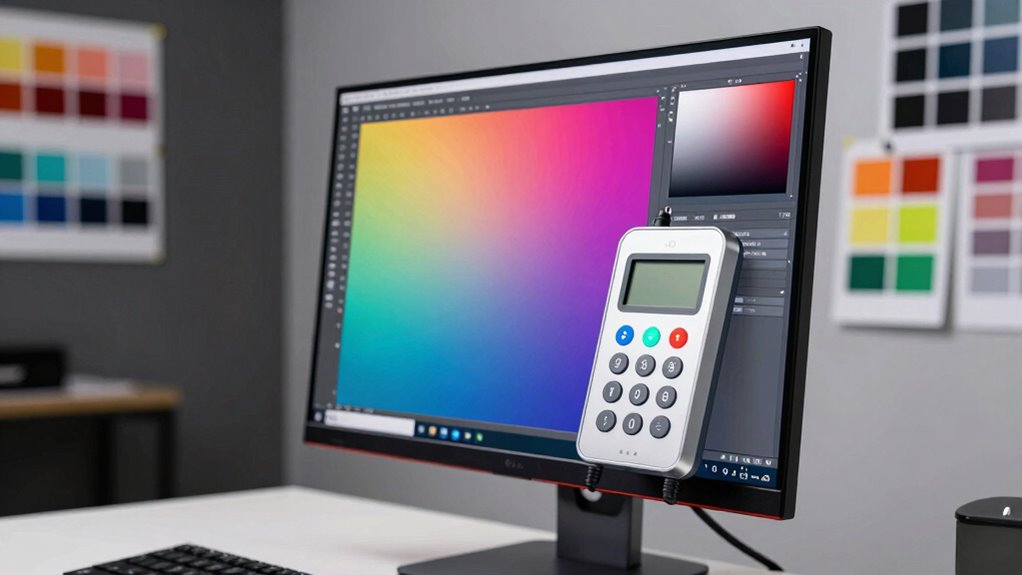
Choosing the right monitor calibration device for print matching is essential for anyone working in professional photography, design, or printing. The best calibration tools ensure your on-screen colors match your printed output with precision. The Datacolor Spyder X Pro stands out as the overall top choice for its balance of accuracy and ease of use. Meanwhile, the Calibrite Display Pro HL offers excellent performance for those needing advanced features, and the X-Rite i1Publish caters to high-end workflows. These options highlight the main tradeoffs: affordability versus professional-grade accuracy, simplicity versus advanced controls. Continue reading for a detailed breakdown of each device and what makes it suitable for your print matching needs.

Prime made for students and young adults
- Fast, free delivery for dorm and study essentials
- Prime Video and Amazon Music included
- Member-only deals
Key Takeaways
- The top picks offer a wide range of features, from beginner-friendly to professional-grade calibration tools.
- Accuracy in color matching is often paired with more complex setup processes; simpler options may sacrifice some precision.
- Calibration devices that support a variety of display types, including OLED and Mini LED, provide more versatility for different workflows.
- Consistency over time is crucial; some devices include automatic re-calibration reminders or software updates that ensure ongoing accuracy.
- Price often correlates with features—more expensive models tend to deliver higher precision and additional measurement capabilities.
| Datacolor Spyder X Pro Monitor Calibrator |  | Best Overall for Ease and Versatility | Color engine: Lens-based | Calibration targets: 12 predefined | Monitor compatibility: Multiple displays including laptops and desktops | VIEW ON AMAZON | See Our Full Breakdown |
| Calibrite Video Photo Kit with Display Plus HL Colorimeter and ColorChecker Passport Video 2 |  | Best for High-Brightness and Video Workflow | Includes: Calibrite Display Plus HL colorimeter, ColorChecker Passport Video 2, protective case, USB-C adapter | Monitor Brightness Compatibility: Up to 10,000 nits | Target Types: Video color, grayscale, white balance, 24-color | VIEW ON AMAZON | See Our Full Breakdown |
| Calibrite Display Pro HL Monitor Calibration Colorimeter for LCD, Mini LED, and OLED Displays |  | Best for Professional High-Luminance Display Calibration | Display Technology: LCD, mini-LED, OLED | Brightness: 3000 candela_per_square_meter | Measurement Technology: Advanced color calibration measurements | VIEW ON AMAZON | See Our Full Breakdown |
| Calibrite Photo Kit with Display Pro HL Monitor Calibration Colorimeter and ColorChecker Passport Photo 2 |  | Best for Photographers and RAW Workflow | Product Dimensions: 7.5 x 2.8 x 7.5 inches | Item Weight: 13.1 ounces | Includes: Colorimeter, camera profiling tools | VIEW ON AMAZON | See Our Full Breakdown |
| Calibrite Creator Kit with Display 123 Colorimeter and ColorChecker Passport Video 2 |  | Best for Filmmakers and Multi-Device Workflow | Package Dimensions: 7.4 x 5.63 x 2.83 inches | Item Weight: 0.005 ounces | Includes: Colorimeter, camera profiling tools | VIEW ON AMAZON | See Our Full Breakdown |
| X-Rite i1Publish Software |  | Best for Professional Color Management and Print Matching | Compatibility: Requires compatible calibration hardware | VIEW ON AMAZON | See Our Full Breakdown | ||
| Calibrite Display 123 Monitor Calibration Colorimeter for Photo Editing and Color Accurate Viewing |  | Best for Multi-Monitor Setups and Beginners | Connection: USB C | Supports: 2 displays | Size: 34mm tall x 37mm diameter | VIEW ON AMAZON | See Our Full Breakdown |
| Calibrite ColorChecker Display Pro (CCDIS3) |  | Best for Consistent Professional Color Profiling | Display Aspect Ratio: 16:9 | Display Finish: Matte | Display Technology: LED | VIEW ON AMAZON | See Our Full Breakdown |
| Calibrite ColorChecker Studio Spectrophotometer for Complete Color Management with ColorChecker Classic Mini |  | Best for All-in-One Color Profiling Across Devices | Product Dimensions: 5 x 4 x 2 inches | Item Weight: 14.5 ounces | Includes: ColorChecker Mini | VIEW ON AMAZON | See Our Full Breakdown |
More Details on Our Top Picks
Datacolor Spyder X Pro Monitor Calibrator
The Datacolor Spyder X Pro stands out for its quick, user-friendly calibration process, making it an excellent choice for photographers and casual users who need reliable color matching across multiple monitors. Compared to the Calibrite Display Pro HL, which offers higher brightness calibration for professional HDR displays, the Spyder X Pro favors simplicity and speed, though it sacrifices some advanced control. Its automatic profile adjustments and room-light monitoring give it an edge in ease of use, but it may lack the customization options preferred by seasoned colorists. The inclusion of evaluation tools helps users see the impact of calibration without complex settings. Ideal for those seeking a straightforward, effective device for print matching without deep technical setup.
Pros:- Highly accurate color calibration for multiple monitors
- Simple, single-click calibration with a wizard workflow
- Fast calibration process taking just a couple of minutes
- Includes evaluation tools to compare before and after profiles
Cons:- Limited customization options for advanced users
- Requires software installation and setup
Best for: Photographers, hobbyists, and first-time calibrators looking for quick, reliable color accuracy for multiple monitors.
Not ideal for: Advanced professionals needing detailed control over calibration parameters or working with high-end HDR workflows.
- Color engine:Lens-based
- Calibration targets:12 predefined
- Monitor compatibility:Multiple displays including laptops and desktops
- Features:Room-light monitoring, automatic profile changing, before-and-after evaluation
Our verdict“This device is perfect for users who want quick, dependable print matching without complex adjustments.”
Calibrite Video Photo Kit with Display Plus HL Colorimeter and ColorChecker Passport Video 2
The Calibrite Video Photo Kit excels at calibration for high-brightness displays up to 10,000 nits and camera matching, making it ideal for professional video and high-end photo editing. Unlike the Calibrite Display Pro HL, which focuses on standard high-luminance calibration, this kit supports extreme brightness levels and comprehensive color tools, though it comes at a higher cost. Its included software simplifies workflow integration, and the kit is tailored for those working with multiple devices and cameras in demanding environments. However, its complexity and price can be barriers for casual users. This kit is best suited for professionals needing precise control over print matching in complex workflows.
Pros:- Supports calibration of displays up to 10,000 nits, ideal for HDR workflows
- Includes tools for camera matching and comprehensive color targets
- Easy-to-use software for complex workflows
- Designed for professional-grade calibration and consistency
Cons:- Relatively high price for non-professional users
- Requires software setup, which may be complex for beginners
Best for: Video editors, photographers, and professionals working with high-brightness displays or camera matching.
Not ideal for: Casual users or hobbyists who do not need high-brightness calibration or camera profiling features.
- Includes:Calibrite Display Plus HL colorimeter, ColorChecker Passport Video 2, protective case, USB-C adapter
- Monitor Brightness Compatibility:Up to 10,000 nits
- Target Types:Video color, grayscale, white balance, 24-color
- Weight:0.15 g
- Compatibility:Mac and Windows
- Features:HDR support, uniformity tools
Our verdict“This kit delivers high-precision calibration ideal for high-end video and photography professionals who demand accuracy across multiple devices.”
Calibrite Display Pro HL Monitor Calibration Colorimeter for LCD, Mini LED, and OLED Displays
The Calibrite Display Pro HL is tailored for professionals needing to calibrate high-luminance displays such as LCD, mini-LED, and OLED screens, with measurement capabilities up to 3000 nits. Unlike the Spyder X Pro, which targets general use, this device offers advanced tools like validation and uniformity checks, making it better suited for color-critical workflows. Its compatibility with both Mac and Windows via PROFILER software enhances versatility, but its USB-C connection and complex features might be overkill for casual users. This calibration device is a strong choice for those working with high-end displays where print matching demands precise luminance control. Designed for professionals who need detailed calibration and validation for print consistency.
Pros:- Supports calibration of high-brightness, HDR, and OLED displays
- Includes tools for validation and uniformity analysis
- Compatible with Mac and Windows software
- Portable with built-in mount and travel pouch
Cons:- Requires USB-C connection, may need adapters
- Complex features may be overwhelming for casual users
Best for: Colorists, high-end photographers, and videographers working with HDR or OLED displays requiring exact print matching.
Not ideal for: Entry-level users or those with standard monitors who do not need high-brightness calibration or advanced validation tools.
- Display Technology:LCD, mini-LED, OLED
- Brightness:3000 candela_per_square_meter
- Measurement Technology:Advanced color calibration measurements
- Connectivity:USB Type C
- Validation Tools:Yes
- Warranty & Support:30-Day Return Guarantee
Our verdict“This pick is best for professionals needing detailed, high-brightness print matching calibration for advanced display technologies.”
Calibrite Photo Kit with Display Pro HL Monitor Calibration Colorimeter and ColorChecker Passport Photo 2
This Photo Kit combines a high luminance monitor calibrator with a camera profiling tool, making it ideal for photographers who need consistent print matching from capture to editing. Compared to the Calibrite Video-Photo Kit, this kit emphasizes camera profiling and monitor calibration for still images, offering more tailored features for photography workflows. Its software allows for custom presets, simplifying complex color adjustments. While highly effective for those familiar with calibration processes, beginners may find the setup somewhat technical. Best suited for photographers seeking a comprehensive solution for print matching and color control in RAW workflows.
Pros:- Supports calibration of modern displays including mini-LED and OLED
- Enables custom camera profiling for accurate RAW editing
- Includes software for precise color management and presets
- Suitable for high-end photographic workflows
Cons:- Requires some technical knowledge to maximize features
- Price details are not specified, potentially expensive
Best for: Professional photographers working with RAW files and needing precise monitor calibration aligned with camera profiles.
Not ideal for: Videographers or casual users who do not require camera profiling or advanced calibration features.
- Product Dimensions:7.5 x 2.8 x 7.5 inches
- Item Weight:13.1 ounces
- Includes:Colorimeter, camera profiling tools
- Compatibility:Modern high-brightness displays
- Software:Yes
- First Available:November 15, 2024
Our verdict“This kit provides precise print matching for photographers handling RAW workflows with high-luminance displays.”
Calibrite Creator Kit with Display 123 Colorimeter and ColorChecker Passport Video 2
The Calibrite Creator Kit combines the Display 123 colorimeter with the Video Passport for comprehensive color management across monitors and cameras, making it an excellent choice for filmmakers and content creators. It offers solid calibration tools for different devices, supporting print matching in multi-camera and display environments. Compared with the Photo Kit, this kit emphasizes exposure and white balance control suited for video workflows, though it may lack some of the high-brightness calibration features professionals in HDR need. Its user-friendly setup helps streamline color consistency from capture to post-production, but it may have limited advanced calibration options for highly technical workflows. This kit is ideal for videographers seeking reliable calibration for professional-grade print matching across multiple devices.
Pros:- Includes tools for monitor calibration and camera profiling
- Supports consistent color and exposure control
- User-friendly workflow for video and photo professionals
- Reliable for multi-device color management
Cons:- Limited high-brightness calibration features
- Specific compatibility details are not fully outlined
Best for: Filmmakers, videographers, and multi-device content creators requiring reliable color consistency.
Not ideal for: Casual photographers or users focused solely on print work without video needs.
- Package Dimensions:7.4 x 5.63 x 2.83 inches
- Item Weight:0.005 ounces
- Includes:Colorimeter, camera profiling tools
- Supports:Multiple device calibration
- First Available:November 15, 2024
Our verdict“This kit offers dependable calibration suited for video workflows requiring consistent print matching across multiple devices.”
X-Rite i1Publish Software
The X-Rite i1Publish Software stands out for its ability to deliver professional-level color calibration, making it ideal for print matching where accuracy is critical. Compared with simpler solutions like the Calibrite Display 123, it offers broader device compatibility and more detailed color profiling options, but it also comes with limited feature descriptions and requires compatible hardware. This software is best suited for printing professionals and photographers who need precise, repeatable color across multiple outputs. The main tradeoff is that it lacks user-friendly setup guides and has no direct user reviews, which could leave some uncertainty about real-world performance. Overall, this makes the most sense for experienced users with existing calibration hardware seeking maximum color fidelity for print matching.
Pros:- Provides professional-level color calibration capabilities
- Ensures highly accurate color reproduction across devices
- Compatible with a wide range of calibration hardware
Cons:- Limited information on features and setup process
- Requires compatible hardware, increasing initial investment
Best for: Professional printers, photographers, and color managers needing high-precision print matching
Not ideal for: Beginners or users without compatible calibration hardware who prioritize ease of use over maximum accuracy
- Compatibility:Requires compatible calibration hardware
Our verdict“This software is best suited for experienced professionals seeking maximum control over print color matching.”
Calibrite Display 123 Monitor Calibration Colorimeter for Photo Editing and Color Accurate Viewing
The Calibrite Display 123 is designed for ease of use and supports calibration for up to two displays, making it a strong choice for creators managing multi-monitor workflows. Compared to the Calibrite ColorChecker Display Pro, it offers a more straightforward, guided calibration process, but is limited to two screens and may not suit larger setups. Its compact size and simple workflow make it ideal for photographers and hobbyists who need quick, reliable calibration without fuss. However, the reliance on a USB C connection might limit compatibility with older computers, and its small form factor can be less comfortable for those handling the device frequently. This pick makes the most sense for users with a dual-monitor setup seeking a user-friendly calibration device.
Pros:- Supports calibration for up to two displays, ideal for multi-monitor setups
- Easy guided workflow suitable for beginners and pros
- Includes built-in comparison view to verify calibration accuracy
Cons:- Limited to two displays, not suitable for extensive multi-monitor environments
- Requires USB C port, which may not be available on older devices
Best for: Photographers, content creators, and hobbyists with dual monitors needing quick, reliable calibration
Not ideal for: Users with more than two displays or those working in complex multi-monitor environments, due to its limited support
- Connection:USB C
- Supports:2 displays
- Size:34mm tall x 37mm diameter
- Features:Adjustable counterweight, brightness target, before/after check
Our verdict“This device is perfect for users with dual monitors who want straightforward calibration without complexity.”
Calibrite ColorChecker Display Pro (CCDIS3)
The Calibrite ColorChecker Display Pro excels in delivering high repeatability across various display types, making it a strong choice for professional workflows. Its optical design with a rotatable diffuser arm and tripod mount enhances consistency and ease of use, especially when paired with ccProfiler or i1Profiler software. Compared with the Calibrite Display 123, it targets professionals needing more detailed profiling and multiple device support, though it has limited connectivity with just one USB port and may be overly complex for beginners. The device’s focus on repeatability and compatibility with advanced calibration software makes it ideal for high-end color workflows. Still, its complexity and limited connectivity could be a barrier for casual users. This device suits professionals who require precise, repeatable calibration for high-stakes projects.
Pros:- High repeatability for consistent color calibration
- User-friendly with integrated diffuser arm and tripod mount
- Compatible with professional calibration software
Cons:- Limited connectivity options, only one USB port
- Designed primarily for professionals, potentially complex for novices
Best for: Color professionals and labs needing consistent, repeatable calibration across multiple high-end displays
Not ideal for: Beginners or casual users looking for a simple, plug-and-play calibration device
- Display Aspect Ratio:16:9
- Display Finish:Matte
- Display Technology:LED
- Brightness:200 nits
- Connectivity:Bluetooth and USB
Our verdict“This is an excellent choice for professionals demanding repeatability and accuracy in high-end color workflows.”
Calibrite ColorChecker Studio Spectrophotometer for Complete Color Management with ColorChecker Classic Mini
The Calibrite ColorChecker Studio Spectrophotometer is designed for comprehensive color management, capable of profiling displays, printers, scanners, projectors, and cameras. Its adaptive profiling and ambient light measurement enhance accuracy across a range of devices, particularly when paired with the included ColorChecker Classic Mini target for camera calibration. Compared to single-purpose devices like the Calibrite Display 123, it offers a broader workflow but involves more complexity and software dependency. Its versatility makes it suitable for those managing multi-device environments, although some users might find the moderate customer satisfaction ratings and lack of full software details a concern. This device is best for professionals who need a consolidated color profiling solution. It’s a solid pick for those seeking a one-stop calibration tool for diverse media and devices.
Pros:- Supports comprehensive profiling for multiple device types
- Includes ColorChecker Mini for camera calibration
- Features adaptive profiling for improved accuracy
Cons:- Customer satisfaction appears moderate, indicating possible software or setup issues
- Lacks detailed warranty or full software package info
Best for: Creative professionals managing multiple device types, including camera calibration and print workflows
Not ideal for: Casual users or those needing simple, single-device calibration, due to its complexity and cost
- Product Dimensions:5 x 4 x 2 inches
- Item Weight:14.5 ounces
- Includes:ColorChecker Mini
- Adaptive Profiling:Yes
Our verdict“This device is ideal for professionals requiring an all-in-one solution for diverse color management needs across devices.”

How We Picked
These products were evaluated based on calibration accuracy, ease of use, compatibility with different display types, build quality, and value for money. We prioritized devices that provide reliable, repeatable results specifically for print matching, rather than general color calibration. The ranking reflects a balance between professional-grade features and accessibility for serious hobbyists or small studios. Consideration was also given to software usability, support for various workflows, and long-term maintenance. This approach ensures we recommend options that meet diverse needs without sacrificing core performance for print accuracy.Factors to Consider When Choosing Monitor Calibration Device For Print Matching
Selecting the right monitor calibration device for print matching involves understanding several key factors. Accuracy is paramount because your goal is to ensure the colors you see on screen precisely match your printed results. Compatibility with different display technologies, such as OLED or Mini LED, can affect calibration quality and ease of setup. Ease of use and software interface matter, especially if you plan to calibrate frequently or need consistent results over time. Budget considerations also play a role, but investing in a higher-quality device often pays off in more accurate color reproduction and reliability. Lastly, consider whether the device supports multi-monitor setups, which is common in professional workflows.Calibration Accuracy and Color Precision
The core reason for choosing a calibration device is its ability to produce accurate and consistent color results. Devices that use high-quality sensors and advanced measurement algorithms tend to deliver better print matching. Look for tools that support 24-bit color depth and offer detailed calibration profiles, as these ensure your screen’s output aligns closely with your print colors. Remember, a highly accurate device may come with a steeper learning curve or higher price, but it’s worth it if precise color matching is critical to your work.
Compatibility and Display Support
Not all calibration devices work equally well across different display types. OLED, Mini LED, and high-end LCDs have unique color and luminance characteristics that some sensors handle better. Ensure the device explicitly supports your display technology to avoid subpar calibration results. Additionally, check whether the device can calibrate multiple monitors simultaneously if your workflow involves several screens, which can save time and maintain consistency across your setup.
Ease of Use and Software Interface
A calibration device’s software should be intuitive and straightforward, especially if you’re not a seasoned color management professional. Look for tools that automate routine tasks, provide clear instructions, and generate detailed calibration reports. Some software also offers advanced features like ambient light measurement, which can improve calibration accuracy in varying lighting conditions—a helpful feature for print matching where consistent viewing conditions are essential.
Long-Term Reliability and Maintenance
Calibration sensors degrade over time, so choosing a device with reliable support and calibration reminders is vital. Some devices include automatic re-calibration prompts or software updates that help maintain accuracy without additional hassle. Consider the lifespan of the sensor, ease of recalibration, and availability of replacement parts or upgrades, especially if you depend heavily on color accuracy for print matching projects.
Budget and Value for Money
While high-end calibration tools offer superior accuracy and features, they come at a higher cost. Budget-conscious buyers should focus on devices that strike a good balance between affordability and performance. For hobbyists or small studios, a slightly less precise but more user-friendly device may suffice. Conversely, professionals working on high-stakes print projects should prioritize accuracy and durability, even at a higher investment, to avoid costly reprints or color mismatches.
Frequently Asked Questions
Can I use a regular monitor calibration device for print matching?
While many monitor calibration devices can improve color accuracy on-screen, not all are optimized for print matching. Print matching requires a device that can produce highly precise and consistent profiles, often involving advanced sensors and software features. Some devices are specifically designed for print workflows and include calibration options tailored for color accuracy in print output. If print matching is your primary goal, choosing a device with dedicated features for high-precision calibration provides better results than general-purpose tools.
How often should I calibrate my monitor for print work?
For critical print projects, calibrating your monitor at least once a month is advisable, especially if your workflow involves consistent color accuracy. Changes in ambient lighting and display aging can affect calibration over time, so regular re-calibration helps maintain reliable results. Some calibration devices include software reminders to prompt you when re-calibration is due, which can help prevent drift and ensure your on-screen colors remain aligned with your printed output.
Are more expensive calibration devices worth the investment?
Higher-priced calibration tools typically offer greater accuracy, better build quality, and more advanced features, which can be crucial for professional print matching. If your work depends on precise color reproduction—such as professional photography or high-end printing—investing in a premium device is often justified. However, for casual or hobbyist use, mid-range options can still provide satisfactory results without breaking the bank. Balancing your need for accuracy against your budget helps determine the right investment.
Is it necessary to calibrate multiple monitors separately?
Yes, each monitor can have different color and luminance characteristics, especially if they are of different brands or models. Calibrating each display individually ensures consistent color accuracy across your entire workflow. Many calibration devices support multi-monitor setups and include software features to streamline the process. Regular calibration of all screens involved in your print matching process helps prevent discrepancies and ensures your final output matches your on-screen preview.
What should I consider when choosing a calibration device for OLED displays?
OLED displays have unique luminance and color characteristics that require a calibration device capable of handling high contrast and deep blacks. Look for sensors that support OLED-specific calibration and software that accurately measures luminance levels without damaging the display. Additionally, ensure the device supports the resolution and refresh rates of your OLED monitor to achieve consistent results. Proper calibration of OLED screens can significantly improve print matching accuracy, especially for detailed color work.
Conclusion
For most users seeking a reliable, all-around solution, the Datacolor Spyder X Pro offers a balanced mix of ease of use and accuracy, making it ideal as the best overall pick. Professionals with demanding workflows should consider the Calibrite Display Pro HL for its advanced features and support for various display types. Those new to calibration or working on smaller projects will find the X-Rite i1Publish a user-friendly and precise option. Budget-conscious buyers can opt for simpler, more affordable devices, while high-end users should look at devices with extended measurement capabilities and software integration. Ultimately, matching your specific print workflow needs with the right calibration tool ensures consistent, color-accurate results.
Halloween Picks
halloween
As an affiliate, we earn on qualifying purchases.