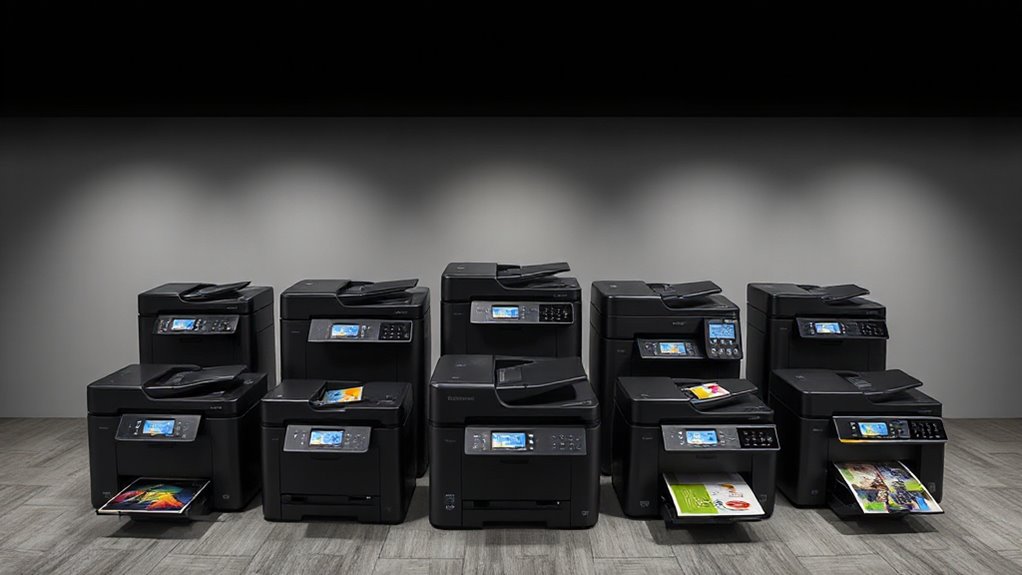

A 36-inch pigment printer gives design, architecture, and print businesses room for wide plans, posters, and graphics, but the right choice depends on more than maximum roll width. My best overall pick is the Canon imagePROGRAF TM-350 MFP Lm36, which pairs pigment printing with multifunction capability for a broader workflow. The Epson SureColor T5170 stands out for wireless convenience, while the HP DesignJet T630 includes useful media-handling features for technical documents. The main tradeoffs are multifunction features versus a simpler printer, bundled supplies versus the printer alone, and newer models versus older product lines. Read on for the full comparison and guidance on matching a printer to your workload.

Prime made for students and young adults
- Fast, free delivery for dorm and study essentials
- Prime Video and Amazon Music included
- Member-only deals
Key Takeaways
The Canon TM-350 MFP Lm36 is the most versatile choice in this group because it combines 36-inch pigment printing with multifunction capability; buyers who only need printing may prefer a simpler model.
The Epson SureColor T5170 differentiates itself through wireless convenience, while the HP DesignJet T630 stands out for included sheet-feeding and media-storage features.
Several Canon TM-series listings represent closely related printers, but their configurations and included supplies can differ; compare the exact bundle rather than relying on the shared model family name.
The iPF780 and iPF785 are older-generation options in this selection, so buyers should weigh their fit and availability against the more current TM-series models.
“36-inch” describes the wide-format class, not a promise that every job will print at a full 36 inches; check actual media support, roll handling, and workspace needs before ordering.
| Epson SureColor T5170 36-Inch Wide-Format Wireless Inkjet Printer |  | Best for Wireless, Mixed-Media Work | Printer type: Inkjet | Print width: 36 inches | Ink: UltraChrome XD2 pigment, cyan, magenta, yellow, and black | VIEW ON AMAZON | See Our Full Breakdown |
| HP DesignJet T630 36-Inch Large-Format Plotter Printer with Auto Sheet Feeder, Media Bin, and Stand | 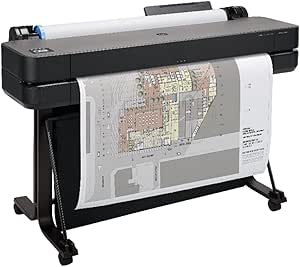 | Best for Streamlined Plotter Workflows | Printer type: Thermal | Maximum roll width: 36 inches | Maximum sheet size: 13 × 19 inches | VIEW ON AMAZON | See Our Full Breakdown |
| Canon imagePROGRAF TM-350 MFP Lm36 36-Inch 5-Color Pigment Ink Printer |  | Best for Small Offices Needing Scanning | Printer type: Inkjet | Maximum media size: 36 inches | Ink system: Five-color Lucia TD pigment ink: black, cyan, magenta, yellow, and gray | VIEW ON AMAZON | See Our Full Breakdown |
| Canon imagePROGRAF iPF780 36-Inch Large-Format Printer |  | Best for High-Capacity Ink Runs | Printer type: Inkjet | Maximum media size: 36 inches | Print resolution: 2400 × 1200 dpi | VIEW ON AMAZON | See Our Full Breakdown |
| CES Imaging Canon imagePROGRAF TM-300 36-Inch 5-Color Large-Format Inkjet Printer |  | Best for Straightforward Ethernet Printing | Printer type: Inkjet | Maximum media size: 36 inches | Print colors: 5 | VIEW ON AMAZON | See Our Full Breakdown |
| Canon imagePROGRAF iPF785 36-Inch Wide-Format Color Inkjet Printer |  | Best for Five-Ink Color Flexibility | Printer type: Inkjet | Maximum media size: 36 inches | Maximum print resolution: 2400 × 1200 dpi | VIEW ON AMAZON | See Our Full Breakdown |
| CES Imaging Canon imagePROGRAF TM-300 36-Inch 5-Color Large Format Inkjet Printer with Extra Ink |  | Best for Support and Ink Readiness | Printer type: Inkjet | Maximum media size: 36 inches | Print resolution: 2400 × 1200 dpi | VIEW ON AMAZON | See Our Full Breakdown |
| Canon imagePROGRAF TM-340 MFP Lm36 36-Inch Large Format Printer |  | Best for Small-Space Print-and-Scan Workflows | Printer type: Inkjet | Print width: 36 inches | Functions: Print, scan | VIEW ON AMAZON | See Our Full Breakdown |
| HP DesignJet T650 36-Inch Large-Format Plotter Printer |  | Best for Automated Media Handling | Maximum roll width: 36 inches | Maximum sheet size: 13 × 19 inches | Media handling: Sheet feed, roll feed, automatic sheet/roll switch, media bin, horizontal cutter | VIEW ON AMAZON | See Our Full Breakdown |
| Canon imagePROGRAF TM-350 36-Inch Color Inkjet Printer |  | Best for Pigment-Specified Output | Printer type: Inkjet | Maximum media size: 36 inches | Ink type: Pigmented | VIEW ON AMAZON | See Our Full Breakdown |
| Canon imagePROGRAF TM-340 36-Inch 5-Color Large-Format Printer |  | Best for Consistent Production Printing | Printer type: Inkjet | Ink system: 5-color pigment inks | Maximum media size: 36 inches | VIEW ON AMAZON | See Our Full Breakdown |
| Canon imagePROGRAF TM-300 36-inch 5-Color Inkjet Printer Plotter |  | Best for Scan-and-Print Workflows | Print width: 36 inches | Ink type: LUCIA TD pigment ink | Number of colors: 5 | VIEW ON AMAZON | See Our Full Breakdown |
| inch pigment printer | Connectivity | Printer type | Maximum media size |
|---|---|---|---|
| Epson SureColor T5170 36-Inch | USB, Wi-Fi, and Wi-Fi Direct | Inkjet | — |
| HP DesignJet T630 36-Inch Larg | Gigabit Ethernet, USB 2.0, Wi-Fi, and Wi-Fi Direct | Thermal | — |
| Canon imagePROGRAF TM-350 MFP | USB-C | Inkjet | 36 inches |
| Canon imagePROGRAF iPF780 36-I | Wired Ethernet | Inkjet | 36 inches |
| CES Imaging Canon imagePROGRAF | Ethernet | Inkjet | 36 inches |
| Canon imagePROGRAF iPF785 36-I | Ethernet, USB 2.0 | Inkjet | 36 inches |
| CES Imaging Canon imagePROGRAF | USB 2.0 | Inkjet | 36 inches |
| Canon imagePROGRAF TM-340 MFP | Ethernet, USB | Inkjet | — |
| HP DesignJet T650 36-Inch Larg | Gigabit Ethernet, USB 2.0, Wi-Fi | — | — |
| Canon imagePROGRAF TM-350 36-I | Gigabit Ethernet, USB | Inkjet | 36 inches |
| Canon imagePROGRAF TM-340 36-I | USB, Ethernet | Inkjet | 36 inches |
| Canon imagePROGRAF TM-300 36-i | WiFi, USB 3.0, Ethernet | — | — |
More Details on Our Top Picks
Epson SureColor T5170 36-Inch Wide-Format Wireless Inkjet Printer
The Epson SureColor T5170 is a strong fit for offices that alternate between technical drawings and posters and want pigment ink without a complicated media routine. Its 36-inch width, roll feed, and auto sheet feeder support varied jobs, while Wi-Fi and Wi-Fi Direct let compatible devices send files without a wired connection. Epson lists A1/D-size output in 31 seconds, putting its speed in the same general range as the HP DesignJet T630. The Epson’s standout distinction is its 4.3-inch touchscreen and stated cartridge capacities of up to 50 mL for color and 80 mL for black. The tradeoff is a 101-pound footprint and the requirement for genuine Epson cartridges. I’d pick it over the Canon imagePROGRAF TM-350 MFP for wireless access and broader listed connectivity, but not for scanning, which the Canon includes.
Pros:- Prints on media up to 36 inches wide using UltraChrome XD2 pigment ink.
- Wi-Fi and Wi-Fi Direct supplement USB connectivity.
- Roll feed and auto sheet feeder handle different job formats.
- A1/D-size prints are listed at 31 seconds, with high-capacity cartridge options.
Cons:- Requires genuine Epson-brand cartridges.
- At 101 pounds, it is difficult to move and needs a dedicated installation space.
Best for: Small design and engineering offices that need 36-inch pigment printing, wireless file sending, and both roll and sheet media.
Not ideal for: Buyers who need a built-in scanner or a lightweight desktop machine; this printer weighs 101 pounds and occupies substantial space.
- Printer type:Inkjet
- Print width:36 inches
- Ink:UltraChrome XD2 pigment, cyan, magenta, yellow, and black
- Print resolution:2880 × 1440
- A1/D-size speed:As little as 31 seconds
- Connectivity:USB, Wi-Fi, and Wi-Fi Direct
- Media handling:Roll feed and auto sheet feeder; maximum sheet capacity 50
- Weight:101 pounds
Our verdict“Choose the T5170 if you want a 36-inch pigment printer with wireless access and flexible media handling, but skip it if scanning or a smaller footprint matters more.”
HP DesignJet T630 36-Inch Large-Format Plotter Printer with Auto Sheet Feeder, Media Bin, and Stand
The HP DesignJet T630 is aimed at teams that print technical drawings, maps, and posters and want media handling and file checks built into the workflow. It accepts 36-inch rolls and sheets up to 13 × 19 inches, then switches between roll and sheet feed automatically; an automatic cutter and media bin help keep jobs moving with less manual handling. HP Click adds preview and error checking, a practical advantage over the more basic workflow described for the Epson SureColor T5170. HP lists A1/D output at up to 30 seconds, close to the Epson’s 31-second figure. Connectivity includes Ethernet, USB, and Wi-Fi, so it suits shared offices. The cost of that office-ready setup is physical: at 123 pounds and 52 inches wide, it needs room for the included stand and media accessories.
Pros:- Handles 36-inch rolls and sheets up to 13 × 19 inches.
- Automatically switches between roll and sheet media and includes a horizontal cutter.
- HP Click supports file preview and error checking before printing.
- Offers Ethernet, USB, Wi-Fi, and Wi-Fi Direct.
Cons:- The 123-pound printer and 52-inch-wide body demand considerable space.
- Maximum sheet size is 13 × 19 inches, limiting larger sheet-fed jobs.
Best for: Architecture, engineering, and mapping teams that share a 36-inch plotter and value automatic media switching and pre-print file checks.
Not ideal for: Home offices or small studios with limited floor space, and buyers who require sheet sizes larger than 13 × 19 inches.
- Printer type:Thermal
- Maximum roll width:36 inches
- Maximum sheet size:13 × 19 inches
- A1/D print speed:Up to 30 seconds per page; up to 76 prints per hour
- Media handling:Sheet and roll feed, automatic switching, media bin, and horizontal cutter
- Connectivity:Gigabit Ethernet, USB 2.0, Wi-Fi, and Wi-Fi Direct
- Onboard memory:1 GB
- Weight:123 pounds
Our verdict“Pick the T630 for a shared technical-printing workflow with automatic media handling, provided you have room for its substantial stand-mounted setup.”
Canon imagePROGRAF TM-350 MFP Lm36 36-Inch 5-Color Pigment Ink Printer
Among these five options, the Canon imagePROGRAF TM-350 MFP Lm36 is the clearest choice when a 36-inch pigment printer also needs to digitize or copy documents. Its automatic document feeder scanner adds a workflow the print-only CES Imaging Canon TM-300 does not provide, while automatic paper detection and an adjustable touchscreen make routine setup less hands-on. Five-color Lucia TD pigment ink, including gray, suits offices producing CAD sheets, posters, and signage. Canon describes the machine as intended for low-volume work in small spaces, so I wouldn’t rank it as a high-throughput production plotter. The listed connection is USB-C only, a narrower choice than the Epson T5170’s USB and wireless options. Its initial-page figure is 18.75 seconds, but that number alone doesn’t establish sustained large-format throughput.
Pros:- Combines 36-inch pigment printing with an ADF scanner.
- Five-color Lucia TD ink includes gray for a broader ink set.
- Automatic paper detection reduces manual media setup.
- Adjustable 4.3-inch touchscreen supports direct operation.
Cons:- Designed for low-volume printing rather than sustained production workloads.
- Only USB-C connectivity is listed, unlike the wireless Epson T5170.
Best for: Small architecture, design, or sign-making offices that print occasional 36-inch jobs and need an ADF scanner for document workflows.
Not ideal for: High-volume print departments or teams that need Wi-Fi, Ethernet, or several connection choices; the listed interface is USB-C.
- Printer type:Inkjet
- Maximum media size:36 inches
- Ink system:Five-color Lucia TD pigment ink: black, cyan, magenta, yellow, and gray
- Print resolution:1200 dpi, color and black-and-white
- Initial-page print time:18.75 seconds
- Scanner:Automatic document feeder (ADF)
- Connectivity:USB-C
- Maximum sheet capacity:100
Our verdict“Choose the TM-350 MFP Lm36 when scanning is as important as occasional 36-inch pigment printing, but look elsewhere for heavy workloads or wireless networking.”
Canon imagePROGRAF iPF780 36-Inch Large-Format Printer
The Canon imagePROGRAF iPF780 makes the most sense for an office that values longer print runs and steady operation more than wireless convenience or easy relocation. Its sub-ink tank system lets operators replace an ink tank during a job, which can reduce interruptions on shared plotter work. Canon also lists support for 300 mL tanks and an Arch D print time of up to 21 seconds in Economy mode, faster on paper than the 30-second A1/D figure for the HP DesignJet T630; the modes and stated formats differ, so these figures aren’t a direct throughput contest. Five-color ink and wired Ethernet suit a fixed office installation. The 239-pound weight is a major commitment, and the listed wired-only connection makes the more flexible Epson SureColor T5170 a better fit for wireless teams.
Pros:- Sub-ink tank design allows tank replacement during a print job.
- Supports ink tanks up to 300 mL.
- Prints media up to 36 inches wide with five ink colors.
- Lists an Arch D Economy-mode print time of up to 21 seconds.
Cons:- At 239 pounds, installation and relocation require substantial planning.
- Wired Ethernet is the only listed connectivity option.
- Maximum sheet capacity is 20.
Best for: Established print rooms producing recurring large-format office jobs where replaceable ink tanks and a fixed Ethernet connection fit the workflow.
Not ideal for: Small studios that may need to move the printer, or teams that rely on wireless printing; it weighs 239 pounds and lists wired Ethernet.
- Printer type:Inkjet
- Maximum media size:36 inches
- Print resolution:2400 × 1200 dpi
- Ink colors:Cyan, magenta, yellow, black, and matte black
- Ink tank capacity:Supports tanks up to 300 mL
- Arch D speed:Up to 21 seconds in Economy mode
- Connectivity:Wired Ethernet
- Weight:239 pounds
Our verdict“Select the iPF780 for a fixed office that prioritizes ink-run continuity and large-format throughput over portability and wireless access.”
CES Imaging Canon imagePROGRAF TM-300 36-Inch 5-Color Large-Format Inkjet Printer
The CES Imaging Canon imagePROGRAF TM-300 is a print-only 36-inch option for buyers who want a direct Ethernet-connected machine rather than an all-in-one workflow. It includes a 130 mL PFI-120MBK pigment black tank and a one-year on-site warranty, making it a practical fit for a fixed office setup. Its listed 25-second initial-page time falls between the Canon iPF780’s 21-second Economy-mode Arch D figure and the HP T630’s 30-second A1/D figure, though those measures use different formats or conditions. Unlike the Canon imagePROGRAF TM-350 MFP Lm36, it has no scanner; that keeps its stated function focused on printing but rules out scan-and-copy workflows. Simplex printing and a five-sheet capacity also limit its usefulness for offices that expect frequent unattended sheet jobs.
Pros:- Prints color media up to 36 inches wide.
- Includes a 130 mL PFI-120MBK pigment black ink tank.
- Ethernet supports a fixed wired office connection.
- Includes a one-year on-site warranty.
Cons:- Prints simplex only, with no duplex option listed.
- Maximum sheet capacity is five.
- No scanner is listed, unlike the Canon TM-350 MFP Lm36.
Best for: Small offices with a wired network that need 36-inch color output and a print-only setup with an included pigment black tank.
Not ideal for: Teams that need scanning, duplex output, or sizeable sheet-fed batches; this model is print-only, simplex, and holds up to five sheets.
- Printer type:Inkjet
- Maximum media size:36 inches
- Print colors:5
- Included ink tank:PFI-120MBK pigment black, 130 mL
- Connectivity:Ethernet
- Initial-page print time:25 seconds
- Maximum sheet capacity:5
- Printing mode:Simplex
Our verdict“Choose this TM-300 for straightforward Ethernet-based 36-inch printing, but skip it if your workflow needs scanning, duplexing, or larger sheet batches.”
Canon imagePROGRAF iPF785 36-Inch Wide-Format Color Inkjet Printer
The Canon imagePROGRAF iPF785 is a practical fit for print rooms that need 36-inch color output and a separate matte black ink option. Its five-color setup and 2400 × 1200 dpi resolution suit technical drawings, posters, and other work where legible lines and clear color matter. Compared with the HP DesignJet T650, it offers fewer listed workflow conveniences: the HP adds Wi-Fi, automatic sheet/roll switching, and mobile printing, while the iPF785 provides Ethernet and USB. The tradeoff is a more straightforward connectivity setup and simplex-only printing; its listed speed is 6 pages per minute. I would shortlist it when the ink configuration and wired connections matter more than automated media handling, but skip it if hands-off roll-and-sheet changes are a priority.
Pros:- Handles media up to 36 inches wide.
- Five ink colors include matte black.
- Print resolution reaches 2400 × 1200 dpi.
- Ethernet and USB 2.0 support wired installation options.
Cons:- Simplex printing only.
- No Wi-Fi is listed, unlike the HP DesignJet T650.
- Listed print speed is 6 pages per minute.
Best for: Small architecture, engineering, and reprographics teams that need a 36-inch Canon with matte black ink and wired network access.
Not ideal for: Workgroups that need Wi-Fi, automatic switching between roll and sheet media, or duplex output.
- Printer type:Inkjet
- Maximum media size:36 inches
- Maximum print resolution:2400 × 1200 dpi
- Ink colors:Cyan, magenta, yellow, black, matte black
- Connectivity:Ethernet, USB 2.0
- Print speed:6 pages per minute, color and black-and-white
- Printing:Simplex
- Maximum sheet capacity:250
Our verdict“Choose the iPF785 for 36-inch five-ink output with wired connectivity, not for automated media handling or wireless access.”
CES Imaging Canon imagePROGRAF TM-300 36-Inch 5-Color Large Format Inkjet Printer with Extra Ink
This CES Imaging bundle makes the Canon imagePROGRAF TM-300 more appealing to a buyer setting up a first 36-inch print station: it includes an extra set of ink and a two-year on-site warranty. The 2400 × 1200 dpi resolution and five-color output place it in the same broad class as the Canon imagePROGRAF TM-350, but the TM-350 lists Gigabit Ethernet and USB, while this bundle lists USB alone. That limitation can matter if several people need network access. The TM-300’s listed paper handling reaches 200 sheets, though the supplied details do not give a print speed. I’d favor this package when local USB setup and included support are useful; choose a network-equipped alternative if the printer must serve a shared office.
Pros:- Supports color printing on media up to 36 inches wide.
- 2400 × 1200 dpi print resolution.
- Includes an extra set of ink.
- Lists a two-year on-site warranty.
Cons:- USB is the only listed connectivity option.
- Simplex printing only.
- No print speed is provided in the supplied product details.
Best for: A small studio or office buying a 36-inch Canon for a single workstation and valuing included ink and on-site service.
Not ideal for: Shared print rooms that require Ethernet or wireless access, or buyers who need a clearly stated speed specification.
- Printer type:Inkjet
- Maximum media size:36 inches
- Print resolution:2400 × 1200 dpi
- Ink colors:5
- Paper handling:Up to 200 sheets
- Connectivity:USB 2.0
- Printing:Simplex
- Included:Extra set of ink
- Warranty:2-year on-site warranty
Our verdict“Pick this TM-300 bundle for its included ink and on-site coverage when USB-only connection is sufficient.”
Canon imagePROGRAF TM-340 MFP Lm36 36-Inch Large Format Printer
The Canon imagePROGRAF TM-340 MFP Lm36 stands apart from the print-only models here by combining 36-inch printing with basic scanning. Its full-frontal operation and flat-body design are aimed at tighter work areas, while the adjustable 4.3-inch screen and included poster and workflow software give operators a more self-contained setup. It also lists support for varied media, including adhesive and metallic options. The tradeoff is that its stated resolution is 1200 × 1200, below the 2400 × 1200 listed for the Canon imagePROGRAF TM-350 and iPF785. At 130.5 pounds, it still needs a sturdy, planned location. I’d choose it when scanning and compact access matter more than matching those models’ higher stated print resolution.
Pros:- Combines 36-inch color printing with scanning.
- Full-frontal operation and flat-body design can suit restricted work areas.
- Includes an adjustable 4.3-inch screen and print workflow software.
- Lists compatibility with glossy, metallic, rag, and adhesive media.
Cons:- Listed resolution is 1200 × 1200, lower than the 2400 × 1200 of the Canon TM-350.
- Weight of 130.5 pounds calls for a sturdy, planned installation.
- Warranty is described only as limited, without a duration in the supplied details.
Best for: Small design, education, or architecture offices that need occasional wide-format scanning alongside poster, CAD, or signage printing.
Not ideal for: Buyers prioritizing the higher stated resolution of the TM-350 or iPF785, or anyone without a stable footprint for a 130.5-pound machine.
- Printer type:Inkjet
- Print width:36 inches
- Functions:Print, scan
- Resolution:1200 × 1200
- Color depth:24 bpp
- Connectivity:Ethernet, USB
- Display:Adjustable 4.3-inch screen
- Weight:130.5 pounds
- Energy and sustainability:ENERGY STAR; EPEAT Gold
Our verdict“Choose the TM-340 MFP when scanning and front-access operation are more useful to your workflow than higher stated print resolution.”
HP DesignJet T650 36-Inch Large-Format Plotter Printer
The HP DesignJet T650 is the workflow-first choice among these 36-inch options. It accepts rolls up to 36 inches and sheets up to 13 × 19 inches, then uses automatic sheet/roll switching and a horizontal cutter to reduce manual media changes. HP Click adds PDF checking and auto-nesting, while Wi-Fi and the HP Smart app give teams more ways to send jobs than the USB-only CES Imaging TM-300 bundle. The product details emphasize plotter workflows and list supported formats including PDF, TIFF, and HP-GL/2, but do not provide a pigment-ink specification or print resolution. I’d select it for technical drawing throughput and flexible job handling, not as the safest choice for someone specifically seeking documented pigment inks or detailed color-output specs.
Pros:- Supports rolls up to 36 inches and sheets up to 13 × 19 inches.
- Automatically switches between sheet and roll media.
- HP Click includes PDF error checking and auto-nesting.
- Gigabit Ethernet, USB, and Wi-Fi provide several connection options.
Cons:- Supplied details do not specify pigment ink or print resolution.
- Large-format roll workflows require compatible wide media.
- The stated hourly capacity has conflicting figures in the supplied product information.
Best for: Architecture, engineering, and construction teams that switch between roll plots and smaller sheets and want app-based job handling.
Not ideal for: Buyers who require confirmed pigment inks or a listed print resolution before choosing a 36-inch printer.
- Maximum roll width:36 inches
- Maximum sheet size:13 × 19 inches
- Media handling:Sheet feed, roll feed, automatic sheet/roll switch, media bin, horizontal cutter
- Connectivity:Gigabit Ethernet, USB 2.0, Wi-Fi
- Memory:1 GB
- Print speed:Up to 25 seconds per A1/D page
- Supported file formats:PDF, JPEG, TIFF, DWF, HP-GL/2, PNG
- Included software:HP Click, HP Smart app
- Support:2-year onsite support
Our verdict“Choose the T650 for automated roll-and-sheet plotter work, but verify ink type and resolution if pigment output is a requirement.”
Canon imagePROGRAF TM-350 36-Inch Color Inkjet Printer
For shoppers who specifically want a 36-inch pigment printer, the Canon imagePROGRAF TM-350 has the clearest match in this group: its product details explicitly list pigmented ink, a 2400 × 1200 dpi resolution, and Gigabit Ethernet. That makes it easier to assess against the iPF785, which also lists 2400 × 1200 dpi but identifies a five-color ink set rather than explicitly describing the ink as pigment. The TM-350’s adjustable 4.3-inch touchscreen and included roll holder and basket support a more complete installation, though its listed speed is 3.2 pages per minute and its 224-pound weight makes placement a serious planning issue. Warranty details also conflict, with both one-year and two-year coverage stated. I’d prioritize it for pigment specification and network setup, while checking the warranty terms and space needs before ordering.
Pros:- Explicitly lists pigmented ink.
- Print resolution reaches 2400 × 1200 dpi.
- Built-in Gigabit Ethernet and USB support wired connections.
- Includes starter ink tanks, printhead, stackable basket, and roll holder with adapters.
Cons:- Listed speed is 3.2 pages per minute, below the iPF785’s listed 6 pages per minute.
- At 224 pounds, installation and relocation need careful planning.
- Supplied warranty information conflicts between one-year and two-year coverage.
Best for: Print studios and technical offices that want an explicitly pigment-ink 36-inch Canon with high listed resolution and Gigabit Ethernet.
Not ideal for: High-volume teams constrained by the listed 3.2-page-per-minute speed, or buyers without space and equipment to place a 224-pound printer.
- Printer type:Inkjet
- Maximum media size:36 inches
- Ink type:Pigmented
- Print resolution:2400 × 1200 dpi
- Print speed:3.2 pages per minute, color and black-and-white
- Display:Adjustable 4.3-inch touchscreen
- Connectivity:Gigabit Ethernet, USB
- Weight:224 pounds
- Dimensions:35.9 × 57.6 × 31.5 inches (D × W × H)
Our verdict“Choose the TM-350 when documented pigment ink and wired network capability outweigh its slow listed speed, heavy build, and unclear warranty term.”
Canon imagePROGRAF TM-340 36-Inch 5-Color Large-Format Printer
The TM-340 is a strong fit for shops that need repeatable 36-inch output without adding scanner functions they may not use. Its five-color pigment ink system supports posters, CAD documents, and signage, while automatic media detection reads media type, width, and remaining length to reduce setup steps when jobs change. Automatic color calibration also helps keep output consistent across repeat runs. Compared with the Canon imagePROGRAF TM-300, the TM-340 is the more straightforward print-only choice; the TM-300 adds scanning and copying for teams that need a broader workflow. The tradeoff is that the TM-340 cannot digitize or reproduce documents, and its 130.5-pound, 57.6-inch-wide body calls for a dedicated location. Its included stand, catch basket, and 300 ml of ink make it ready for a fuller print setup.
Pros:- Automatic media detection identifies media type, width, and remaining length.
- Automatic color calibration supports consistent output across repeat jobs.
- Handles banner paper, glossy film, and plain paper.
- Includes a stand, catch basket, and 300 ml of ink.
Cons:- Print-only functionality does not support scanning or copying.
- Its 130.5-pound weight and 57.6-inch body require substantial space and careful placement.
Best for: Print shops, architecture offices, and sign makers that produce recurring wide-format jobs and want automated media handling without paying for an integrated scanner workflow.
Not ideal for: Small studios or offices with limited floor space, and teams that need one machine to scan or copy large-format originals.
- Printer type:Inkjet
- Ink system:5-color pigment inks
- Maximum media size:36 inches
- Maximum print resolution:2400 x 1200 dpi
- Connectivity:USB, Ethernet
- Display:4.3-inch adjustable touchscreen
- Included ink:300 ml
- Weight and dimensions:130.5 pounds; 35.9 x 57.6 x 31.5 inches
- Warranty:2 years
Our verdict“Choose the TM-340 for recurring 36-inch print production with automated media and color controls, but pick the TM-300 if scanning and copying belong in the same workflow.”
Canon imagePROGRAF TM-300 36-inch 5-Color Inkjet Printer Plotter
The TM-300 earns its place by combining 36-inch pigment printing with an integrated scanner, giving map, drawing, and poster workflows a way to reproduce or digitize originals without a separate large-format device. Its SmartWorks MFP software and stated scan speeds of up to 13 inches per second in monochrome and 6 in color support practical document handling, while WiFi, USB 3.0, and Ethernet offer flexible connections. The listed capacity of up to 144 D-sized prints per hour suits busy jobs, though actual workflow needs will vary. Unlike the print-only Canon imagePROGRAF TM-340, this model includes scanning and copying functions; the TM-340 instead lists a higher 2400 x 1200 dpi print resolution and automatic media detection. The TM-300’s 1200 dpi print resolution and more involved setup make it a better fit for multifunction needs than buyers focused only on print detail and simpler operation.
Pros:- Integrated scanner supports large-format digitizing and copying workflows.
- SmartWorks MFP software is included for multifunction operation.
- WiFi, USB 3.0, and Ethernet provide multiple connection options.
- Listed maximum speed of 144 D-sized prints per hour suits high-throughput work.
Cons:- Setup may require technical knowledge.
- Large format demands substantial workspace.
- Pigment ink can add ongoing ink costs.
Best for: Engineering, mapping, and reprographics teams that regularly scan or copy large-format originals alongside printing 36-inch pigment output.
Not ideal for: Buyers who only need wide-format printing, have limited space, or want the simpler setup and automatic media detection listed for the TM-340.
- Print width:36 inches
- Ink type:LUCIA TD pigment ink
- Number of colors:5
- Maximum print resolution:1200 dpi
- Scan resolution:9600 dpi
- Scan speed:13 inches/sec monochrome; 6 inches/sec color
- Connectivity:WiFi, USB 3.0, Ethernet
- Included software:SmartWorks MFP
- Maximum print speed:144 D-sized prints per hour
Our verdict“Choose the TM-300 if scanning and copying are part of your large-format workflow; choose the TM-340 if you need a print-focused machine with listed automatic media and color controls.”
How We Picked
I ranked these printers by how well their listed capabilities match common 36-inch workflows: technical drawings, posters, and wide-format color output. I gave weight to pigment-ink positioning, workflow features such as wireless connectivity or multifunction scanning, and practical media handling, since those factors shape daily use more than headline width alone. I also treated bundle contents as a meaningful distinction: extra ink or included accessories can change setup convenience, but they do not automatically make the underlying printer a better fit.
The ranking favors models with a clear advantage for a defined buyer, then accounts for versatility and the likely limits of each option. Newer TM-series models generally rank ahead of older iPF products for buyers seeking a current-generation choice, while the Epson and HP picks earn attention for distinct workflow benefits. Because several listings describe closely related Canon models or bundles, I avoid treating a name variation as proof of a major performance difference; buyers should verify the exact configuration, compatibility, and included items before purchase.
| inch pigment printer | Printer type |
|---|---|
| Epson SureColor T5170 36-Inch | Inkjet |
| HP DesignJet T630 36-Inch Larg | Thermal |
| Canon imagePROGRAF TM-350 MFP | Inkjet |
| Canon imagePROGRAF iPF780 36-I | Inkjet |
| CES Imaging Canon imagePROGRAF | Inkjet |
| Canon imagePROGRAF iPF785 36-I | Inkjet |
| CES Imaging Canon imagePROGRAF | Inkjet |
| Canon imagePROGRAF TM-340 MFP | Inkjet |
| HP DesignJet T650 36-Inch Larg | — |
| Canon imagePROGRAF TM-350 36-I | Inkjet |
| Canon imagePROGRAF TM-340 36-I | Inkjet |
| Canon imagePROGRAF TM-300 36-i | — |
Factors to Consider When Choosing 36 Inch Pigment Printer
Before choosing a 36-inch printer, I would pin down the job pattern rather than start with brand or model number. The differences that matter most are often workflow-related: what you print, how media is loaded, whether scanning is part of the process, and how the machine will fit into your workspace.
Match the Printer to the Documents You Produce
Technical plans, presentation graphics, and photo-oriented artwork place different demands on a wide-format printer. For plans, prioritize legible fine lines, predictable color, and a convenient way to handle frequent sheet or roll jobs. Posters and display graphics may call for more attention to color management and the media types you plan to use. A 36-inch maximum width does not mean every job needs that width, so check the smallest and largest formats you actually print. A common mistake is paying for capacity that rarely gets used while overlooking the media path that would make everyday jobs easier. Make a short list of recurring output sizes before comparing machines.
Check Ink Type and Your Output Requirements
Pigment ink is often chosen for durable, professional output, but the word “pigment” alone does not settle whether a printer fits your work. Confirm the specific ink system and supported media against the permanence, color, and handling needs of your prints. Technical documents may prioritize clear lines and readable annotations, while display pieces may put more emphasis on color consistency across different media. Also check whether your intended software and color-management process support the printer. Do not assume that two printers with similar names or ink descriptions produce interchangeable results. When output must meet a client or archival requirement, ask for the manufacturer’s specifications for that exact model and ink set.
Decide Whether Multifunction Capability Is Worth the Space
A multifunction model can streamline a studio or office that regularly scans or copies large-format documents, but those features add complexity and take up room. If your work involves revising marked-up plans or digitizing oversized originals, an integrated workflow may be more useful than a standalone printer. If scanning is occasional, a separate device or outside service could leave more space and keep the printer choice focused on output. Think about who will use each function and how often, rather than treating an all-in-one configuration as an automatic upgrade. Measure the full operating footprint, including access for loading media and opening covers. The TM-350 MFP and TM-340 MFP listings are the options here to compare when integrated functions matter.
Compare Bundles, Not Just Model Names
Listings can pair a printer with extra ink or other supplies, and those additions may be useful when the machine needs to start work quickly. They do not necessarily change print capabilities, so separate the printer itself from the bundle when judging value. This roundup includes multiple TM-300 listings and several closely related TM-series configurations, making exact item matching especially important. Check what is included, whether supplies are compatible with your expected workload, and whether the listing identifies the same model and configuration you intend to buy. Avoid assuming that “with extra ink” means a different printer or a specific amount of ink unless the listing states it. Keep a copy of the configuration details when comparing sellers.
Plan for Media Handling and Workspace
Wide-format printers need room not only for the machine but also for rolls, sheets, and finished output. Features such as a sheet feeder, media bin, or stand can reduce handling steps, especially when an office prints mixed document sizes. Compare those conveniences with the space they require and the way your team works. A compact footprint may matter more in a home office, while a busy print area may benefit from dedicated storage and easier access to media. Measure doorways, installation routes, and clearance around the printer before delivery. Also confirm the media formats and thicknesses supported by the specific model rather than assuming all 36-inch devices accept the same stock.
Balance Current Features Against Older Model Generations
The list includes both current-looking TM-series names and older iPF780 and iPF785 models, so buyers should account for model age as part of the decision. An older model may still suit a workflow, but check support status, compatible supplies, drivers, and service options before choosing it. A familiar model name is not a substitute for confirming that it works with your current operating systems and applications. Newer equipment can offer a more suitable fit for present-day workflows, though it may cost more or include features a small office will never use. Compare the expected years of use and maintenance access, not just the initial setup. This matters most for businesses that cannot afford long interruptions to wide-format production.
Frequently Asked Questions
Is the Canon TM-350 MFP Lm36 the right choice if I only need to print?
It can still suit a print-only buyer, but its main distinction is the multifunction workflow. If scanning and copying are unlikely to be used, compare it with the Canon TM-350 and other standalone options before choosing. A simpler printer may better match a workflow that only needs wide-format output. On the other hand, occasional large-document scanning can make an MFP useful even when printing remains the main task. Decide based on the functions your team will actually use and the space available.
Should I choose the HP DesignJet T630 or the T650?
Start by comparing the exact listings and included accessories, rather than assuming the model numbers describe the whole difference. The T630 listing here calls out an auto sheet feeder, media bin, and stand, while the T650 listing is described as a large-format plotter without those same accessories in its name. Those included items can affect setup and daily media handling, but listing titles may not show every bundle detail. Verify the package contents and supported workflow features for each configuration. Choose based on the handling conveniences you need, not the model number alone.
Are the three Canon TM-300 listings different printers?
They appear to center on the Canon imagePROGRAF TM-300, but their titles and bundle descriptions differ. One listing specifies extra ink, while the others describe the printer with slightly different wording. That may change what arrives in the box without changing the core printer. Check the exact model identifier, ink included, accessories, and warranty terms on each listing. Do not pay more for a bundle feature unless you know it is included and useful for your workload.
Is an older Canon iPF780 or iPF785 a sensible buy for a current office?
It may be a fit when the model meets a defined workflow need and the buyer can confirm support and supply availability. These are older-generation choices than the TM-series options in this roundup, so check driver compatibility with your computers and applications before purchase. Ask about ongoing access to ink, maintenance items, and repair service as well. For a production environment, downtime and support access can outweigh a familiar feature set. If those details are uncertain, a current-generation option is the safer comparison point.
What should I verify before ordering any 36-inch pigment printer?
Confirm the exact printer configuration, compatible media, ink system, connectivity, and included accessories. Measure the installation area and route to the workspace, since a wide-format machine may need more clearance than its basic dimensions suggest. Check whether the device supports your required roll and sheet sizes instead of relying on the 36-inch label. For shared offices, verify that the printer works with your operating systems and print workflow. Finally, confirm support and supply availability for the specific model, particularly for older products and bundled listings.
Conclusion
For the broadest range of office tasks, I recommend the Canon imagePROGRAF TM-350 MFP Lm36 as best overall, especially when scanning or copying belongs in the workflow. The Canon TM-300 family is my value-focused pick for buyers who want a straightforward 36-inch Canon option, with the extra-ink listing worth checking if bundled supplies suit the workload. For premium versatility, choose the Canon imagePROGRAF TM-340 MFP Lm36 when its multifunction setup better matches your process. The Epson SureColor T5170 is my beginner-friendly pick for buyers who value wireless convenience, while the HP DesignJet T630 best fits those who want the listed sheet-feeding and media-storage accessories. If you need a simpler Canon printer, compare the TM-340 or TM-350 standalone listings; choose the older iPF780 or iPF785 only after confirming current compatibility and support.