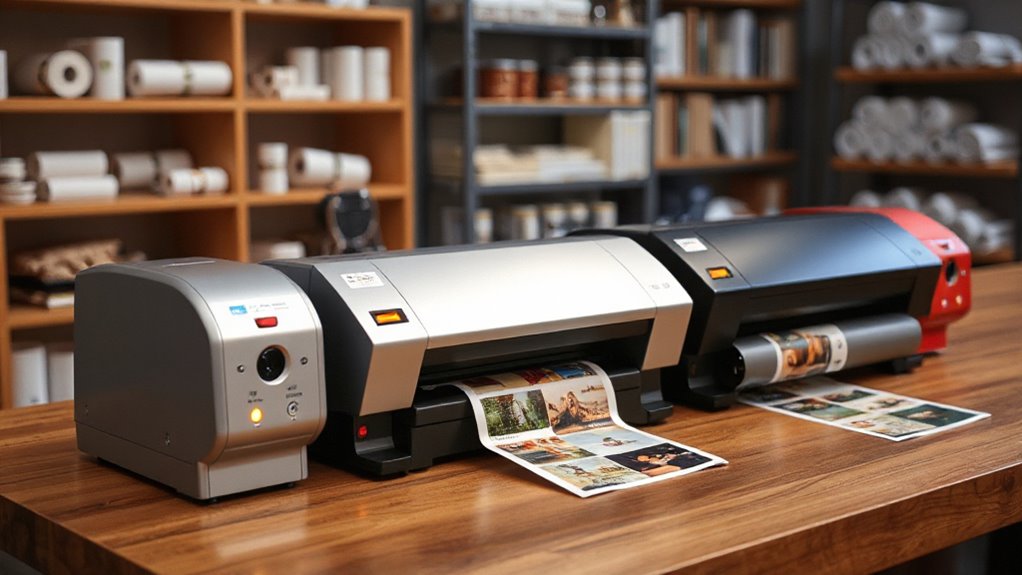
For photos and prints, the right roll laminator depends on whether you need heat for durable, sealed finishes or cold pressure for heat-sensitive media. The USI ARL 2700 is my best overall pick for buyers seeking a dedicated thermal roll machine, while the GBC Ultima 35 EZ Load stands out for a narrower workspace and easier roll loading. For oversized prints that cannot take heat, the VEVOR 29.5-Inch Manual Cold Laminator offers a wider cold-lamination path. Width, temperature control, setup effort, and material compatibility are the main tradeoffs. Read on for the full comparison and help matching a machine to your prints.

Prime made for students and young adults
- Fast, free delivery for dorm and study essentials
- Prime Video and Amazon Music included
- Member-only deals
Key Takeaways
- Thermal and cold machines serve different print needs: the USI and GBC thermal models use heat, while the VEVOR, INTBUYING, and MXBAOHENG manual models apply cold pressure.
- Working width changes what you can finish: the GBC Ultima 35 EZ Load tops out at 12 inches, the MXBAOHENG A3 at 13.8 inches, and several manual models reach roughly 25 to 39 inches.
- Hot-and-cold flexibility comes with more setup decisions: the V350 and 18-inch digital-control model suit users working across materials, while dedicated cold machines avoid heat for sensitive prints.
- Roll loading and temperature control matter for repeat jobs: the GBC EZ Load emphasizes simpler loading, and the 18-inch model offers digital temperature adjustment; manual cold machines keep operation simpler but rely on careful pressure and alignment.
- Wider capacity is not automatically a better fit: a 39-inch cold laminator can handle large prints, but compact or 12-inch machines may be easier to place and better matched to routine photo-sized work.
| USI ARL 2700 Thermal Roll Laminator |  | Best for Wide Thermal Work | Model: ARL 2700 | Laminating type: Thermal roll | Maximum film width: 27 inches | VIEW ON AMAZON | See Our Full Breakdown |
| GBC Ultima 35 EZ Load Thermal Roll Laminator, 12-Inch Maximum Width |  | Best for Fast, Simple Letter-Size Jobs | Maximum document width: 12 inches | Warm-up time: Less than 2 minutes | Laminating speed: 36 inches per minute | VIEW ON AMAZON | See Our Full Breakdown |
| GBC Ultima 65 Thermal Roll Laminator, 27-Inch |  | Best for High-Volume Wide Prints | Maximum laminating width: 27 inches | Warm-up time: Under 10 minutes | Laminating speed: Variable, with one-touch AutoSpeed | VIEW ON AMAZON | See Our Full Breakdown |
| VEVOR 29.5-Inch Manual Cold Roll Laminator |  | Best for Power-Free Cold Laminating | Working width: 29.5 inches | Maximum material thickness: 10 mm | Operation: Manual hand crank | VIEW ON AMAZON | See Our Full Breakdown |
| V350 350 mm Hot and Cold Roll Laminator |  | Best for Flexible Lamination Modes | Model: V350 | Lamination types: Cold, single-sided hot, and double-sided hot | Maximum film width: 350 mm (13.7 inches) | VIEW ON AMAZON | See Our Full Breakdown |
| 18-Inch Hot and Cold Roll Laminator with Digital Temperature Control |  | Best for Flexible Photo and Print Jobs | Laminating modes: Hot and cold; single- and double-sided | Suggested maximum laminating width: 460 mm (18 in) | Countertop width: 500 mm (19.7 in) | VIEW ON AMAZON | See Our Full Breakdown |
| VEVOR 25-Inch Manual Cold Roll Laminator | | Best for Sturdy, Mid-Width Cold Mounting | Type: Manual cold roll laminator | Working width: 25 in | Maximum material thickness: 10 mm | VIEW ON AMAZON | See Our Full Breakdown |
| INTBUYING 25.5-Inch Manual Cold Roll Laminator |  | Best Compact Wide-Format Pick | Maximum laminating width: 25.5 in (650 mm) | Maximum laminating thickness: 0.4 in (10 mm) | Operation: Manual cold press | VIEW ON AMAZON | See Our Full Breakdown |
| VEVOR 39-Inch Manual Cold Roll Laminator |  | Best for Oversized Prints | Working width: 39 in | Operation: Manual hand crank; no power supply required | Roller adjustment: Adjustable for different material thicknesses | VIEW ON AMAZON | See Our Full Breakdown |
| GBC HeatSeal Pinnacle 27 Thermal Roll Laminator |  | Best for High-Volume Thermal Work | Maximum document width: 27 in | Laminating speed: Up to 12 ft/min | Warm-up time: 6–9 minutes | VIEW ON AMAZON | See Our Full Breakdown |
| MXBAOHENG A3 Manual Cold Laminator, 13.8-Inch |  | Best for Power-Free Photo and Print Protection | Type: Manual cold laminator | Maximum width: 13.8 inches | Maximum material thickness: 2 mm | VIEW ON AMAZON | See Our Full Breakdown |
More Details on Our Top Picks
USI ARL 2700 Thermal Roll Laminator
The USI ARL 2700 suits print rooms that need to laminate wide photos, prints, and posters with thermal film. Its 27-inch capacity matches the larger GBC Ultima 65, while support for film up to 5 mils gives buyers room to choose thicker films when their materials call for them. Adjustable temperature and variable speed offer control across different jobs; the digital readout makes settings easier to track. Compared with the GBC Ultima 35 EZ Load, this machine handles much wider work but lacks that model’s quick warm-up and built-in trimmer. Electric reverse and a wraparound prevention bar help manage feeding problems, though the machine requires thermal film and is better suited to a regular work area than occasional, compact use.
Pros:- Accepts film up to 27 inches wide and 5 mils thick
- Adjustable temperature with a digital readout
- Variable-speed motor and electric reverse support controlled feeding
- Includes a two-year warranty and lifetime technical support
Cons:- Requires thermal laminating film
- Its wide-format capacity takes space and may be unnecessary for standard-size prints
Best for: School print rooms and small print shops that regularly laminate posters or wide-format photos with thermal film
Not ideal for: Occasional home users who need a compact machine or want to laminate without heat
- Model:ARL 2700
- Laminating type:Thermal roll
- Maximum film width:27 inches
- Maximum film thickness:5 mils
- Temperature control:Adjustable with digital readout
- Motor:Quiet variable speed
- Safety and feed features:Electric reverse, automatic shutoff, wraparound prevention bar, motor key lock
- Warranty and support:2-year warranty; lifetime technical support
Our verdict“Choose the USI ARL 2700 for frequent, wide thermal laminating when adjustable settings and ongoing support matter more than compact size.”
GBC Ultima 35 EZ Load Thermal Roll Laminator, 12-Inch Maximum Width
For photos and prints up to 12 inches wide, the GBC Ultima 35 EZ Load prioritizes a quick start and straightforward feeding. It warms in under two minutes and runs at 36 inches per minute, so it is a more practical fit for regular letter-size batches than the wider GBC Ultima 65, which takes under 10 minutes to warm up. AutoSpeed adjusts the pace, and EZ Load film helps reduce loading errors; the built-in trimmer is useful for tidying finished pieces. That convenience comes with a constraint: it takes GBC EZ Load blue end cap film, limiting film choice compared with machines that accept standard-core rolls. Its 12-inch width also rules it out for posters, where the USI ARL 2700 offers much more room.
Pros:- Warm-up takes less than two minutes
- Laminates at up to 36 inches per minute with AutoSpeed
- EZ Load design helps simplify film loading
- Built-in trimmer and reverse function support finishing and feed correction
Cons:- Maximum document and roll width is 12 inches
- Requires compatible GBC EZ Load blue end cap film
- Limited one-year warranty
Best for: Teachers, office staff, and home printmakers laminating frequent batches of letter-size photos, worksheets, and prints
Not ideal for: Print shops handling posters or buyers who want broad choice among standard roll films
- Maximum document width:12 inches
- Warm-up time:Less than 2 minutes
- Laminating speed:36 inches per minute
- Compatible film thickness:1.7–5 mil
- Film roll width:12 inches
- Film core size:1 inch
- Dimensions:16.92 × 18.11 × 11.14 inches
- Power-saving features:Standby after 1 hour; automatic shutoff after 2 hours of non-use
- Warranty:Limited 1 year
Our verdict“Pick the Ultima 35 EZ Load for quick, repeatable laminating of standard-size prints if its film system suits your workflow.”
GBC Ultima 65 Thermal Roll Laminator, 27-Inch
The GBC Ultima 65 is aimed at schools and production areas that regularly finish large posters, photos, or other prints up to 27 inches wide. AutoSpeed chooses a laminating pace for the material, while film-loading access and a footage counter help operators change rolls and track consumption. That workflow focus distinguishes it from the USI ARL 2700: both offer wide thermal capacity, but the Ultima 65 emphasizes automated speed selection and film management, while the USI specifies support for film up to 5 mils and includes a two-year warranty. The Ultima 65 takes under 10 minutes to warm up and does not include film. Its listed film compatibility also calls for particular EZ Load or standard-core film types, so buyers should check supply compatibility before settling on it.
Pros:- Handles documents up to 27 inches wide
- AutoSpeed selects a laminating speed for the job
- Film-loading features provide access to the rollers during changes
- Footage counter and stop buttons help track film use
Cons:- Warm-up takes under 10 minutes
- Laminating film is sold separately
- Compatibility is specified for particular EZ Load or standard-core film types
Best for: School print departments and busy copy rooms that routinely laminate posters and want help managing film use
Not ideal for: Small offices with only occasional letter-size jobs or buyers needing a short warm-up
- Maximum laminating width:27 inches
- Warm-up time:Under 10 minutes
- Laminating speed:Variable, with one-touch AutoSpeed
- Compatible EZ Load film:25- or 27-inch EZ Load Gray Cap NAP I film
- Compatible standard-core film:Standard 1-inch core NAP I film up to 3 mil
- Film included:No
- Film-management features:Footage counter and stop buttons
Our verdict“Choose the Ultima 65 for repeated wide-format production when its film-management features justify the longer warm-up.”
VEVOR 29.5-Inch Manual Cold Roll Laminator
The VEVOR 29.5-Inch Manual Cold Roll Laminator makes sense for photo and print work where avoiding heat matters, such as materials that should not pass through a thermal machine. Its 29.5-inch working width exceeds the GBC Ultima 65’s 27 inches, and the hand crank means it needs no power supply. Adjustable rollers can accommodate materials up to 10 mm thick, while the folding table helps with storage between jobs. The tradeoff is a more hands-on workflow: feeding each print requires cranking, so repeated batches can take more effort than on the powered thermal GBC or V350. It is cold-only, too, which makes the V350 a more flexible choice for buyers who also need hot lamination.
Pros:- Wide 29.5-inch working width for posters and large prints
- Manual operation needs no power supply
- Adjustable rollers accommodate materials up to 10 mm thick
- Folding table and non-slip feet support storage and stable operation
Cons:- Hand-crank operation takes more effort than powered laminators
- Cold laminating only
- Film is not listed as included
Best for: Studios and sign makers laminating wide prints with cold film, especially where heat or electrical power is unsuitable
Not ideal for: Users who need hot lamination or want powered feeding for frequent production runs
- Working width:29.5 inches
- Maximum material thickness:10 mm
- Operation:Manual hand crank
- Laminating type:Cold roll
- Construction:All metal
- Rollers:Soft rubber
- Power:No power supply required
- Table:Folding
Our verdict“Choose this VEVOR for broad, power-free cold laminating when manual feeding and the lack of hot mode fit your work.”
V350 350 mm Hot and Cold Roll Laminator
The V350 is the lineup’s flexible mid-width choice: it supports cold, single-sided hot, and double-sided hot lamination for prints and materials up to 350 mm wide. That range gives it more options than the cold-only VEVOR 29.5-Inch, but its 13.7-inch maximum width is far short of the large-format GBC Ultima 65 or USI ARL 2700. Adjustable film tension and roller pressure let buyers tune feeding for different jobs, while the temperature display and automatic control help manage heated runs. At up to 43.3 inches per minute, it is built for powered work, though its 0.8 mm thickness limit narrows what can pass through. Film is not included, and the 700 W, 110 V setup calls for a suitable outlet.
Pros:- Supports cold, single-sided hot, and double-sided hot lamination
- Adjustable film tension and roller pressure
- Temperature display with automatic control and safety protections
- Laminating speed reaches up to 43.3 inches per minute
Cons:- Maximum width is 350 mm, or 13.7 inches
- Materials must be no thicker than 0.8 mm
- Laminating film is not included
Best for: Small print shops and makers who need both cold and hot lamination for documents, business cards, and brochures
Not ideal for: Buyers laminating posters wider than 350 mm or materials thicker than 0.8 mm
- Model:V350
- Lamination types:Cold, single-sided hot, and double-sided hot
- Maximum film width:350 mm (13.7 inches)
- Maximum material thickness:0.8 mm (0.031 inches)
- Power:700 W
- Operating voltage and frequency:110 V, 60 Hz
- Laminating speed:Up to 43.3 inches per minute
- Temperature precision:±3°C
- Warranty and included film:12 months; film not included
Our verdict“Choose the V350 when you need hot and cold modes for mid-width work and can stay within its material thickness limit.”
18-Inch Hot and Cold Roll Laminator with Digital Temperature Control
I’d choose this model when a mix of photo finishes and print sizes matters more than high throughput. Its hot and cold modes and adjustable temperature let buyers match the process to different materials, while the suggested 18-inch width covers larger prints than the V350 350 mm Hot and Cold Roll Laminator. At about 1.3 m/min, it is suited to occasional or small-batch work rather than the pace of the GBC HeatSeal Pinnacle 27, which reaches up to 12 ft/min. The nearly 20-inch countertop width also calls for dedicated space. I’d treat the unspecified warm-up time and film thickness compatibility as real unknowns for buyers planning repeat production; the available details make its range of modes clearer than its operating limits.
Pros:- Hot and cold modes accommodate different lamination needs.
- Adjustable temperature supports tuning the process for varied materials.
- Suggested 18-inch maximum width handles prints wider than the V350 350 mm model.
- Supports single- and double-sided lamination.
Cons:- At about 1.3 m/min, it is slower than the GBC HeatSeal Pinnacle 27 for larger batches.
- Warm-up time and supported film thickness are not specified.
- The 19.7-inch countertop width needs substantial space.
Best for: Photographers, printmakers, and small studios that need hot and cold options for work up to 18 inches wide.
Not ideal for: Busy school or office teams that need published warm-up and film-thickness details or faster production.
- Laminating modes:Hot and cold; single- and double-sided
- Suggested maximum laminating width:460 mm (18 in)
- Countertop width:500 mm (19.7 in)
- Laminating speed:About 1.3 m/min
- Temperature control:Adjustable digital temperature
- Intended materials:Photos, cards, recipes, book covers, invitations, and leaflets
Our verdict“Pick this for flexible hot or cold lamination on mid-sized photo and print jobs when speed and published film limits are secondary.”
VEVOR 25-Inch Manual Cold Roll Laminator
For buyers laminating prints that should avoid heat, this VEVOR pairs a 25-inch working width with an all-metal frame and adjustable rollers. The wider capacity gives it more room than the INTBUYING 25.5-Inch Manual Cold Roll Laminator only by a small margin, so the choice between them is less about size and more about setup: VEVOR specifies a folding table and four non-slip feet, while INTBUYING lists a 10-pound weight and compact folded dimensions. Its 10 mm material allowance makes it useful for thicker flat pieces, though the hand crank makes each pass a manual task. Unlike the GBC HeatSeal Pinnacle 27, it offers no heat or powered speed, so I’d reserve it for deliberate cold-film work rather than frequent, time-sensitive batches.
Pros:- 25-inch working width accommodates larger prints and posters.
- Adjustable rollers accept material up to 10 mm thick.
- All-metal construction and soft rubber rollers support sturdy, smooth feeding.
- Folding table and non-slip feet aid storage and stability.
Cons:- Manual cranking takes effort and limits batch speed.
- Cold-only operation does not support thermal film.
- The listed data does not give folded dimensions or weight for planning storage.
Best for: Print studios and sign shops mounting cold film on posters or photos up to 25 inches wide, including thicker flat materials.
Not ideal for: Users laminating heat-sensitive and heat-compatible work interchangeably, or anyone who needs powered throughput.
- Type:Manual cold roll laminator
- Working width:25 in
- Maximum material thickness:10 mm
- Construction:All metal
- Rollers:Soft rubber; adjustable position
- Power source:Manual; no power supply required
- Table and feet:Folding table; four non-slip rubber feet
Our verdict“Choose this for sturdy, wide cold-film mounting where manual operation is acceptable and heat is not needed.”
INTBUYING 25.5-Inch Manual Cold Roll Laminator
The INTBUYING is the space-conscious choice among these wide manual cold laminators: its 25.5-inch capacity is paired with a listed weight of just 10 pounds and a foldable design. That makes it easier to store or move than the VEVOR 39-Inch Manual Cold Roll Laminator, whose much greater width suits oversized work but demands more room. It also accepts flat material up to 0.4 inches thick, giving photo and art users flexibility for mounting beyond thin paper. The tradeoff is still hands-on feeding: its two rubber rollers turn by crank, and no power or heat is available. The handwheel type ships at random, so buyers who need a particular control style have less certainty than the model’s clear width and weight figures suggest.
Pros:- 25.5-inch width supports larger photos, artwork, and posters.
- Foldable design and 10-pound weight aid storage and transport.
- Accommodates materials up to 0.4 inches thick.
- Operates without heat or electricity.
Cons:- Manual crank operation is slower and more effortful than powered lamination.
- Cold press only; thermal film is not supported.
- Handwheel type is shipped at random.
Best for: Mobile photographers, artists, and small studios that need a storable cold laminator for prints up to 25.5 inches wide.
Not ideal for: Production teams that laminate many sheets quickly or buyers who require thermal lamination or a specific handwheel type.
- Maximum laminating width:25.5 in (650 mm)
- Maximum laminating thickness:0.4 in (10 mm)
- Operation:Manual cold press
- Rollers:2 rubber rollers
- Structure:Steel
- Design:Foldable
- Dimensions:25.5 × 25.5 × 0.39 in
- Weight:10 lb
Our verdict“Pick this when wide cold lamination and easy storage matter more than powered speed or control over the handwheel style.”
VEVOR 39-Inch Manual Cold Roll Laminator
When a print is too wide for desktop machines, this VEVOR’s 39-inch working width is the defining reason to choose it. That reach outpaces the 25-inch VEVOR and 25.5-inch INTBUYING cold laminators, making it the lineup’s fit for extra-wide posters and mounting projects. Its manual crank, adjustable rollers, all-metal construction, and folding table bring practical support for cold film and varied material thicknesses. But the width also means a larger working setup; the product details do not provide dimensions or weight, so storage planning is less straightforward than with the INTBUYING. There is no heat option or powered feed, and large sheets can be cumbersome to guide by hand. I’d favor it for occasional oversized jobs, not routine photo batches.
Pros:- 39-inch width handles oversized prints beyond the 25-inch models.
- Adjustable rollers accommodate different material thicknesses.
- All-metal construction and soft rubber rollers support stable feeding.
- Folding table and non-slip feet aid setup and storage.
Cons:- Manual cranking and sheet alignment can be demanding on wide materials.
- Cold-only operation rules out thermal lamination.
- Dimensions and weight are not listed, making storage planning harder.
Best for: Sign makers, print shops, and artists mounting occasional posters or artwork wider than 25 inches with cold film.
Not ideal for: Home users with limited workspace or teams processing frequent batches that call for powered feeding or thermal lamination.
- Working width:39 in
- Operation:Manual hand crank; no power supply required
- Roller adjustment:Adjustable for different material thicknesses
- Construction:All metal
- Rollers:Soft rubber
- Table:Folding
- Feet:Four non-slip rubber feet
Our verdict“Choose this for oversized cold-laminated prints when you have room for the machine and can accept manual feeding.”
GBC HeatSeal Pinnacle 27 Thermal Roll Laminator
For schools and offices laminating stacks of photos, prints, or documents, the Pinnacle 27 brings the most production-focused setup in this batch: up to 12 ft/min, adjustable speed and heat, and a 27-inch maximum width. Its built-in trimmer and footage counter also help manage repeated jobs, unlike the manual VEVOR 39-Inch, which accommodates wider pieces but relies on hand cranking. The Pinnacle’s 6–9 minute warm-up means it is not instant, and its 35.5-inch width makes it a substantial machine to place. It accepts NAP I and NAP II roll film up to 3 mil on a 1-inch core, so film compatibility is a constraint buyers should check before settling on it. For hot-film throughput, it is the strongest fit here; cold mounting is outside its stated role.
Pros:- Up to 12 ft/min speed suits repeated batch work.
- 27-inch document width covers larger prints than desktop machines.
- Adjustable heat and speed allow settings to suit different jobs.
- Built-in trimmer and footage counter support repeatable finishing and film tracking.
Cons:- Large 35.5-inch-wide body requires substantial workspace.
- Requires compatible NAP I or NAP II film on a 1-inch core, up to 3 mil.
- Warm-up takes 6–9 minutes and the machine is thermal rather than cold.
Best for: School and office teams that regularly laminate prints and documents up to 27 inches wide using compatible thermal roll film.
Not ideal for: Photographers needing cold lamination, users with limited workspace, or buyers whose film uses a different core or thickness.
- Maximum document width:27 in
- Laminating speed:Up to 12 ft/min
- Warm-up time:6–9 minutes
- Film compatibility:NAP I and NAP II roll film, up to 3 mil, on 1 in core
- Dimensions:21 in L × 35.5 in W × 14.25 in H
- Safety features:Power shuts off if tray table locks disengage; auto standby after 1 hour and shut off after 2 hours inactive
- Warranty:Limited one-year warranty with on-site technician service
Our verdict“Pick the Pinnacle 27 for frequent, wide thermal lamination when its film requirements and large footprint fit your workspace.”
MXBAOHENG A3 Manual Cold Laminator, 13.8-Inch
The MXBAOHENG A3 suits makers who want to laminate photos and prints without heat, electricity, or warm-up time. Its hand crank feeds self-adhesive cold film, so it can handle heat-sensitive materials that thermal models such as the GBC Ultima 35 EZ Load are built around. The 13.8-inch capacity covers A3-sized work, while adjustable pressure knobs let you adapt the feed for flat materials up to 2 mm thick. Compared with the much wider VEVOR 29.5-Inch Manual Cold Roll Laminator, this machine takes up less space but cannot handle large-format prints. The tradeoff is manual control: steady cranking takes attention, and thermal film is incompatible. I’d choose it for occasional small-batch work, not fast production.
Pros:- Runs without electricity or warm-up time
- Cold lamination avoids heat exposure for sensitive photos and prints
- Adjustable pressure accommodates flat materials up to 2 mm thick
- Includes five A3 self-adhesive laminating films
Cons:- Works only with self-adhesive cold film, not thermal laminating film
- Manual cranking requires steady handling and can slow repeated jobs
- 13.8-inch maximum width excludes larger-format prints
Best for: Artists and photo hobbyists protecting heat-sensitive prints up to A3 size in a workspace without convenient power access
Not ideal for: Print shops processing large sheets or frequent batches, since the 13.8-inch manual feed limits size and speed
- Type:Manual cold laminator
- Maximum width:13.8 inches
- Maximum material thickness:2 mm
- Power:No power required
- Compatible film:Self-adhesive cold film
- Pressure adjustment:Two adjustable pressure knobs
- Construction:All-metal frame with four rubber footpads
- Included:Five A3 self-adhesive cold laminating films
- Weight:6.2 lbs
Our verdict“Choose this compact manual model for occasional A3 cold lamination without power, but pick a wider roll laminator for large prints or faster throughput.”

How We Picked
I ranked these machines around the choices that most affect photo and print results: lamination method, usable width, control over the process, and day-to-day handling. Thermal models can suit prints that tolerate heat and benefit from film sealed by warmth; cold models make more sense for heat-sensitive media and use pressure-sensitive film. Hot-and-cold machines offer broader material options, though buyers need to account for setup and adjustment. I also weighed the practical difference between a compact machine for smaller work and a wide unit intended for posters or production tasks.
The order reflects how well each model’s stated format and operating approach match common photo and print workflows, with versatility and ease of handling favored for the top positions. A narrower machine can rank well when it better fits frequent smaller jobs, while the wide manual cold models are aimed at specific oversize needs. These products are not interchangeable: film compatibility, material sensitivity, and the operator’s tolerance for alignment and setup should guide the final choice.
Factors to Consider When Choosing Roll Laminator For Photos And Prints
Before choosing a model, I would map the machine to the prints you actually finish and the films you can readily use. A laminator’s headline width does not tell you whether it is suited to a delicate photo, a heat-sensitive ink, or repeated large-format work.
Choose the lamination method around the print
Start by checking whether the print can tolerate heat, including the paper, ink, and any coating. Thermal machines use heated rollers and compatible thermal film, while cold machines use pressure-sensitive adhesive film without heat. A cold process can reduce heat-related risk for sensitive materials, but it still requires suitable film and careful handling to avoid bubbles or skew. Hot-and-cold models give you options, though they add decisions about mode and settings. Do not assume that a photo is safe for every thermal setting just because the machine can laminate it. When the print or finish is unfamiliar, check its maker’s guidance and the film’s instructions before committing a valuable original.
Size the width for the whole job, not just one print
Measure the widest item you expect to laminate, then allow room for film edges and alignment. A machine sized exactly to a print’s width can leave little margin for correcting a crooked feed. If most work is small photos or letter-sized prints, a compact unit may be easier to store and operate than a 25-inch or wider machine. Oversized equipment earns its place when posters or batches regularly exceed smaller formats. Think about the largest recurring job rather than a rare exception. Also check the space needed to feed and collect long sheets, since a wide roller needs clear working room on both sides.
Match controls to your volume and consistency needs
Temperature adjustment becomes more useful when you switch film types or materials, while a fixed or simpler control scheme can suit repetitive work with a known setup. Digital temperature control can help you return to a selected setting, but it does not remove the need to follow film guidance or feed material evenly. For occasional projects, straightforward operation may matter more than fine adjustment. For repeated batches, consider how easily you can reproduce the same speed, heat, and pressure. Manual cold machines avoid temperature settings but put more responsibility on the operator’s feed alignment and pressure. Choose the control style that fits both your experience and how often the machine will run.
Account for film loading and operator learning
Roll changes and threading can take a meaningful share of setup time, especially if you switch film often. Loading aids such as the GBC Ultima 35 EZ Load’s system may be useful when the machine is used by several people or for frequent roll changes. Manual cold units have fewer heat controls, yet consistent feeding still takes practice. Uneven starts, wrinkles, and trapped debris can spoil a print even when the machine is mechanically simple. Plan a few sacrificial test sheets before running keepsakes or finished artwork. If multiple operators will share the machine, favor clear controls and repeatable loading over a feature list that only one person can interpret.
Compare the complete film workflow
A laminator only works with film suited to its method, width, and intended finish. Before buying, check the available film formats and whether the thickness or adhesive type matches your use. Thermal film needs heat-compatible media and correct temperature handling; cold film needs pressure-sensitive adhesive and a clean feed path. Film roll width can also create waste if it is much wider than your typical prints. Consider how you will trim edges and store partially used rolls. The low-effort choice is often the machine whose compatible supplies match your normal jobs without requiring frequent changes or awkward trimming.
Decide when extra capacity is worth the footprint
Wide rollers expand the kinds of prints you can handle, but they also take more workspace and can make small jobs feel cumbersome. A larger machine makes sense when wide output is routine, a shared studio needs flexible capacity, or work arrives in unpredictable sizes. If your prints stay within a compact range, a smaller machine can keep loading and storage simpler. Do not buy width solely for a hypothetical future project without considering where the machine will live. For occasional large work, compare the convenience of owning a wide unit with arranging access to one when needed. Capacity pays off when it matches a steady workflow, not just a maximum specification.
Frequently Asked Questions
Should I use a hot or cold roll laminator for photographic prints?
Choose based on the print’s tolerance for heat and the finish you want. Thermal lamination can suit compatible photo papers and films, but heat may affect sensitive coatings, inks, or mounted materials. Cold lamination avoids heated rollers and is a practical path for heat-sensitive work, provided the pressure-sensitive film is compatible. Check the photo paper and film guidance before using an original. If you work with both types, a hot-and-cold model can add flexibility, but you will still need to match the film and process to each job.
How much wider should the laminator be than my print?
Leave enough margin for the film and for small alignment corrections; a machine that exactly matches the print width can make feeding less forgiving. The needed extra width depends on the film roll and how you trim finished edges. Measure the widest regular print and compare it with the machine’s usable maximum width, rather than relying only on the model name. Remember that very wide machines also need room to stage and collect the sheet. If nearly all your work is small, extra capacity may add bulk without helping your usual workflow.
Can a roll laminator laminate a single valuable photo safely?
It can, but a single original leaves little room for a feed or setting mistake. Confirm that the photo, ink, and surface can take the selected process, and use compatible film. Practice on a similar spare print first so you can check alignment, pressure, and finish. Keep the rollers and work area clean, since dust or debris can become trapped against the image. For an irreplaceable photo, consider making a copy for lamination rather than risking the only original.
Is a manual cold laminator a good choice for posters and art prints?
A manual cold model can suit posters and art prints when they are heat-sensitive and fit within its working width. It avoids temperature setup, but the operator must guide the material evenly and maintain steady pressure to limit wrinkles and bubbles. Wide models are useful for oversized sheets, though they need more workspace and can be awkward for small pieces. Check that pressure-sensitive film is available in a suitable width and finish. For frequent, consistent production, compare the hands-on feed process with a powered or temperature-controlled option.
When is a hot-and-cold roll laminator worth choosing?
It is worth considering when your regular work includes both heat-tolerant prints and materials that need a cold process. The flexibility can reduce the need to keep separate machines, but it adds settings and requires compatible supplies for each method. If nearly all your prints use one process, a dedicated machine may be simpler to set up and operate. Look at the widest recurring job as well as material types, since dual-mode operation does not solve a width mismatch. Choose the extra versatility only when your actual workflow will use it.
Conclusion
My best overall choice is the USI ARL 2700 for buyers who want a dedicated thermal roll laminator for compatible photos and prints. The GBC Ultima 35 EZ Load is my best value and beginner-friendly fit for narrower work where easier roll loading matters. For a premium wide-format thermal option, look at the GBC Ultima 65 or HeatSeal Pinnacle 27 if their format and thermal workflow match your needs. Choose the VEVOR 29.5-Inch Manual Cold Laminator for heat-sensitive oversized prints, and the MXBAOHENG A3 when compact cold lamination is the priority. If you regularly switch between heat-sensitive and heat-tolerant materials, compare the V350 and 18-Inch Digital Temperature Control model for their hot-and-cold approach.
Columbus Day / Indigenous Peoples' Day Picks
long weekend sales
As an affiliate, we earn on qualifying purchases.