For most people digitizing slides at home, I’d start with the Magnasonic FS71: its 24MP output, 5-inch display, and HDMI connection make it a capable all-rounder. The Plustek OpticFilm 8300i Ai is a better fit for buyers who want dedicated 35mm scanning controls, while the HP FilmScan stands out for its large touchscreen. The main choice is between quick, self-contained scanning and a more involved workflow that gives you greater control over image capture. Film formats, dust cleanup, and how you plan to save and edit files matter as much as the headline megapixel figure. Read on for how all 15 options differ and which one suits your slides.

Prime made for students and young adults
- Fast, free delivery for dorm and study essentials
- Prime Video and Amazon Music included
- Member-only deals
Key Takeaways
- Magnasonic FS71 leads the all-rounder group with a 24MP claim, 5-inch display, and HDMI output; buyers should still compare its workflow and format support with their needs.
- The Plustek OpticFilm 8300i Ai and 8200i SE are dedicated 35mm scanners, a better match for buyers who value scanning control over a built-in screen and quick standalone operation.
- Several options, including the HP FilmScan and Kodak Slide N Scan models, emphasize larger screens and direct operation, making them approachable for occasional home use.
- A higher megapixel label does not by itself establish sharper scans; optics, focus, film condition, and the ability to adjust capture settings also affect the result.
- The lineup spans multi-format desktop scanners, compact screen-based units, a dedicated LED viewer, and PC-oriented scanners, so choosing by workflow and film format narrows the field faster than choosing by brand.
| BEONEGLOBAL ClearScan MINI 16MP Film and Slide Scanner with 2.31-Inch LCD |  | Best Compact Pick | Scanner type: Film scanner | Resolution: 16 megapixels | Sensor: 1/3-inch CMOS | VIEW ON AMAZON | See Our Full Breakdown |
| HP FilmScan Film and Slide Scanner with 7-Inch Touchscreen and 13 MP Sensor |  | Best for On-Device Editing | Sensor: 13 MP color CMOS | Display: 7-inch color LCD touchscreen | Supported formats: 135, 126, and 110 | VIEW ON AMAZON | See Our Full Breakdown |
| Magnasonic FS71 24MP Film and Slide Scanner with 5-Inch Display and HDMI |  | Best for Format Range | Resolution: 24MP | Display: 5-inch LCD | Supported film formats: 35mm, 110, 126, and Super 8 | VIEW ON AMAZON | See Our Full Breakdown |
| Kodak Scanza Film and Slide Scanner with 3.5-Inch LCD |  | Best Accessory Bundle | Supported film formats: 35mm, 126, 110, Super 8, and 8mm | Output format: JPEG | Sensor resolution: 14 megapixels | VIEW ON AMAZON | See Our Full Breakdown |
| KODAK Slide N Scan Max Film Scanner |  | Best for Direct Card Saving | Supported film formats: 135, 110, and 126 | Supported media: Slides and color or black-and-white negatives | Sensor: 13MP CMOS | VIEW ON AMAZON | See Our Full Breakdown |
| 22MP Film and Slide Scanner with 5-Inch LCD |  | Best for TV Preview | Resolution: 22MP | Display: 5-inch HD LCD | Supported negatives: 135, 110 | VIEW ON AMAZON | See Our Full Breakdown |
| HP Film & Slide Scanner HPFS500 with 5-Inch Touchscreen |  | Best for Beginners | Sensor resolution: 13MP | Interpolated resolution: 22MP | Display: 5-inch touchscreen | VIEW ON AMAZON | See Our Full Breakdown |
| DigitPro 22MP Film and Slide Scanner with 5-Inch LCD |  | Best for Flexible Storage | Supported formats: 35mm/135, 110, 126, 50mm slides, Super 8 | Resolution information: 22MP in title; 1080P in product information | Display: 5-inch LCD | VIEW ON AMAZON | See Our Full Breakdown |
| Kodak Mini Digital Film and Slide Scanner with 2.4-Inch LCD |  | Best Compact Pick | Supported formats: 135 (35mm), 126, 110, Super 8, and monochrome negatives and slides | Display: 2.4-inch color LCD | Output format: JPEG | VIEW ON AMAZON | See Our Full Breakdown |
| Plustek OpticFilm 8300i Ai Film Scanner with SilverFast 9 and IT8 Target |  | Best for Color-Critical 35mm Scans | Scanner type: 35mm film and slide scanner | Included software: SilverFast 9 Ai Studio and Plustek QuickScan Plus | Calibration target: 3-slide IT8 target, ISO 12641-2 compliant (2019) | VIEW ON AMAZON | See Our Full Breakdown |
| TCNEWCL 35mm Negative and Slide Scanner with LED Light |  | Best Compact Pick | Scanner type: Photo | Connection: USB | Resolution: 300–400 dpi | VIEW ON AMAZON | See Our Full Breakdown |
| Plustek OpticFilm 8200i SE 35mm Film and Slide Scanner | 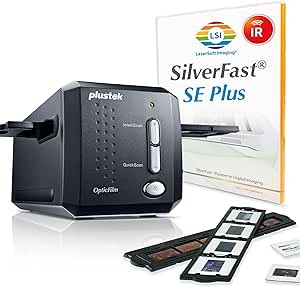 | Best for Detailed 35mm Scans | Media: Negatives, photos, and slides | Resolution: 7200 × 7200 dpi | Color depth: 48 bits | VIEW ON AMAZON | See Our Full Breakdown |
| DIGITNOW! 135 Film Negative and Slide Scanner |  | Best for Standalone Simplicity | Supported media: 35 mm film and slides | Resolution: 1800 dpi; 5/10 megapixels | File format: JPEG | VIEW ON AMAZON | See Our Full Breakdown |
| DigitPro Photo, Slide, and Negative Scanner with 5-Inch Screen |  | Best for Mixed Media | Media: Film, photos, and negatives | Film formats: 35 mm and 110 | Resolution: 1080P | VIEW ON AMAZON | See Our Full Breakdown |
| KODAK Slide N Scan Film and Slide Scanner with 5-Inch LCD |  | Best for Multi-Format Family Archives | Resolution: 22 MP | Display: 5-inch LCD with gallery mode | Supported film formats: 135, 110, 126, and 50 mm slides | VIEW ON AMAZON | See Our Full Breakdown |
| slide scanner | Display | Resolution |
|---|---|---|
| BEONEGLOBAL ClearScan MINI 16M | 2.31-inch LCD | 16 megapixels |
| HP FilmScan Film and Slide Sca | 7-inch color LCD touchscreen | — |
| Magnasonic FS71 24MP Film and | 5-inch LCD | 24MP |
| Kodak Scanza Film and Slide Sc | 3.5-inch TFT LCD with adjustable brightness and tilt | — |
| KODAK Slide N Scan Max Film Sc | — | — |
| 22MP Film and Slide Scanner wi | 5-inch HD LCD | 22MP |
| HP Film & Slide Scanner HPFS50 | 5-inch touchscreen | — |
| DigitPro 22MP Film and Slide S | 5-inch LCD | — |
| Kodak Mini Digital Film and Sl | 2.4-inch color LCD | — |
| Plustek OpticFilm 8300i Ai Fil | — | — |
| TCNEWCL 35mm Negative and Slid | — | 300–400 dpi |
| Plustek OpticFilm 8200i SE 35m | — | 7200 × 7200 dpi |
| DIGITNOW! 135 Film Negative an | 2.4-inch TFT LCD, 480 × 234 | 1800 dpi; 5/10 megapixels |
| DigitPro Photo | — | 1080P |
| KODAK Slide N Scan Film and Sl | 5-inch LCD with gallery mode | 22 MP |
More Details on Our Top Picks
BEONEGLOBAL ClearScan MINI 16MP Film and Slide Scanner with 2.31-Inch LCD
The ClearScan MINI suits someone who wants a small, self-contained way to digitize 35mm and 126 slides or film. Its 16MP sensor and on-device brightness, color, flip, and rotate controls offer more direct adjustment than the KODAK Slide N Scan Max, whose listed controls focus on one-touch resizing and conversion. The tradeoff is format coverage: the Magnasonic FS71 also handles 110 and Super 8 film, while this model is limited to 35mm/135 and 126. The 2.31-inch LCD is handy for a quick preview, but it gives less room for inspecting crops than the HP FilmScan’s 7-inch touchscreen. At just over 10 ounces, this is the more portable choice; you will need to supply an SD card, which is not included.
Pros:- Compact, lightweight body weighs 10.08 ounces
- 16MP scanning for supported film and slides
- On-device brightness, color, flip, and rotate controls
- Works with SD cards up to 32GB
Cons:- Supports only 35mm/135 and 126 formats
- SD card is not included
- Small 2.31-inch display leaves limited room for previewing details
Best for: People with 35mm or 126 slides who want a lightweight scanner they can store or move easily.
Not ideal for: Collectors with 110 or Super 8 film, or buyers who want a large screen for close scan review.
- Scanner type:Film scanner
- Resolution:16 megapixels
- Sensor:1/3-inch CMOS
- Color depth:24 bits
- Supported media:35mm/135 and 126 film and slides
- Display:2.31-inch LCD
- Storage:SD card up to 32GB; card not included
- Dimensions and weight:3.98 x 3.62 x 4.72 inches; 10.08 ounces
Our verdict“Choose the ClearScan MINI if portability and simple adjustments matter more than broad format support or a large preview screen.”
HP FilmScan Film and Slide Scanner with 7-Inch Touchscreen and 13 MP Sensor
The 7-inch touchscreen is the HP FilmScan’s defining advantage: it gives buyers more space to preview, crop, and adjust scans than the 2.31-inch display on the BEONEGLOBAL ClearScan MINI. That larger interface makes sense for someone who wants to review images without moving to a computer. Its 13MP sensor is lower resolution than the Magnasonic FS71’s 24MP capture, so buyers prioritizing listed pixel count may prefer that model. The HP supports 135, 126, and 110 formats and handles both color and black-and-white negatives, but its format list excludes Super 8, which the Magnasonic accepts. USB transfer covers file movement, while HDMI makes it possible to show a slideshow on a TV. The tradeoff is that this is a screen-centered option rather than the strongest resolution pick.
Pros:- Large 7-inch touchscreen for scan preview and adjustments
- On-device cropping and image adjustment tools
- Supports 135, 126, and 110 formats
- USB transfer and HDMI slideshow output
Cons:- 13MP sensor has a lower stated resolution than the Magnasonic FS71
- Supported formats are limited to 135, 126, and 110
- Large touchscreen may be unnecessary for buyers who only need basic scanning
Best for: Families digitizing mixed 135, 126, and 110 negatives who want to crop and review scans on the device.
Not ideal for: Buyers scanning Super 8 or choosing primarily for the highest stated resolution.
- Sensor:13 MP color CMOS
- Display:7-inch color LCD touchscreen
- Supported formats:135, 126, and 110
- Supported media:Color and black-and-white negatives and slides
- Editing:On-device crop and adjustment tools
- Connectivity:USB and HDMI
- Loading:Quick-feed tray with 50 mm adapter
Our verdict“Pick the HP FilmScan for a large, hands-on editing screen, provided its format range and 13MP sensor fit your archive.”
Magnasonic FS71 24MP Film and Slide Scanner with 5-Inch Display and HDMI
The Magnasonic FS71 is the broadest format choice among these five: it handles 35mm, 110, 126, and Super 8 film, plus 135, 126, and 110 slides. That coverage gives it an edge over the HP FilmScan, which supports 135, 126, and 110 but does not list Super 8. Its 24MP JPEG output also has the highest stated resolution in this group, while the KODAK Slide N Scan Max lists a 13MP sensor with 22MP interpolation. A 5-inch screen, HDMI output, and on-device image adjustments make it usable without a computer; scans take under five seconds per image according to the product data. The tradeoff is added setup: neither an SD card nor an HDMI cable is included, and output is JPEG rather than a listed raw format.
Pros:- Supports several film formats, including Super 8
- 24MP JPEG output is the highest stated resolution in this group
- 5-inch LCD and HDMI support viewing without a computer
- On-device adjustments and scans under five seconds per image
Cons:- SD card is not included
- HDMI cable is not included
- Output format is JPEG
Best for: Film collectors with a mix of 35mm, 110, 126, or Super 8 film who want on-device scanning and TV viewing.
Not ideal for: Buyers who need raw output or want a ready-to-use setup without sourcing an SD card and HDMI cable.
- Resolution:24MP
- Display:5-inch LCD
- Supported film formats:35mm, 110, 126, and Super 8
- Supported slide formats:135, 126, and 110
- Output format:JPEG
- Storage:SD card up to 128GB; card not included
- Connectivity:HDMI
- Scanning speed:Less than 5 seconds per image
Our verdict“Choose the FS71 for broad format support and its 24MP capture, if supplying storage and an HDMI cable is acceptable.”
Kodak Scanza Film and Slide Scanner with 3.5-Inch LCD
The Kodak Scanza stands out for its supplied adapters and cables: film inserts, adapter trays, USB power, HDMI, video, and an AC adapter are included, along with a cleaning brush. That reduces the number of accessories to source compared with the Magnasonic FS71, which lists its SD card and HDMI cable as separate purchases. Format support is another strength, covering 35mm, 126, 110, Super 8, and 8mm negatives and slides. Its 14MP sensor is below the Magnasonic’s 24MP figure; the listed option to interpolate up to 22MP increases output dimensions without changing the sensor’s native resolution. The tilting 3.5-inch LCD aids viewing, but this scanner produces still images from Super 8 rather than video. It also does not scan photo prints or develop raw film.
Pros:- Supports 35mm, 126, 110, Super 8, and 8mm
- Includes film inserts, adapter trays, cables, AC adapter, and cleaning brush
- Tilting 3.5-inch LCD with adjustable brightness
- Works with SD cards up to 128GB
Cons:- 14MP sensor resolution is lower than the Magnasonic FS71’s 24MP
- Super 8 is converted to still images rather than video
- SD card is not included
Best for: People digitizing several supported film formats who value included adapters and cables for setup.
Not ideal for: Buyers seeking Super 8 video conversion, photo-print scanning, or the highest native sensor resolution in this group.
- Supported film formats:35mm, 126, 110, Super 8, and 8mm
- Output format:JPEG
- Sensor resolution:14 megapixels
- Enhanced resolution:Up to 22 megapixels with interpolation
- Display:3.5-inch TFT LCD with adjustable brightness and tilt
- SD card support:Up to 128GB; card not included
- Compatibility:Mac and PC
- Included accessories:Film inserts, adapter trays, USB power cable, HDMI cable, AC adapter, video cable, and cleaning brush
- Scanning limitation:Converts developed film and negatives to still images; does not scan photos or convert Super 8 to video
Our verdict“The Scanza fits buyers who want broad format support and a well-supplied accessory set, as long as still-image output meets their needs.”
KODAK Slide N Scan Max Film Scanner
The Slide N Scan Max keeps the workflow simple: scan supported slides or color and black-and-white negatives, make one-touch adjustments, and save directly to an SD or SDHC card without a computer. Its 13MP CMOS sensor captures up to 4208 × 3120 pixels, with 22MP interpolation available. Compared with the Magnasonic FS71, it offers less stated native resolution and does not list Super 8 support; the Magnasonic also includes HDMI viewing. The Max does cover 135, 110, and 126 formats, which gives it broader listed coverage than the BEONEGLOBAL ClearScan MINI’s 35mm and 126 support. The feeder tray is intended to keep scanning smooth, though the supplied data does not specify a screen size or scan speed. Buyers will also need to check card capacity: support is listed up to 32GB.
Pros:- Saves directly to SD or SDHC cards without a computer
- Supports 135, 110, and 126 slides and negatives
- One-touch controls for resizing, conversion, and adjustments
- 13MP capture with up to 22MP interpolation
Cons:- Supports only the listed 135, 110, and 126 formats
- SD/SDHC card capacity is limited to 32GB
- Product data does not specify display size or scanning speed
Best for: People digitizing 135, 110, and 126 slides or negatives who want to save scans straight to a memory card.
Not ideal for: Collectors with Super 8 film or buyers who want HDMI viewing or a specified large preview display.
- Supported film formats:135, 110, and 126
- Supported media:Slides and color or black-and-white negatives
- Sensor:13MP CMOS
- Maximum resolution:4208 × 3120 pixels
- Interpolated resolution:22MP
- Storage:SD/SDHC cards up to 32GB
- Loading:Feeder tray
Our verdict“Choose the Slide N Scan Max for a straightforward memory-card workflow across 135, 110, and 126 media, rather than Super 8 support or HDMI viewing.”
22MP Film and Slide Scanner with 5-Inch LCD
This scanner suits buyers who want to review scans on a large screen without relying on a computer. Its 5-inch LCD supports previewing and onboard adjustments, while the included HDMI cable lets you display images on a TV. It also accepts more slide formats than the HP Film & Slide Scanner HPFS500, including Super 8, which makes it a better fit for collections spanning several generations of film. The tradeoff is that it must stay plugged in during use, and you’ll need to supply an SD card. JPEG output and storage capped at 64GB keep the workflow straightforward, but it lacks the dedicated scanning software and calibration target included with the Plustek OpticFilm 8300i Ai.
Pros:- Supports 135 and 110 negatives plus 135, 110, 126, and Super 8 slides
- Large 5-inch screen supports previewing and image adjustments
- HDMI and USB cables are included
- Includes five film adapters and a 36-month warranty
Cons:- Requires an external power source throughout scanning
- SD card is not included
- Outputs JPEG files rather than offering a stated range of file formats
Best for: Families with mixed 135, 110, 126, and Super 8 slides who want to preview scans on a TV
Not ideal for: People who need a portable scanner or want computer-based color calibration and advanced film processing
- Resolution:22MP
- Display:5-inch HD LCD
- Supported negatives:135, 110
- Supported slides:135, 110, 126, Super 8
- Output format:JPEG
- Storage:SD card, FAT32 or exFAT, up to 64GB
- Connections:Type-C to USB cable and HDMI
- Power:Must be plugged into a power source during use
- Warranty:36 months
Our verdict“Choose this model for broad slide-format support and TV viewing, provided a plugged-in setup and separate SD card suit your workflow.”
HP Film & Slide Scanner HPFS500 with 5-Inch Touchscreen
The HPFS500 is a straightforward choice for someone who wants to scan and review slides without setting up a computer. Its 5-inch touchscreen makes previewing and editing scans more direct than on the Kodak Mini Digital Film and Slide Scanner, whose display is only 2.4 inches. It saves scans to an SD card and works with 135, 126, and 110 film strips and positive slides. The listed 13MP sensor and 22MP interpolation are different measures, so I would not treat the interpolated figure as equivalent to a native 22MP capture. Unlike the broader-format 22MP Film and Slide Scanner with 5-Inch LCD, this HP model does not list Super 8 support. It is compact and USB-C powered, but the product details do not specify an included power adapter.
Pros:- 5-inch touchscreen supports on-device preview and editing
- Saves scans to an SD card without requiring a computer
- Supports 135, 126, and 110 film strips and positive slides
- Compact body weighs 13.4 ounces
Cons:- Requires an SD card, which is not included in the listed details
- 13MP sensor resolution is distinct from the 22MP interpolated resolution
- Included power adapter is not specified
Best for: First-time digitizers with 135, 126, or 110 film who want an on-device touchscreen workflow
Not ideal for: Collectors with Super 8 or other unlisted formats, or buyers who want a clearly specified native 22MP sensor
- Sensor resolution:13MP
- Interpolated resolution:22MP
- Display:5-inch touchscreen
- Supported formats:135, 126, and 110 film strips and positive slides
- Color depth:24 bits
- Storage:SD card
- Connection:USB-C
- Dimensions:4.66 x 5.7 x 3.54 inches
- Weight:13.4 ounces
Our verdict“Pick the HPFS500 for an approachable touchscreen workflow with common film formats, but skip it if you need Super 8 support or native 22MP capture.”
DigitPro 22MP Film and Slide Scanner with 5-Inch LCD
DigitPro gives buyers two places to save scans: its 128MB built-in memory or an SD card up to 64GB. That built-in space can help with a small batch before an SD card is ready, a convenience the HPFS500 does not list. The 5-inch LCD and USB and HDMI connections also support previewing, transferring, or displaying images. Format coverage is broad, including 35mm, 110, 126, 50mm slides, and Super 8. There is a meaningful specification caveat: the title says 22MP, while product information lists 1080P, so buyers should not assume the higher figure describes the actual output. Compared with the Plustek OpticFilm 8300i Ai, DigitPro is more self-contained but lacks its named scanning software and calibration target.
Pros:- Supports 35mm, 110, 126, 50mm slides, and Super 8
- Can save scans to built-in memory or a compatible SD card
- 5-inch LCD supports preview and basic adjustments
- Includes USB and HDMI cables and format-specific holders
Cons:- Resolution details conflict between 22MP and 1080P
- Built-in memory is limited to 128MB
- SD card is not included
Best for: Casual digitizers with mixed film formats who want built-in storage and on-device previews
Not ideal for: Buyers who need confirmed image resolution, calibrated color, or a computer-based archival workflow
- Supported formats:35mm/135, 110, 126, 50mm slides, Super 8
- Resolution information:22MP in title; 1080P in product information
- Display:5-inch LCD
- Built-in memory:128MB
- External storage:SD card up to 64GB; FAT32 or exFAT
- Connections:USB Type-C and HDMI
- Color depth:24 bits
- Weight:0.6 kg
- Warranty:12 months
Our verdict“Choose DigitPro for flexible storage and wide format support if its unclear resolution specification is acceptable for your scanning needs.”
Kodak Mini Digital Film and Slide Scanner with 2.4-Inch LCD
The Kodak Mini is the compact-screen option for people who value a simple scan-and-save routine over a large preview. Its 2.4-inch color LCD is much smaller than the 5-inch display on the HPFS500, making detailed image checks less convenient, but the scanner includes adapters, a cleaning wand, and several connection cables. It handles 135, 126, 110, Super 8, and monochrome negatives and slides, with JPEG output and 128MB of internal memory. That built-in storage gives it a small head start over models that require an SD card before the first scan, though a card up to 32GB is supported for larger jobs. Its resolution is listed as up to 14/22MP, so the exact capture level is not clearly stated.
Pros:- Supports 135, 126, 110, Super 8, and monochrome negatives and slides
- Built-in display allows viewing and editing scans
- 128MB internal memory allows saving without an SD card
- Includes adapters, a multi-region power source, USB cable, and TV cable
Cons:- 2.4-inch screen is small for checking image detail
- Internal memory is limited to 128MB
- Resolution is listed as up to 14/22MP without clarifying the difference
Best for: Occasional home users with varied older formats who want a compact scanner with included adapters and cables
Not ideal for: People who need a large preview screen, substantial internal storage, or clearly specified native resolution
- Supported formats:135 (35mm), 126, 110, Super 8, and monochrome negatives and slides
- Display:2.4-inch color LCD
- Output format:JPEG
- Image resolution:Up to 14/22MP
- Internal memory:128MB
- SD card support:Up to 32GB; card not included
- Included accessories:Adapters, universal US/EU/UK power source, cleaning wand, USB cable, TV cable
Our verdict“The Kodak Mini fits occasional users who want broad format support and included accessories, but its small screen is less suited to careful image review.”
Plustek OpticFilm 8300i Ai Film Scanner with SilverFast 9 and IT8 Target
The Plustek OpticFilm 8300i Ai takes a different approach from the LCD scanners here: it is a 35mm film and slide scanner built around computer software, color calibration, and image processing. The included IT8 target supports calibration, while SilverFast 9 Ai Studio offers tools such as infrared correction, Multi-Exposure, and NegaFix. Those options make it better suited to deliberate 35mm archiving than the HPFS500 or DigitPro, which emphasize on-device previews and broader listed format support. Plustek also states a 38% scan speed increase over its previous model, though no absolute scan time is provided. The narrow format range is the main tradeoff: other film sizes are not specified, and this setup does not offer the standalone LCD workflow found on the other picks.
Pros:- Includes SilverFast 9 Ai Studio and Plustek QuickScan Plus
- IT8 target supports scanner color calibration
- Includes infrared, iSRD, HDRi, Multi-Exposure, and NegaFix features
- Supports Windows 7 through 11 and Mac OS
Cons:- Only 35mm film and slides are specified
- Requires computer software rather than offering an onboard LCD workflow
- A 38% speed increase is stated without an absolute scan time
Best for: 35mm slide and film archivists who want software tools and a calibration target for color-focused scanning
Not ideal for: People scanning 110, 126, Super 8, or other formats, or anyone seeking a standalone scanner with a built-in screen
- Scanner type:35mm film and slide scanner
- Included software:SilverFast 9 Ai Studio and Plustek QuickScan Plus
- Calibration target:3-slide IT8 target, ISO 12641-2 compliant (2019)
- Image processing:Infrared, iSRD, HDRi, 16-bit Histogram, Multi-Exposure, NegaFix
- Connectivity:USB
- Compatible operating systems:Windows 7/8/10/11 and Mac OS
- Stated scan speed increase:38% compared to the previous model
Our verdict“Choose the Plustek for a software-led, calibration-focused 35mm workflow, and look elsewhere if your collection includes other film formats.”
TCNEWCL 35mm Negative and Slide Scanner with LED Light
The TCNEWCL is the most travel-friendly option here: its foldable, 0.23 kg design packs away easily, and the built-in LED backlight lets a phone camera capture 35 mm slides and negatives. That keeps the setup simple compared with the Plustek OpticFilm 8200i SE, which connects to a computer and offers dedicated high-resolution scanning and infrared cleanup. The tradeoff is that the TCNEWCL does not scan independently; image quality depends on the smartphone camera, its focus, and the app. It suits casual digitizing when portability and using a phone matter more than predictable detail or dust correction. I would skip it for large archiving projects or anyone expecting the scanner itself to produce consistent, high-detail files.
Pros:- Works with 35 mm slides and film negatives
- Foldable design is easy to store or carry
- Built-in LED backlight illuminates film for phone capture
- Free app supports capture, editing, and sharing
Cons:- Capture quality depends on the smartphone camera
- Requires a smartphone to make scans
- Does not offer the dedicated high-resolution scanning and infrared cleanup of the Plustek OpticFilm 8200i SE
Best for: Phone owners who want a lightweight, foldable way to capture occasional 35 mm slides and negatives while traveling
Not ideal for: Film archivists who need consistent high-detail scans, infrared dust cleanup, or operation without a smartphone
- Scanner type:Photo
- Connection:USB
- Resolution:300–400 dpi
- Film compatibility:35 mm slides and negatives
- Lighting:Built-in LED backlight
- Design:Foldable
- Weight:0.23 kg
Our verdict“Choose the TCNEWCL for portable, occasional phone-based captures; choose the Plustek OpticFilm 8200i SE when scan detail and dust correction matter more.”
Plustek OpticFilm 8200i SE 35mm Film and Slide Scanner
For buyers prioritizing detail from 35 mm originals, the Plustek OpticFilm 8200i SE is the dedicated option in this group: it supports up to 7200 dpi, 48-bit color, and infrared detection for dust and scratches. Those tools give you more scope for enlarging images and cleaning up film scans than the standalone KODAK Slide N Scan, which emphasizes quick previews and one-touch capture across several formats. That higher-control workflow comes with more setup: the Plustek needs a computer, a supported operating system, and scanning software. It also handles 35 mm negatives and mounted slides rather than the broader format range of the Kodak. I’d pick it for a focused 35 mm archive where image detail and cleanup justify a computer-based process, but not for fast, screen-led scanning across mixed film formats.
Pros:- Scans 35 mm film and mounted slides at up to 7200 dpi
- 48-bit input and output support
- Infrared channel detects dust and scratches for cleanup
- Includes Plustek QuickScan and SilverFast SE Plus
Cons:- Requires a computer and compatible operating system
- Limited to 35 mm negatives and mounted slides
- Computer-based workflow takes more setup than the standalone KODAK Slide N Scan
Best for: 35 mm film collectors who want high-resolution scans, infrared dust detection, and control through desktop software
Not ideal for: Beginners seeking standalone scanning, quick on-device previews, or support for multiple film formats
- Media:Negatives, photos, and slides
- Resolution:7200 × 7200 dpi
- Color depth:48 bits
- Dynamic range:Up to 3.6
- Connection:USB
- Dimensions:4.72 × 10.71 × 4.69 in
- Weight:1.8 kg
- Supported operating systems:Windows 7–11; Mac OS 10.7–14.x
- Included software:Plustek QuickScan and SilverFast SE Plus
Our verdict“Choose the Plustek for a computer-based 35 mm archive where detail and infrared cleanup matter more than speed or format flexibility.”
DIGITNOW! 135 Film Negative and Slide Scanner
The DIGITNOW! 135 keeps scanning independent of a computer: its 2.4-inch LCD supports on-device adjustment, and JPEGs go straight to an SD or SDHC card. That makes it a practical middle ground between the phone-dependent TCNEWCL and the desktop-connected Plustek OpticFilm 8200i SE. Its adjustable slide feeder also helps with handling mounted slides, while TV output offers another way to view scans. The tradeoff is a modest screen and a workflow centered on JPEG files, with card support capped at 32 GB. Its listed operating-system compatibility only names Windows through version 10 and Mac OS, so computer-transfer needs deserve a check. I’d choose it for straightforward 35 mm batches without software setup, but not for high-detail archiving or broad format support.
Pros:- Scans without requiring a computer or software
- Saves JPEG files directly to an SD or SDHC card
- Built-in 2.4-inch LCD supports convenient adjustments
- Adjustable slide feeder aids handling mounted slides
Cons:- Supports SDHC cards only up to 32 GB
- Listed operating-system support specifies Windows through version 10 and Mac OS
- Smaller screen than the 5-inch display on the KODAK Slide N Scan
Best for: People digitizing a modest collection of 35 mm film and slides who want to scan directly to a memory card
Not ideal for: Archivists seeking high-resolution control, newer explicitly listed operating-system support, or film-format flexibility beyond 35 mm
- Supported media:35 mm film and slides
- Resolution:1800 dpi; 5/10 megapixels
- File format:JPEG
- Storage:SD/SDHC card up to 32 GB
- Display:2.4-inch TFT LCD, 480 × 234
- Interface:USB 2.0
- TV output:NTSC/PAL
- Compatible operating systems:Windows XP, Vista, 7, 8, 10; Mac OS
Our verdict“Choose the DIGITNOW! for simple standalone 35 mm scanning to a card, especially if you value a direct workflow over a larger preview screen.”
DigitPro Photo, Slide, and Negative Scanner with 5-Inch Screen
The DigitPro stands apart for the range of originals it accepts: alongside 35 mm and 110 negatives and slides, it handles printed photos and business cards. Its 5-inch screen and included 8GB SD card make it a self-contained setup for previewing and saving scans. Compared with the KODAK Slide N Scan, it adds printed photos and business cards to the mix; the Kodak, by contrast, lists 135, 110, and 126 film formats and gives more detail about its film adapters and one-touch capture. DigitPro’s listed 1080P resolution leaves uncertainty beside the title’s 22MP claim, and transferring images off the scanner requires a computer connection. I’d choose it for a household with varied media to digitize, but check the resolution details carefully if film scan detail is your priority.
Pros:- Handles 35 mm and 110 film, slides, printed photos, and business cards
- Standalone scanning does not require a computer
- 5-inch LCD provides a large preview area
- Includes an 8GB SD card and scanning accessories
Cons:- Listed resolution is 1080P while the title mentions 22MP digital images
- Requires a computer connection to transfer images off the scanner
- Listed film formats do not include the 126 format supported by the KODAK Slide N Scan
Best for: Households digitizing a mix of 35 mm and 110 film, slides, printed photos, and business cards on one standalone device
Not ideal for: Film collectors who need clearly specified high-resolution output or want to transfer scans without connecting a computer
- Media:Film, photos, and negatives
- Film formats:35 mm and 110
- Resolution:1080P
- Optical sensor:CMOS
- Connections:HDMI and USB
- Screen:5 inches
- Included storage:8GB SD card
- Weight:1.5 kg
- Warranty:3 years
Our verdict“Choose DigitPro if you need one standalone device for film and printed media; look elsewhere if clearly specified scan resolution is your main priority.”
KODAK Slide N Scan Film and Slide Scanner with 5-Inch LCD
The KODAK Slide N Scan suits family archives with mixed film because its adapters cover 135, 110, and 126 formats, plus 50 mm slides. A 5-inch LCD, gallery mode, and one-touch capture keep the process accessible without making a computer part of each scan. Compared with the DIGITNOW! 135, it offers a larger preview and broader listed film-format support; DIGITNOW! still provides standalone SD-card scanning for 35 mm collections. Kodak’s main limitation is storage: the SD or SDHC card is not included, and capacity tops out at 32 GB. Its 22 MP figure and on-screen editing favor convenient home digitizing, while the Plustek OpticFilm 8200i SE is better suited to buyers seeking infrared cleanup and a dedicated desktop workflow. I’d pick Kodak for varied family reels and slides, not demanding archival restoration.
Pros:- Supports 135, 110, and 126 film formats and 50 mm slides
- 5-inch LCD includes gallery mode for previewing images
- One-touch capture simplifies scanning
- Includes film adapters, cleaning brush, USB cable, and HDMI cable
Cons:- SD or SDHC card must be supplied separately
- Supported memory cards are limited to 32 GB
- Lacks the infrared dust and scratch detection offered by the Plustek OpticFilm 8200i SE
Best for: Families digitizing a varied collection of 135, 110, and 126 film with simple on-device previews and capture
Not ideal for: Archivers who need infrared dust correction, a computer-driven workflow, or storage above 32 GB
- Resolution:22 MP
- Display:5-inch LCD with gallery mode
- Supported film formats:135, 110, 126, and 50 mm slides
- Storage:SD or SDHC card up to 32 GB; not included
- Computer connection:USB-C
- Included cables:USB and HDMI
- Included accessories:50 mm slide holder, film adapters, and cleaning brush
Our verdict“Choose the KODAK Slide N Scan for a varied family film collection and easy standalone capture, but plan to supply a compatible memory card.”

How We Picked
I ranked these slide scanners by how well their stated features address the jobs buyers actually face: capturing slides with useful detail, handling the film formats they own, previewing images, saving scans conveniently, and getting through a batch without unnecessary setup. I also weighed the difference between a self-contained scanner with a screen and a dedicated scanner designed to work with a computer. A large display or high megapixel claim can help, but neither tells the whole story about scan quality or ease of editing.
The order gives priority to broadly useful combinations of output, handling, and workflow, then accounts for more specialized strengths. That puts the Magnasonic FS71 in the all-rounder position, while Plustek’s models rank for buyers willing to trade simple operation for a more controlled 35mm workflow. The HP and Kodak screen-based options suit buyers who want direct previews and straightforward operation; smaller or more specialized devices make sense when portability, format, or a narrow task matters more. Product names alone do not establish identical performance, so I avoid treating shared labels or megapixel figures as proof of equal scan results.
Factors to Consider When Choosing Slide Scanner
Before choosing a slide scanner, I’d map the purchase to the slides themselves and the way you want to work through them. These broader checks can prevent a mismatch that a large screen or impressive resolution label might hide.
Match the scanner to your film formats
Start by checking whether your collection is made up of mounted 35mm slides, loose negatives, or less common film sizes. A scanner advertised for both slides and negatives may still rely on specific holders, so check the supported dimensions and included adapters before buying. If the bulk of your archive is 35mm, a dedicated scanner can be a more focused choice than a multi-format unit. Owning a few other formats may make a versatile device more useful even if it is not your strongest option for every format. A common mistake is to assume that a slide scanner handles every kind of mounted slide because the title says “film and slide.”
Choose a workflow you will stick with
Standalone scanners with a built-in display can make casual digitizing feel immediate: preview an image, capture it, and save it without keeping a computer beside the scanner. A computer-based model adds setup and file-handling steps, but can fit buyers who plan to adjust scans and organize them on a desktop. Think about whether you prefer checking every frame as you go or running a longer batch and editing later. If you need to capture a large archive, holder loading, file transfer, and the number of manual steps may matter more than a touch interface. Try to picture an ordinary scanning session, rather than judging only the first scan.
Treat resolution claims as one clue
Megapixel counts describe output size, but they do not alone tell you how much real detail a scanner resolves from film. Focus consistency, lens quality, sensor performance, and the condition of the slide all shape what appears in the final file. A larger scan may give you more room to crop or print, but only if the image contains useful detail. If the images are mostly for viewing on a screen, a dependable, simple workflow may serve you better than chasing the largest number on a product page. For prints or archival use, check for sample scans and control features, and compare results at the size you expect to use.
Plan for dust, color, and editing
Slides can carry dust, scratches, fading, and color shifts that a scanner cannot automatically fix in every workflow. Cleaning film carefully before scanning reduces avoidable marks, while software tools can help with color correction and retouching afterward. Check what software or correction features are included and whether they suit your computer and editing habits. A bundled editing package may be helpful for a first-time digitizer, but it should not be mistaken for a substitute for sound capture or careful handling. If you prefer to edit with software you already use, prioritize file access and a workflow that does not lock you into one application.
Balance batch speed against control
A compact scanner with a small screen can be convenient for a handful of family slides, yet repetitive loading may become tiring across a large collection. A more involved computer workflow can take longer to learn but may provide controls that matter when individual frames vary in brightness or color. Consider how many slides you have and whether you need every frame to receive individual attention. For a small group, simplicity may outweigh automation; for a large archive, repeatable handling and manageable file organization deserve more weight. Avoid assuming that a fast preview means the entire job, including transfers and corrections, will be fast.
Decide what you need after the scan
Think about where the finished images need to go: a computer archive, a shared family folder, a television, or another device. HDMI can make previewing on a larger display convenient, while removable storage or straightforward computer transfer affects how easily you can back up and sort files. Check the actual saving options and connection requirements, since a screen alone does not tell you how scans leave the unit. Plan a naming and backup routine before a big project so files remain findable after capture. The best output path is the one that fits your storage habits, rather than the one with the most connection labels.
Frequently Asked Questions
Is a standalone slide scanner enough for preserving family slides?
It can be enough if your goal is convenient digital copies for sharing and viewing, and the scanner supports the size and type of slides you own. A built-in screen lets you check framing before saving, but it does not guarantee archival detail or accurate color. For an important collection, make a few sample scans and inspect them on a computer before processing everything. Keep the original slides and back up the resulting files in more than one place. If the samples need extensive correction, a computer-based workflow may suit you better.
Should I choose a 24MP slide scanner over a 22MP model?
Not on the megapixel figure alone. The number describes the output file size, while focus, optics, sensor quality, and processing determine how much detail is visible. A scanner with fewer stated megapixels can still make a more useful image if it captures cleanly and consistently. Compare full-size sample scans when possible, paying attention to fine edges, grain, and shadow detail. Also ask whether you need a large file for printing or whether a simpler scan is enough for screen sharing.
Do I need a dedicated 35mm scanner if I only have mounted slides?
Not necessarily: many film and slide scanners are designed to handle mounted 35mm slides directly. A dedicated 35mm model may make sense if scanning control and a computer-based workflow matter more to you than an integrated display. Check the included slide holder and confirm that it accommodates your mounts, especially if they are unusually thick. If you also have other film sizes, a multi-format scanner could be more practical. Your best fit depends on collection size and how much adjustment you expect to do after capture.
What should I check before scanning a large slide collection?
Run a small trial batch and review image detail, color, framing, file transfer, and the time each slide takes from loading to saved file. This shows whether the scanner’s workflow suits the scale of your project before you commit to hundreds of frames. Check how holders load and whether slides need to be positioned one at a time. Decide on filenames and folders in advance so scans do not become an unlabeled pile. Clean slides gently, and preserve a separate backup of the original files before editing them.
Can a slide scanner remove dust and fading automatically?
Some scanners and bundled software offer correction tools, but features and results vary, and automatic correction cannot restore information that is no longer present. Dust or scratches may still show in the scan, particularly when they are on the film surface. Clean slides with appropriate care before scanning and inspect test images at full size. Faded colors often need manual adjustments in an image editor for a natural result. If restoration is a central goal, evaluate software support and sample results alongside the scanner itself.
Conclusion
For the broadest mix of stated output and convenient connections, I’d choose the Magnasonic FS71 as best overall. The BEONEGLOBAL ClearScan MINI is a compact alternative for buyers who favor a smaller unit, while the HP FilmScan is a strong beginner pick if a large touchscreen makes previewing and operation easier. For a more involved 35mm workflow, the Plustek OpticFilm 8300i Ai is my premium choice, with the 8200i SE for buyers seeking a dedicated scanner without the Ai bundle. If you need multi-format handling, compare the holders and support on the Kodak and other film-and-slide models before settling on one; the right match depends on your collection and how you plan to edit and store the scans.
Fall Picks
fall essentials
As an affiliate, we earn on qualifying purchases.