A vinyl cutter machine can range from a compact desktop crafter like the Cricut Joy 2 to a 53-inch floor-standing plotter built for sign shops, and the biggest mistake buyers make is confusing those two worlds. For most home crafters, the Cricut Explore 5 Essential Bundle is the strongest all-around choice because it balances ease of use, dependable cutting quality, and a bundled starter kit. If you sell signage or vehicle wraps professionally, the VEVOR 53-Inch Semi-Automatic model handles wide media and high-volume work that desktop machines simply cannot. The core tradeoff in this category is convenience versus cutting width: Cricut and Silhouette machines are beginner-friendly but capped at 12–13 inches, while VEVOR and USCutter plotters offer 28–53 inch widths with a steeper learning curve. Read on for the full breakdown of all 15 machines and which one fits your workload.

Prime made for students and young adults
- Fast, free delivery for dorm and study essentials
- Prime Video and Amazon Music included
- Member-only deals
Key Takeaways
- Desktop craft machines (Cricut Explore 5, Maker 4, Silhouette Cameo 5) cap out at roughly 12–13 inches of cutting width, while plotter-style cutters from VEVOR and USCutter range from 28 to 53 inches — this single spec should drive your decision before anything else.
- VEVOR dominates the wide-format budget tier with eight entries in this lineup, but the models differ meaningfully: semi-automatic and edge-detection versions save setup time, while the base 28- and 34-inch bundles trade convenience for a lower entry point.
- The Cricut Maker 4 justifies its premium price with adaptive tool systems and heavier-duty cutting beyond vinyl, making it the better long-term pick over the Explore 5 only if you plan to cut leather, chipboard, or balsa.
- The Cricut Joy 2 and Joy Xtra are the only genuinely portable options here, but their narrow mats and limited tool support make them supplements to — not replacements for — a full-size cutter.
- Software is the hidden differentiator: Cricut Design Space is the easiest to learn, Silhouette Studio is the most powerful for advanced design, and SignMaster/VinylMaster on the plotter bundles are built for sign production rather than casual crafting.
| Cricut Explore 5 Essential Bundle with Digital Content, Taupe | 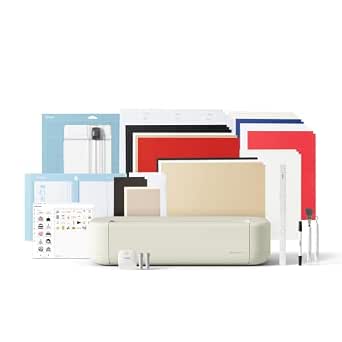 | Best for Everyday Vinyl Crafts | Cutting width: 12 in (30.5 cm) | Compatible materials: 100+ | Compatible tools: 6 tools, including Deep Cutting Tool (sold separately) | VIEW ON AMAZON | See Our Full Breakdown |
| Cricut Maker 4 Smart Cutting Machine with Digital Content Bundle (Seashell) |  | Best for Versatility | Model: Cricut Maker 4 | Compatible materials: 300+ | Functions: Cut, draw, foil, score, engrave, deboss, perforate | VIEW ON AMAZON | See Our Full Breakdown |
| VEVOR 53-Inch Semi-Automatic Vinyl Cutter Machine |  | Best for Wide Signage | Maximum paper feed: 1350 mm (53.1 in) | Maximum cutting width: 1260 mm (49.6 in) | Cutting precision: ±0.01 mm (0.0004 in) | VIEW ON AMAZON | See Our Full Breakdown |
| Cricut Joy 2 Essential Bundle with Rainbow Sampler |  | Best Compact Pick | Weight: Just over 2 lb (0.91 kg) | Cutting width: 4.5 in (11.4 cm) | Material compatibility: 75+ materials | VIEW ON AMAZON | See Our Full Breakdown |
| VEVOR Automatic Edge Detection Vinyl Cutting Machine with Design Software and Materials |  | Best for Guided Standalone Setup | Cutting accuracy: ±0.1 mm | Cutting speed: 20–400 mm/s | Maximum paper feed width: 17 in (450 mm) | VIEW ON AMAZON | See Our Full Breakdown |
| Silhouette America Cameo 5 Alpha Smart Cutting Machine, Matte Black |  | Best for Precise Print-and-Cut Crafts | Brand: Silhouette America | Model: SILH-CAMEO-5A | Color: Matte Black | VIEW ON AMAZON | See Our Full Breakdown |
| VEVOR 12 in Button-Controlled Vinyl Cutting Machine | 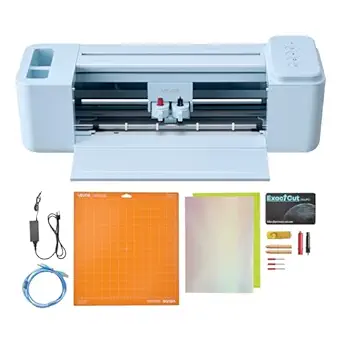 | Best Value for Connected Crafting | Cutting width: 12 in | Control type: Button-controlled | Built-in designs: 20,000+ | VIEW ON AMAZON | See Our Full Breakdown |
| VEVOR Vinyl Cutter Machine, 53 inch Max Feed Width, Dual Blades, Adjustable Force and Speed, LED Display, Bundle with Sticker Sheets, Transfer Film, SignMaster Software |  | Best for Large-Format Sign Making | Brand: VEVOR | Model number: SK-1350L | Maximum feed width: 53 inches | VIEW ON AMAZON | See Our Full Breakdown |
| USCutter 34-Inch Vinyl Cutter Plotter with Stand and VinylMaster Cut Software |  | Best for Established Sign Workflows | Feed width: 34 inches | Cutting width: 30 inches | Pinch rollers: 3 fully adjustable | VIEW ON AMAZON | See Our Full Breakdown |
| VEVOR 28 Inch Vinyl Cutter Machine with 20 Blades and Floor Stand |  | Best Windows Plotter Bundle | Maximum paper feed: 720 mm (28.3 in) | Maximum cutting width: 630 mm (24.8 in) | Cutting precision: ±0.01 mm | VIEW ON AMAZON | See Our Full Breakdown |
| VEVOR 34-inch Vinyl Cutter Machine with SignMaster Software, Supplies, and Tools |  | Best for High-Precision Sign Work | Maximum paper feed: 34.3 in / 870 mm | Maximum cutting width: 30.7 in / 780 mm | Cutting precision: ±0.01 mm | VIEW ON AMAZON | See Our Full Breakdown |
| VEVOR 28-Inch Vinyl Cutter Machine Bundle |  | Best for a Ready-to-Start Windows Bundle | Maximum paper feed: 28.3 in / 720 mm | Maximum cutting width: 24.8 in / 630 mm | Cutting pressure: 10–500 g | VIEW ON AMAZON | See Our Full Breakdown |
| Cricut Joy Xtra Smart Cutting Machine with Digital Content Bundle | 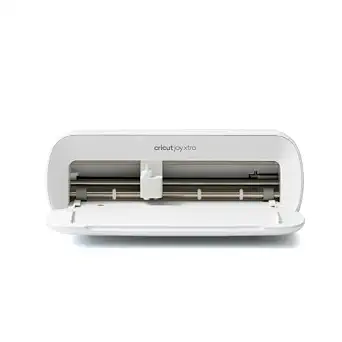 | Best Compact Cutter for Beginners | Compatible materials: 50+ including vinyl, iron-on HTV, cardstock, and stickers | Functions: Cut, write, draw, and foil | Software: Cricut Design Space, free app | VIEW ON AMAZON | See Our Full Breakdown |
| VEVOR Smart3 12-Inch Vinyl Cutting Machine |  | Best for Multi-Device Crafting | Cutting width: 12 in | Functions: Cutting, writing/drawing, and scoring | Supported file formats: PNG, JPG, SVG, and TIF | VIEW ON AMAZON | See Our Full Breakdown |
| VEVOR 34-inch Bluetooth Vinyl Cutter Plotter Machine with Floor Stand |  | Best for Stand-Mounted Large-Format Cutting | Maximum paper feed: 34.3 in / 870 mm | Maximum cutter width: 30.7 in / 780 mm | Cutting pressure: 10–500 g | VIEW ON AMAZON | See Our Full Breakdown |
More Details on Our Top Picks
Cricut Explore 5 Essential Bundle with Digital Content, Taupe
I’d put the Cricut Explore 5 first for buyers whose main goal is making everyday vinyl decals, labels, and iron-on designs without stepping up to a more specialized machine. Its 12-inch cutting width suits common craft projects, while support for more than 100 materials and Print Then Cut add room for stickers and mixed-media work. The bundle supplies enough material for up to 65 projects, so it offers a more substantial start than the Cricut Maker 4 bundle’s sampler. The Maker 4, however, handles over 300 materials and adds engraving and debossing, making it a better fit for broader tool use. The Explore 5’s tradeoffs are its narrower material range and the extra cost of some tools and subscription content; it also needs a compatible device, Bluetooth, and high-speed internet.
Pros:- 12-inch cutting width fits many common decal and apparel projects.
- Cuts more than 100 materials and supports drawing, foiling, and scoring.
- Bundle includes supplies for up to 65 projects.
- Print Then Cut supports full-color stickers and decals.
Cons:- Some compatible tools, including the Deep Cutting Tool, are sold separately.
- Some Design Space content and features require a paid subscription.
- Requires a compatible Bluetooth device and high-speed internet.
Best for: Crafters who want a compact, app-connected machine for regular vinyl decals, iron-on projects, and printable stickers.
Not ideal for: Makers planning to cut materials such as leather or wood, or use engraving and debossing; the Maker 4 supports a wider range of materials and functions.
- Cutting width:12 in (30.5 cm)
- Compatible materials:100+
- Compatible tools:6 tools, including Deep Cutting Tool (sold separately)
- Connectivity:Bluetooth
- Bundle supplies:Enough for up to 65 projects
- Digital content:25 premium images and 1 font; free library includes 3,000+ images, 100+ fonts, and 1,000+ projects
- Size comparison:30% more compact than previous models
- Color:Taupe
Our verdict“Choose the Explore 5 for a capable 12-inch vinyl and craft machine with useful starter supplies; choose the Maker 4 if broader materials and specialty functions matter more.”
Cricut Maker 4 Smart Cutting Machine with Digital Content Bundle (Seashell)
The Cricut Maker 4 earns its place for buyers who want a vinyl cutter that can also take on materials and techniques beyond routine decals. Its support for 300+ materials and functions such as engraving, debossing, and perforating give it a wider working range than the Explore 5, which is better centered on common craft materials. That breadth matters if projects may shift from vinyl to leather, wood, or detailed paper work. The included blade, pen, mat, weeder, sampler, and digital images give new owners several ways to start. The tradeoff is that those added capabilities may be unnecessary for someone focused on vinyl alone, and the bundle does not include an inkjet printer for Print Then Cut. Some library content also sits behind an optional subscription.
Pros:- Works with more than 300 materials, including leather and wood.
- Supports cutting, drawing, foiling, scoring, engraving, debossing, and perforating.
- Bundle includes a blade, pen, mat, weeder, and materials sampler.
- Free Design Space library includes 3,000+ images and 100+ fonts.
Cons:- Its specialty functions may add complexity for buyers focused only on vinyl.
- Print Then Cut requires a separate inkjet printer.
- Access to the larger content library requires an optional subscription.
Best for: Crafters who expect to move between vinyl, leather, wood, paper crafts, and specialty effects on one machine.
Not ideal for: Vinyl-only users seeking a simpler setup; the Explore 5 covers common vinyl projects with fewer specialized functions.
- Model:Cricut Maker 4
- Compatible materials:300+
- Functions:Cut, draw, foil, score, engrave, deboss, perforate
- Software:Cricut Design Space
- Print Then Cut:Compatible with most inkjet printers
- Bundle includes:Fine-Point Blade, materials sampler, Fine Point Pen, Light Grip Mat, weeder, 30 bonus digital images
- Free content library:3,000+ images and 100+ fonts
- Color:Seashell
Our verdict“Pick the Maker 4 if you need one machine for vinyl and a broad mix of materials and techniques; for routine vinyl work, the Explore 5 is more focused.”
VEVOR 53-Inch Semi-Automatic Vinyl Cutter Machine
For oversized vinyl jobs, the VEVOR 53-Inch Semi-Automatic stands apart from the desktop Cricut machines in this group. Its 49.6-inch maximum cutting width gives sign makers room for large lettering and graphics that the 12-inch Explore 5 and compact Joy 2 cannot handle in one pass. Adjustable pressure and speed provide control across different media, while USB, COMPIM, and U-Disk connections offer several ways to send work. This is a more industrial-style choice, though: the supplied information says it is not compatible with Mac, and setup depends on software installation. It also lists SVG and PDF imports but does not describe the guided app library found with the Cricut machines. I’d choose it for large-format cutting when width matters more than a beginner-friendly craft workflow.
Pros:- Cuts up to 49.6 inches wide for large signage.
- Adjustable cutting pressure from 20 to 500 g.
- Adjustable cutting speed from 20 to 800 mm/s.
- USB, COMPIM, and U-Disk interfaces support multiple connection approaches.
Cons:- Not compatible with Mac systems.
- Software installation method can vary.
- Large-format capacity is excessive for small craft projects.
Best for: Sign makers and small shops producing wide vinyl graphics who use a compatible non-Mac computer.
Not ideal for: Mac users and home crafters who primarily make small decals and want an app-led workflow like the Cricut Joy 2.
- Maximum paper feed:1350 mm (53.1 in)
- Maximum cutting width:1260 mm (49.6 in)
- Cutting precision:±0.01 mm (0.0004 in)
- Paper feed precision:3 m (118 in)
- Cutting pressure:20–500 g, adjustable
- Cutting speed:20–800 mm/s, adjustable
- Memory:4 MB high-speed cache
- Interfaces and formats:COMPIM, USB, U-Disk; SVG and PDF
- Mac compatibility:Not compatible
Our verdict“Choose this VEVOR for wide sign work on a compatible computer; choose a Cricut desktop model for smaller projects and a more guided craft workflow.”
Cricut Joy 2 Essential Bundle with Rainbow Sampler
The Cricut Joy 2 is the space-saving option for small vinyl jobs: labels, cards, short decals, and other projects that fit its 4.5-inch cutting width. At just over two pounds, it is easier to store or move than the 12-inch Explore 5, and the bundle includes materials for up to 75 projects. That makes it a practical choice for occasional crafting in a small workspace. The narrow width is the defining compromise. Larger designs may need to be divided into sections, while the Explore 5 can handle wider pieces in a single cut. The Joy 2 works with more than 75 materials and can make printable stickers with a home inkjet printer, but additional Design Space content may require separate purchases or a subscription.
Pros:- Weighs just over two pounds and is easy to store.
- Works with more than 75 materials.
- Bundle materials support up to 75 projects.
- Supports full-color stickers made with a home inkjet printer.
Cons:- The 4.5-inch cutting width limits project size.
- Additional Design Space content may require separate purchases or a subscription.
Best for: Apartment crafters and label makers who need a light, easy-to-store cutter for small projects.
Not ideal for: People making wide signs, large apparel graphics, or other designs that exceed a 4.5-inch cutting width; the Explore 5 is better suited to those jobs.
- Weight:Just over 2 lb (0.91 kg)
- Cutting width:4.5 in (11.4 cm)
- Material compatibility:75+ materials
- Connectivity:Bluetooth
- Included project capacity:Up to 75 projects
- Bundle materials:Smart Vinyl, Smart Iron-On, Value Cardstock, Insert Card Sets, Printable Vinyl
Our verdict“Choose the Joy 2 for compact crafting and small vinyl projects; choose the Explore 5 when wider cuts are a regular need.”
VEVOR Automatic Edge Detection Vinyl Cutting Machine with Design Software and Materials
The VEVOR Automatic Edge Detection offers a middle ground between a small craft cutter and the much wider 53-inch VEVOR plotter. Its 13-inch maximum cut size suits decals, cards, and modest signage, while automatic edge detection and a color touchscreen give it a more self-contained feel than the Cricut Joy 2. The included software supports SVG, EPS, PLT, and AI files, and the package comes with seven starter materials. It also cuts over 100 materials, including adhesive vinyl, HTV, and EVA foam. The main limitation is scale: its maximum cut size is close to desktop craft machines, not a substitute for the wide VEVOR when making large signs. The supplied specs also do not give a broader account of workflow or software compatibility.
Pros:- Automatic edge detection helps position material for cutting.
- Color touchscreen and included design software support a self-contained workflow.
- Supports SVG, EPS, PLT, and AI files.
- Cuts more than 100 materials and includes seven starter materials.
Cons:- Maximum cut size is limited to 13 inches.
- The supplied product details do not specify broader software compatibility.
Best for: DIY crafters who want a touchscreen cutter with included design software and starter media for small to medium projects.
Not ideal for: Sign shops needing wide-format output; the 53-inch VEVOR offers far more cutting width.
- Cutting accuracy:±0.1 mm
- Cutting speed:20–400 mm/s
- Maximum paper feed width:17 in (450 mm)
- Maximum cut size:13 in (330 mm)
- Blade pressure:10 adjustable levels
- Compatible file formats:SVG, EPS, PLT, AI
- Compatible materials:100+
- Display and software:Color touchscreen; included design software with pre-made design library
- Included materials:7 starter materials
Our verdict“Choose this VEVOR for touchscreen-guided craft cutting with starter materials; move to the 53-inch model if your work needs wide signage.”
Silhouette America Cameo 5 Alpha Smart Cutting Machine, Matte Black
The Cameo 5 Alpha is the craft-focused choice here for buyers who need accurate printed designs cut from vinyl, plus room to sketch or emboss other materials. Its four-point registration system helps align cuts to printed artwork, a useful distinction from the wider-format VEVOR SK-1350L, which is aimed more at signs and long runs. At up to 400 mm/s, it can handle repeat projects without taking over a shared workspace with noise. The included AutoBlade, mat, adapter, designs, and Studio software give a new owner several ways to start. Its main limit is the 3 mm material thickness, so it is less suited to thick stock or production sign work than the larger plotters in this lineup.
Pros:- Four-point registration supports accurate print-and-cut alignment
- Cuts, sketches, and embosses materials up to 3 mm thick
- Quiet operation suits home studios and shared spaces
- Includes AutoBlade, cutting mat, adapter, designs, and software
Cons:- 3 mm thickness limit rules out many thicker materials
- Narrower craft format is less suited to large signs than the VEVOR SK-1350L
Best for: Home crafters making accurately aligned printed vinyl stickers, fabric designs, and sketch projects
Not ideal for: Sign makers who need a wide feed path or buyers who regularly cut materials thicker than 3 mm
- Brand:Silhouette America
- Model:SILH-CAMEO-5A
- Color:Matte Black
- Maximum material thickness:3 mm
- Maximum speed:400 mm/s
- Functions:Cutting, sketching, embossing
- Registration system:4-point
- Included components:AutoBlade, cutting mat, sketch pens adapter, 100 designs, Studio software
Our verdict“Choose the Cameo 5 Alpha for precise, versatile home crafting; pick a wide-format plotter for large signs or thicker stock.”
VEVOR 12 in Button-Controlled Vinyl Cutting Machine
This 12-inch VEVOR keeps craft projects accessible with button controls, bundled software, and no recurring software fees. Its USB, Bluetooth, and USB drive connections offer more ways to send designs than the Windows-only VEVOR 28-inch plotter, and compatibility spans Mac, Windows, Android, and iOS. The library of more than 20,000 built-in designs can help buyers start without preparing every file from scratch, while cut, write, and score functions cover common vinyl, heat-transfer, cardstock, and foil projects. That flexibility comes with a clear boundary: the 12-inch cutting width suits decals and smaller crafts, not broad signs or long production runs. Buyers cutting thick or dense materials may also find it less capable than larger plotters.
Pros:- Bundled design software has no recurring subscription fees
- More than 20,000 built-in design resources
- Cuts, writes, and scores several common craft materials
- USB, Bluetooth, and USB drive connectivity across major device platforms
Cons:- 12-inch cutting width limits project size
- May struggle with very thick or dense materials compared with larger cutters
Best for: New and casual crafters who want a compact cutter that works with phones, tablets, or computers
Not ideal for: Sign shops or makers who need wide-format output or routinely cut thick, dense materials
- Cutting width:12 in
- Control type:Button-controlled
- Built-in designs:20,000+
- Supported file formats:PNG, JPG, SVG, TIF
- Connectivity:USB, Bluetooth, USB drive
- Compatibility:Mac, Windows, Android 5.1+, iOS 11.0+
- Functions:Cut, write/draw, score
- Compatible materials:Vinyl, heat transfer paper, cardstock, foil, specialty paper
Our verdict“Choose this VEVOR for flexible, small-format crafts across several devices, and choose the USCutter 34-inch plotter for larger signs.”
VEVOR Vinyl Cutter Machine, 53 inch Max Feed Width, Dual Blades, Adjustable Force and Speed, LED Display, Bundle with Sticker Sheets, Transfer Film, SignMaster Software
For buyers whose vinyl work needs to span windows, vehicles, or large signs, the VEVOR SK-1350L offers the broadest stated feed width in this batch at 53 inches. That scale sets it apart from the USCutter 34-inch plotter, though the USCutter’s more modest width may be easier to accommodate in a smaller work area. The SK-1350L pairs its wide path with adjustable force from 20–500 gf and stated contour accuracy of ±0.1 mm, giving sign makers control over varied jobs. Dual main and auxiliary blades support drawing, cutting, and scoring without a manual blade swap, and the bundle includes SignMaster and materials. Setup and contour cutting can take practice, and the stated 1 mm material thickness limit makes this a wide vinyl tool rather than a thick-stock cutter.
Pros:- 53-inch maximum feed width accommodates large-format projects
- Dual blades support drawing, cutting, and scoring
- Adjustable 20–500 gf cutting force
- Includes licensed SignMaster software, sticker rolls, transfer tape, blades, and accessories
Cons:- Setup and contour cutting may require a learning period
- 1 mm maximum material thickness limits work with thicker stock
- Requires more workspace than the 34-inch USCutter plotter
Best for: Sign makers and experienced DIY users producing wide decals, vehicle graphics, and large-format vinyl work
Not ideal for: Beginners seeking a simple plug-and-play craft cutter or makers who need to cut materials thicker than 1 mm
- Brand:VEVOR
- Model number:SK-1350L
- Maximum feed width:53 inches
- Maximum material thickness:1 mm
- Cutting force:20–500 gf
- Cutting accuracy:±0.1 mm
- Blades:Main and auxiliary dual blades
- Connections:USB, U-disk, serial port
- Software:SignMaster (licensed activation code included)
Our verdict“Choose the SK-1350L when wide-format vinyl capacity matters more than compact setup or beginner simplicity.”
USCutter 34-Inch Vinyl Cutter Plotter with Stand and VinylMaster Cut Software
The USCutter 34-inch plotter is a practical middle ground for sign makers who need more working width than a desktop craft machine but do not need the VEVOR SK-1350L’s 53-inch feed. Its 30-inch cutting width accommodates signs, banners, decals, and apparel transfers while keeping projects within a more manageable scale. Three adjustable pinch rollers, plus speed and pressure controls, let operators adapt material feeding and cutting to the job. VinylMaster Cut is included for artwork creation and image vectorizing, and lifetime phone support may help users working through setup or production questions. Compared with the wider VEVOR, it gives up large-format capacity; compared with the 28-inch VEVOR, it offers greater cutting width. Its stated project ceiling is 30 inches.
Pros:- 30-inch cutting width covers many sign and apparel transfer jobs
- Three fully adjustable pinch rollers
- Adjustable speed and pressure
- Includes VinylMaster Cut software and lifetime phone support
Cons:- Limited to projects up to 30 inches wide
- Less capacity for large-format work than the VEVOR SK-1350L
Best for: Small sign businesses and experienced makers who need a stand-mounted cutter for signs, banners, decals, and apparel transfers
Not ideal for: Users producing graphics wider than 30 inches or crafters who want a small desktop machine
- Feed width:34 inches
- Cutting width:30 inches
- Pinch rollers:3 fully adjustable
- Adjustments:Speed and pressure
- Included software:VinylMaster Cut
- Support:Lifetime phone support
Our verdict“Choose the USCutter for a supported, mid-size sign workflow; move to the SK-1350L when jobs regularly exceed its 30-inch cutting width.”
VEVOR 28 Inch Vinyl Cutter Machine with 20 Blades and Floor Stand
This 28-inch VEVOR plotter gives sign and craft projects more room than desktop cutters, with a maximum feed of 28.3 inches and cutting width of 24.8 inches. Its 10–500 g adjustable pressure and 10–800 mm/s speed range let operators tune the machine for different jobs, while dual-spring pinch rollers help keep material tracking steady. The included floor stand and 20 blades make it a ready-to-equip option beside the USCutter 34-inch model, which provides a wider cutting path and bundled design software. This VEVOR’s key limitation is platform support: it is designed for Windows systems through COM or USB, with no Mac compatibility. Its older listed Windows versions may also make it a poor fit for buyers seeking broad, current device support.
Pros:- 28.3-inch feed handles wider rolls than desktop craft cutters
- Adjustable cutting pressure and speed suit varied jobs
- Dual-spring pinch rollers help reduce material drift
- Includes floor stand and 20 blades
Cons:- Not compatible with Mac operating systems
- Maximum cutting width is 24.8 inches, narrower than the USCutter 34-inch plotter
- Listed OS compatibility is limited to Windows XP through Windows 10
Best for: Windows-based makers and small sign operators who need a stand-mounted plotter for vinyl, labels, and heat-transfer work
Not ideal for: Mac users or shops that need a cutting width above 24.8 inches
- Maximum paper feed:720 mm (28.3 in)
- Maximum cutting width:630 mm (24.8 in)
- Cutting precision:±0.01 mm
- Cutting pressure:10–500 g adjustable
- Cutting speed:10–800 mm/s adjustable
- Interfaces:COM, USB
- Compatible OS:Windows XP/Vista/7/8/10 (32 and 64 bit)
- Included blades:20
- Stand:Sturdy floor stand
Our verdict“Choose this VEVOR if you need a Windows-based stand-mounted cutter and its 24.8-inch cutting width fits your work.”
VEVOR 34-inch Vinyl Cutter Machine with SignMaster Software, Supplies, and Tools
The 30.7-inch cutting width and stated ±0.01 mm precision make this VEVOR a fit for Windows users producing larger signs, lettering, or heat-transfer designs. Its adjustable pressure and speed give operators room to tune cuts for different materials, while the backlit LCD provides on-machine controls. Compared with the VEVOR 28-Inch Vinyl Cutter Machine Bundle, it handles wider designs and has a higher minimum pressure setting; the smaller model includes five vinyl pieces, while this listing describes supplies and tools without specifying the same roll count. This is a manual plotter, so it suits users comfortable supervising setup and feeding material. Windows and USB/COM support narrow its appeal, and the SignMaster activation delivery may be a CD or a magnet code.
Pros:- 30.7-inch maximum cutting width accommodates larger signs
- Adjustable 20–500 g pressure and 20–800 mm/s speed
- Stated ±0.01 mm cutting precision
- SignMaster software and accessories are included
Cons:- Windows-only compatibility is specified, with no Mac support mentioned
- Manual operation calls for hands-on supervision
- SignMaster activation delivery varies between CD and magnet code
Best for: Windows-based sign makers who need a wide cutting area and adjustable controls for lettering, decoration, or heat-transfer work
Not ideal for: Mac users and buyers seeking a compact, app-driven cutter with minimal setup or supervision
- Maximum paper feed:34.3 in / 870 mm
- Maximum cutting width:30.7 in / 780 mm
- Cutting precision:±0.01 mm
- Cutting pressure:20–500 g, adjustable
- Cutting speed:20–800 mm/s, adjustable
- Connectivity:USB and COM
- Supported languages:DM/PL and HP/GL
- Software:SignMaster
Our verdict“Choose this VEVOR if wide, precision-oriented sign work on a Windows PC matters more than compact size or automated operation.”
VEVOR 28-Inch Vinyl Cutter Machine Bundle
For a Windows PC user starting with sign or decal projects, this bundle pairs a 24.8-inch cutting width with five included vinyl pieces and accessories. The LCD lets you adjust speed and pressure, so you can adapt settings as you move between materials. Against the VEVOR 34-inch Vinyl Cutter Machine with SignMaster Software, Supplies, and Tools, this model gives up nearly six inches of cutting width but has a lower stated minimum pressure and specifically lists five vinyl pieces. That makes the package easier to size for medium projects without stepping up to a wider plotter. Its USB/COM connections and Windows requirements limit device choice, however, and Mac users should look at the VEVOR Smart3 instead. The software installation method is not fixed in the listing.
Pros:- 24.8-inch maximum cutting width suits medium-size projects
- Five vinyl pieces in assorted colors are included
- LCD panel supports pressure and speed adjustment
- USB and COM connections are provided
Cons:- Not compatible with Mac
- Smaller cutting width than the VEVOR 34-inch plotters
- Software installation method may vary
Best for: Windows PC crafters and small sign makers who want a mid-size plotter with starter vinyl included
Not ideal for: Mac users or operators who regularly cut designs wider than 24.8 inches
- Maximum paper feed:28.3 in / 720 mm
- Maximum cutting width:24.8 in / 630 mm
- Cutting pressure:10–500 g
- Cutting speed:10–800 mm/s
- Blade accuracy:0.01 mm
- Connectivity:USB and COM
- Included vinyl:Five 23 × 39 in pieces: black, white, red, blue, and yellow
- Compatibility:Windows XP–11; not compatible with Mac
Our verdict“Pick this bundle for medium-width projects on Windows when included vinyl is more useful than the extra capacity of a 34-inch plotter.”
Cricut Joy Xtra Smart Cutting Machine with Digital Content Bundle
The Cricut Joy Xtra is the compact craft-oriented choice here: it cuts, writes, draws, and foils across more than 50 materials, with Design Space guiding users through projects. Its Print-Then-Cut support with most inkjet printers opens up full-color sticker designs, a different workflow from the wider VEVOR plotters, which are geared toward larger-format sign cutting. Practice materials, a pen, a mini weeder, and bonus images give a new crafter useful starting points. The tradeoff is working within Design Space and a smaller machine format; it is not the pick for long, wide signage like the VEVOR 34-inch models. Print-Then-Cut also depends on a separate printer, and the full image library requires an optional subscription.
Pros:- Compact form suits small work areas
- Cuts, writes, draws, and foils on 50+ materials
- Design Space is a free app with included images and fonts
- Practice materials and basic tools are included
Cons:- Print-Then-Cut requires a separate inkjet printer
- Full content library requires an optional Cricut Access subscription
- Compact format is less suited to wide sign projects than VEVOR plotters
Best for: New crafters with limited workspace who want one machine for vinyl, stickers, cardstock, and small personalized projects
Not ideal for: Sign makers who need a wide feed for long lettering or buyers who want Print-Then-Cut without owning an inkjet printer
- Compatible materials:50+ including vinyl, iron-on HTV, cardstock, and stickers
- Functions:Cut, write, draw, and foil
- Software:Cricut Design Space, free app
- Print-Then-Cut:Works with most inkjet printers
- Included components:Fine-Point Blade, Fine Point Pen, Mini Weeder, USB cable, and power adapter
- Bonus content:30 premium images
- Warranty:1-year manufacturer warranty
Our verdict“Choose the Joy Xtra for guided, varied craft projects in a small workspace, and choose a wide VEVOR plotter for large signs.”
VEVOR Smart3 12-Inch Vinyl Cutting Machine
The VEVOR Smart3 stands apart from the larger VEVOR plotters by pairing a 12-inch cutting width with USB, Bluetooth, and USB-drive connections and support for Mac, Windows, Android, and iOS. That flexibility suits crafters who want to move between a computer and mobile device for decals, cards, or decor. It also cuts, writes, and scores materials such as vinyl, heat-transfer paper, cardstock, and foil. Compared with the Cricut Joy Xtra, it lists broader direct file-format support, including PNG, JPG, SVG, and TIF, while the Joy Xtra has a stated library of included images and a Print-Then-Cut workflow. The Smart3 listing gives no speed or precision figures, so it is harder to judge for detailed production work; its smaller width also rules it out for larger signs.
Pros:- Supports Mac, Windows, Android, and iOS devices
- Connects through USB, Bluetooth, or USB drive
- Cuts, writes, and scores several craft materials
- Supports PNG, JPG, SVG, and TIF files
Cons:- 12-inch cutting width limits larger sign projects
- Cutting speed and precision are not specified
- Some mobile compatibility depends on operating system version
Best for: Multi-device crafters who want a compact cutter that supports Mac, Windows, and mobile platforms
Not ideal for: Sign makers who need a wide cutting bed or buyers who want published speed and precision specifications
- Cutting width:12 in
- Functions:Cutting, writing/drawing, and scoring
- Supported file formats:PNG, JPG, SVG, and TIF
- Connectivity:USB, Bluetooth, and USB drive
- Compatible devices:Mac, Windows, Android 5.1+, and iOS 11.0+
- Compatible materials:Vinyl, heat-transfer paper, cardstock, foil, and specialty paper
- Included components:One vinyl cutting machine
Our verdict“Choose the Smart3 for cross-platform crafting and varied file inputs, provided its 12-inch width fits your projects.”
VEVOR 34-inch Bluetooth Vinyl Cutter Plotter Machine with Floor Stand
This VEVOR combines a 30.7-inch cutting width with an aluminum floor stand on casters, giving a large plotter a dedicated, movable workspace. Its bundle includes five vinyl rolls, three replacement blades, SignMaster software, and tools, while adjustable pressure and speed let Windows users tune cuts for different materials. Compared with the VEVOR 34-inch Vinyl Cutter Machine with SignMaster Software, Supplies, and Tools, this model adds a stand, specified vinyl rolls, and Bluetooth control through an Android app; the other 34-inch model lists a backlit LCD and a higher minimum pressure. This plotter makes more sense for a workshop that can accommodate its footprint than for a craft desk. Bluetooth is Android-only, and Windows is the only computer compatibility listed, leaving Mac users without a stated route.
Pros:- 30.7-inch maximum cutter width handles large designs
- Floor stand with casters creates a movable dedicated setup
- Includes five vinyl rolls, three blades, and SignMaster software
- Bluetooth, USB, and COM connectivity are available
Cons:- Bluetooth mobile control is limited to Android
- Windows compatibility is specified, with no Mac support mentioned
- Software delivery may be by CD or download URL
Best for: Windows sign makers who need wide-format cutting, a dedicated floor stand, and included vinyl for ongoing projects
Not ideal for: Mac users, iPhone-only operators, or crafters without room for a stand-mounted plotter
- Maximum paper feed:34.3 in / 870 mm
- Maximum cutter width:30.7 in / 780 mm
- Cutting pressure:10–500 g
- Cutting speed:10–800 mm/s
- Blade accuracy:0.01 mm
- Tracking accuracy:Up to 400 in / 10 m
- Connectivity:Bluetooth (Android app), USB, and COM
- Included components:Floor stand, five vinyl rolls, three blades, SignMaster software, and tools
Our verdict“Choose this model for a stand-mounted, wide-format Windows setup with bundled materials and Android control.”

How We Picked
I evaluated each vinyl cutter machine against four buyer-facing criteria rather than raw spec sheets. Cutting width and media handling came first, because this is the one limitation no accessory can fix — a 12-inch crafter can never cut a 24-inch sign. Software and workflow came second: a powerful cutter paired with clunky software creates frustration, so I weighed how approachable each platform (Cricut Design Space, Silhouette Studio, SignMaster, VinylMaster) is for its intended user. Bundle completeness mattered third, since starter materials, blades, stands, and transfer film change the true cost of getting started.
Finally, I judged fit for the intended workload: a hobbyist making decals a few times a month has different needs than a sign shop running daily production. Machines are ranked by how well they serve their target buyer, not by pure capability — which is why a beginner-friendly Cricut sits above a more powerful 53-inch plotter for most readers, while that same plotter wins outright for commercial buyers.
Factors to Consider When Choosing Vinyl Cutter Machine
Before choosing a specific model, it helps to understand the structural divides in this category. Most buyer regret I see comes from picking a machine for the wrong workload, not from picking a bad machine.
Cutting Width: The Decision You Cannot Undo
Cutting width is the single most consequential spec because it determines what projects are even possible. A 12-inch machine forces you to split larger designs across multiple cuts and seam them with transfer tape, which works for stickers but looks amateurish on banners, vehicle graphics, and storefront signage. The honest cutoff is this: if you ever plan to sell signage, heat-transfer apparel in adult sizes, or window decals wider than a laptop, you need at least a 28-inch plotter. Casual crafters, however, routinely overbuy width and end up with a floor-standing machine that dominates a spare room and demands a learning curve they never use. Match the width to your realistic projects two years out, not your fantasy projects.
Software Ecosystems and Their Lock-In
The software matters as much as the hardware, and each platform carries hidden commitments. Cricut Design Space is cloud-based and the friendliest for beginners, but it requires an internet connection and nudges you toward Cricut’s own material subscriptions and image library. Silhouette Studio offers the deepest design tools of the consumer platforms and works offline, which matters if you edit detailed vector work. The SignMaster and VinylMaster packages bundled with VEVOR and USCutter plotters are production-oriented — expect a professional interface with real contour-cutting and layout tools rather than hand-holding. A common mistake is assuming you can just switch software later; blade systems, file workflows, and muscle memory all create friction that keeps users locked into their first platform for years.
Contour Cutting and Print-Then-Cut Work
If you plan to print designs with a regular printer and then cut around them — the standard workflow for multicolor stickers and printed labels — edge detection and registration mark sensing become non-negotiable features. Machines like the VEVOR Automatic Edge Detection model handle this automatically, while cheaper plotters require manual alignment that adds minutes to every job and wastes material on misaligned cuts. Consumer craft machines handle print-then-cut well but only on small formats, typically capped at letter or A4 sizes. Buyers who skip this consideration often discover too late that their production sticker business needs a sensor-equipped plotter. Ask yourself now whether multicolor printed output is in your future, because it changes which tier of machine you should buy.
Force, Blade Quality, and Material Range
Cutting force determines which materials a machine can handle beyond standard vinyl. Entry-level craft cutters manage adhesive vinyl and HTV comfortably but struggle with thick cardstock, glitter vinyl, or reflective films. The Cricut Maker 4’s adaptive tool system and the adjustable-force plotters with multi-blade bundles open up thicker and more abrasive materials. Blade quality also drives long-term cost: drag blades dull, and a dull blade ruins more vinyl than most people calculate. The 20-blade bundles on some VEVOR models exist precisely because plotter owners burn through blades quickly in production. Budget for consumables, not just the machine — blades, mats, and weeding tools are recurring expenses that rarely appear in the purchase price.
Stand, Footprint, and Workspace Reality
A 53-inch plotter is not a desk accessory — it needs a dedicated stand, clearance for media to feed and exit freely, and often more than six feet of linear workspace. Floor stands bundled with the VEVOR 28- and 34-inch and USCutter models solve part of this, but you still need room behind the machine for vinyl rolls. Desktop craft machines flip this equation: the Cricut Joy 2 fits in a drawer and the Explore and Maker lines store upright on a shelf. Be honest about your workspace before buying wide format, because a plotter wedged against a wall will skew every cut. Many buyers underestimate that a machine’s usable footprint is roughly double its listed width once you account for material feed.
Connectivity and Production Workflow
Connectivity sounds boring until it interrupts your work. Bluetooth models like the VEVOR 34-inch Bluetooth plotter and all current Cricuts free you from tethering a laptop to the machine, which matters in shared craft rooms or small shops. USB-only plotters are fine in a fixed production station but lock you to one physical position. Also consider whether the machine saves projects and cut settings internally, whether it works with your operating system (some sign software is Windows-only), and how quickly you can switch between repeated jobs. For anyone running the same decals day after day, workflow small frictions compound: a machine that takes ninety seconds to set up per job costs you hours over a production month.
Frequently Asked Questions
Can a Cricut or Silhouette replace a professional vinyl cutter for a small sign business?
For the first few months, probably yes — but it becomes a bottleneck fast. Consumer machines cap at 12–13 inches of width, which forces you to panel larger signs and seams become visible on anything viewed up close. They also cut slower and handle roll media poorly, since they’re designed around mats rather than rolls. Where they genuinely outperform plotters is on intricate small detail work, thanks to finer tool control. A reasonable path many sellers take is starting on a Cricut Explore or Cameo 5 to validate the business, then adding a 28- or 34-inch VEVOR or USCutter plotter once signage and vehicle work becomes regular. Keeping both covers the weaknesses of each.
Is a wider cutter always the better purchase?
No, and overbuying width is one of the most common mistakes in this category. A 53-inch machine requires serious floor space, a stand, a learning curve around force and speed calibration, and sign-production software that assumes you know what registration marks and contour cuts are. If your projects are tumblers, shirts, small decals, and cardstock, none of that capacity ever gets used and the machine becomes an obstacle rather than a tool. Width only pays off when you regularly cut signage, banners, or vehicle vinyl wider than 12 inches. A well-matched 12-inch machine that gets used weekly beats a 53-inch plotter that intimidates you into a closet.
What is automatic edge detection, and do I actually need it?
Edge detection (also called optical eye or registration mark sensing) lets a cutter locate a printed design on the material and cut precisely around it, which is the foundation of print-then-cut production. Without it, you align every printed job by hand, which is slow, wasteful, and inconsistent across a batch. You need it if you plan to make printed stickers, multicolor labels, or any design that combines printing with cutting. You do not need it for solid-color vinyl work, where the cut file alone defines the output. The VEVOR Automatic Edge Detection model in this lineup is specifically built for the print-then-cut workflow, while standard craft machines handle it in smaller formats.
Cricut Joy 2, Joy Xtra, or a full-size machine — which should a beginner start with?
The Joy line is tempting because it’s cheap, tiny, and friendly, but it has hard limits: narrow mats, a short list of supported materials, and smaller tool options. Someone who crafts occasionally and mostly makes labels, cards, and small decals will be genuinely happy with a Joy 2 or Joy Xtra. The moment you want to cut full 12-inch HTV shirt designs, larger decals, or a wider range of materials, you’ll hit the wall and end up buying a second machine. My guidance is that beginners with any intention of selling or scaling should start with a full-size Cricut Explore 5 or Silhouette Cameo 5 instead — the learning curve is nearly identical, and the ceiling is far higher.
Why do the wide-format VEVOR models vary so much in price, and where does the money go?
The differences come down to automation and bundle contents rather than raw cutting ability. A base 28- or 34-inch model with a manual setup, basic blades, and starter vinyl does the same fundamental job as pricier siblings. Step up and you gain a floor stand, larger blade kits, more software capability, adjustable force and speed with an LED display, or full semi-automatic operation and edge detection. Semi-automatic feeding and contour detection save real time when you’re running batches daily, which is where the premium pays back. If you’re cutting a few jobs a week, the base bundles deliver nearly all the capability for less; if you’re in daily production, the automation tiers earn their cost quickly.
Conclusion
After comparing all fifteen machines, the right choice comes down to matching the machine to your workload rather than chasing specs. Best overall goes to the Cricut Explore 5 Essential Bundle, which serves the largest group of buyers well with approachable software, reliable cuts, and a starter kit that gets you making things on day one. Best value belongs to the VEVOR 28-Inch Vinyl Cutter with 20 Blades and Floor Stand, which delivers genuine sign-shop width and a deep consumables bundle at a price that undercuts everything comparable. Best premium is the Cricut Maker 4 for crafters who want adaptive tool power and material range beyond vinyl, with the Silhouette Cameo 5 as the pick if advanced design software matters more to you than tool versatility.
Best for beginners is the Cricut Joy Xtra Bundle for casual hobbyists, though anyone planning to grow should skip straight to the Explore 5. For specific needs: the VEVOR 53-Inch Semi-Automatic is the clear choice for professional signage and vehicle wraps, the VEVOR Automatic Edge Detection model wins for printed sticker production, and the USCutter 34-Inch suits small sign businesses that prefer VinylMaster’s production tools. Whatever you pick, buy for the work you’ll actually do — the best vinyl cutter machine is the one whose width, software, and workflow match your real projects.